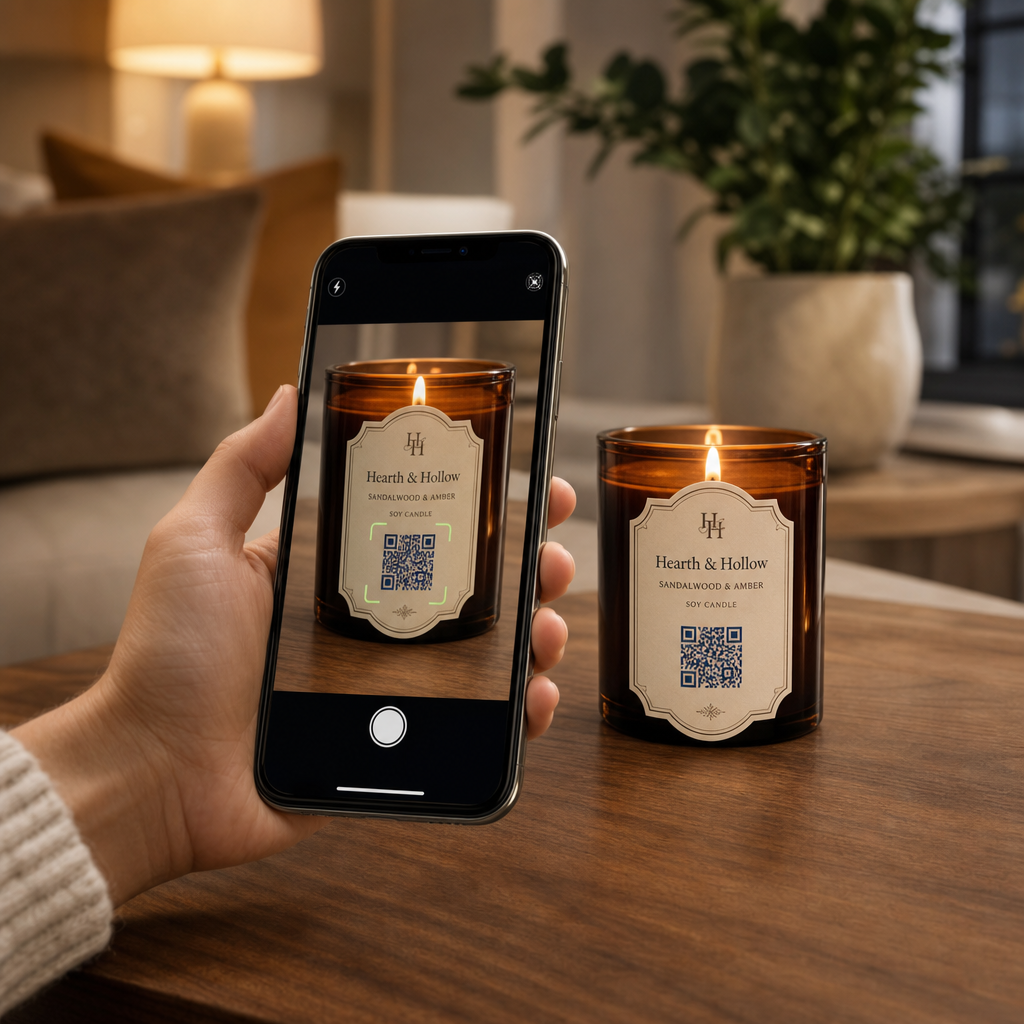
Haben Sie Schwierigkeiten, Ihre Markengeschichte und Werbeaktionen auf kleinen Kerzenetiketten zu teilen? Der physische Platz auf Etiketten ist extrem begrenzt, was Hersteller dazu zwingt, Produktbeschreibungen, Gebrauchsanweisungen oder Geschenkbotschaften zu opfern. Das Hinzufügen von QR-Codes zu Ihrer Verpackung verbindet physische Produkte mit interaktiven digitalen Inhalten und hält dabei Ihr visuelles Layout sauber.
Kreative Wege, QR-Codes auf Kerzenetiketten zu nutzen
Kerzen sind vielseitige Produkte, die häufig als persönliche Heimdekoration, Wellness-Artikel oder durchdachte Geschenke gekauft werden. Die Integration eines scannbaren digitalen Punktes auf Ihrem Behälter oder Ihrer Verpackung verwandelt ein gewöhnliches Produkt in ein fesselndes Markenerlebnis.
- Personalisierte Geschenkbotschaften übermitteln: Käufern ermöglichen, Video-, Audio- oder schriftliche Notizen mithilfe eines Text QR-Code Generator oder ein MP3 QR-Code Generator verwandelt Kerzen in unvergessliche Geschenke für Feiertage, Hochzeiten oder Gedenkfeiern.
- Düfte mit kuratierten Wiedergabelisten kombinieren: Duftprofile mit Audiostimmungen mithilfe eines Spotify QR-Code Generator ermöglicht Käufern, das Glas zu scannen, um zur Duft passender Musik abzuspielen, mit zusätzlichen Einrichtungsdetails, die in unserem Leitfaden zum Teilen von Spotify-Wiedergabelisten.
- Wiederholungsverkäufe durch Werberabatte fördern: Kundenbindung durch gezielte Angebote mithilfe eines Gutschein QR-Code Generator direkt auf der Verpackung fördert wiederholte Online-Bestellungen.
- Umfassende Pflegehinweise für Kerzen bereitstellen: Details über handgegossenes Wachs, ätherische Ölprofile, Dochtpflegehinweise und Tipps zur Wiederverwendung von Gläsern halten physische Etiketten übersichtlich.
Regulatorische Konformität mit Etikettenplatz in Einklang bringen
Bei der Planung strategischer Platzierungen für das Anbringen von QR-Codes auf Produktverpackungen, müssen Sie digitales Engagement mit obligatorischen rechtlichen Verpackungsanforderungen in Einklang bringen.
In den Vereinigten Staaten müssen Kerzenetiketten für Verbraucher dem Fair Packaging and Labeling Act (FPLA) folgen. Dieses Bundesgesetz schreibt vor, dass die primären Anzeigefelder spezifische Informationselemente enthalten müssen:
- Eine Identitätsaussage, die den Artikel klar beschreibt (wie zum Beispiel „Duftende Sojakerze“).
- Die Nettofüllmenge wird sowohl in US-amerikanischen Maßeinheiten (Unzen) als auch in metrischen Einheiten (Gramm) angezeigt.
- Der Firmenname und der physische Standort (Stadt, Bundesstaat und Postleitzahl) des Herstellers, Verpackers oder Händlers.
Darüber hinaus erfordern die unter ASTM F2058 festgelegten Sicherheitsstandards explizite Brandschutzwarnungen. Standard-Warnetiketten nennen drei zentrale Vorsichtsmaßnahmen: „Im Blickfeld abbrennen“, „Von brennbaren Materialien fernhalten“ und „Von Kindern und Haustieren fernhalten.“ Wenn Sie vollständige Brandschutzanweisungen auf der Unterseite eines Glases anbringen, schreiben die Verpackungsstandards vor, dass das Seiten- oder Oberetikett die Benutzer anweisen muss: „Sicherheitsinformationen siehe Unterseite.“
Hintergrundgeschichten, Duftpyramiden und Marketing-Links hinter einem scannbaren Code zu platzieren, hilft, zwingende gesetzliche Textanforderungen zu erfüllen und gleichzeitig die Ästhetik Ihrer Verpackung zu schützen.
Wiederholungsbestellungen mit dynamischen Rabatten steigern Möchten Sie die Kundentreue belohnen, ohne Ihre Kerzenverpackung für jede Kampagne neu zu drucken? Erstellen Sie bearbeitbare Rabatt-Links mit dem Gutschein QR-Code Generator heute verfügbar sind.
Design- und Druckrichtlinien für scannbare Kerzenetiketten
Ein scannbarer Code muss unter alltäglichen Licht- und Handhabungsbedingungen zuverlässig funktionieren. Beim Anbringen von Designs auf Glasgefäßen, Aluminiumdosen oder Kartons sind wichtige Best Practices für die Lesbarkeit von QR-Codes:
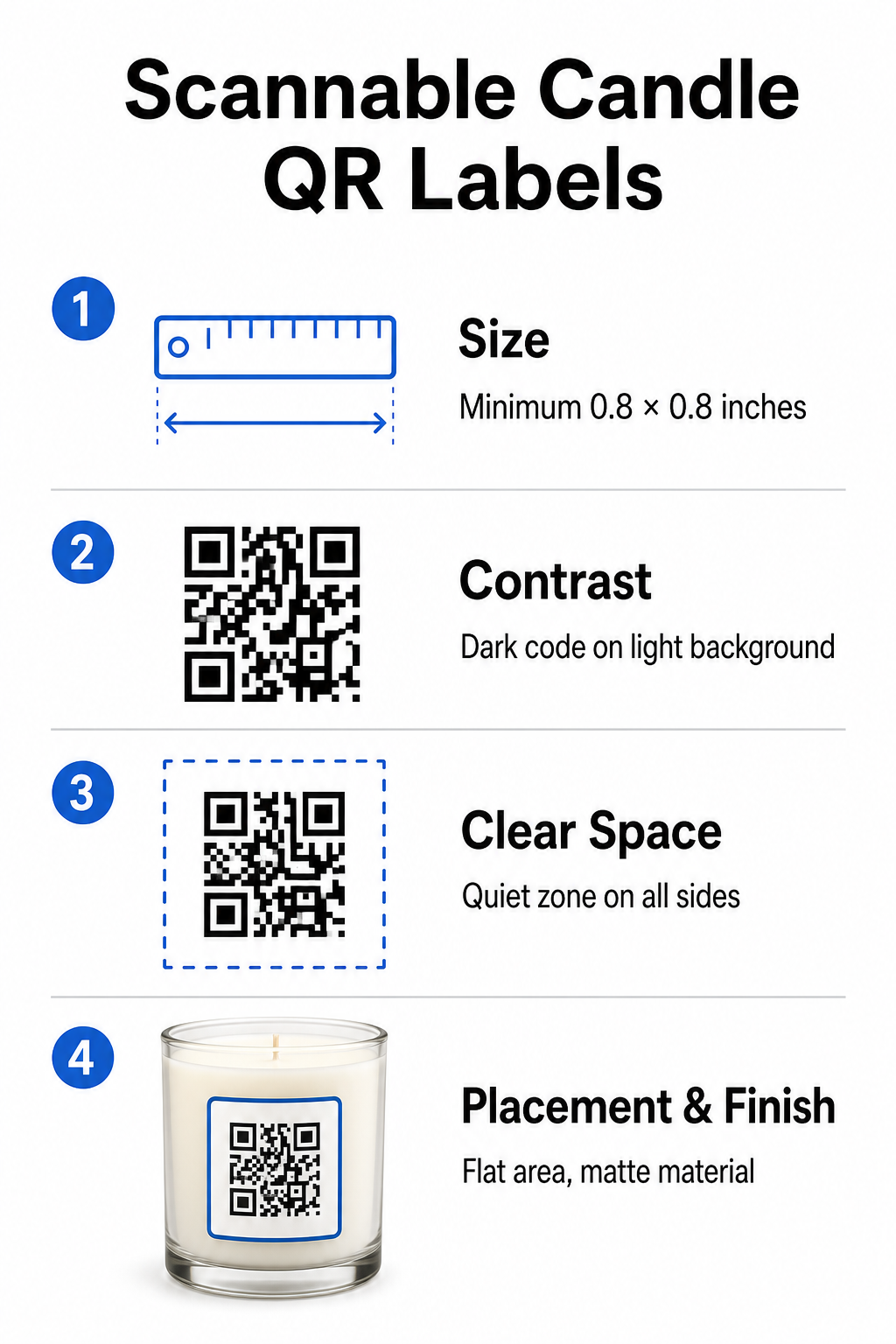
- Richtige Druckmaße einhalten: Halten Sie die physischen Abmessungen auf mindestens 0,8 x 0,8 Zoll (2 x 2 cm) für Etiketten, erweiterbar auf 3 x 3 cm für Umkartons, wie in unserem Leitfaden zu QR-Code-Größen.
- Starken visuellen Kontrast gewährleisten: Verwenden Sie dunkle Muster auf hellen Hintergründen, damit Standard-Handykamerasensoren die Matrix leicht lesen können.
- Eine angemessene Ruhezone bewahren: Halten Sie einen unbedruckten Rand um alle vier Seiten ein, der mindestens das Vierfache der Modulbreite misst.
- Behälterblendung und Oberflächenkrümmung mindern: Platzieren Sie Codes auf flachen Sekundärverpackungen oder halten Sie Etikettencodes schmal, um gekrümmte Verzerrungen zu vermeiden, und wählen Sie matte oder seidenmatte Etikettenmaterialien gegenüber hochglänzenden Oberflächen.
- Export von hochauflösenden Vektordateien: Speichern Sie Grafiken im SVG- oder EPS-Format mit 300 DPI oder höher, um scharfe Kanten zu erhalten, und folgen Sie unserer Anleitung zum Drucken eines QR-Codes auf einem Etikett.
Verbessern Sie Ihr Kerzenerlebnis mit Sound Kombinieren Sie Ihre charakteristischen Düfte mit benutzerdefinierten Audiotracks oder Playlists, um Ihre Kunden zu fesseln. Verwenden Sie den Spotify QR-Code Generator um scannbare Musik-Codes für Ihre Produkte zu erstellen.
Vergleich von statischen und dynamischen QR-Codes für Kerzenmarken
Die Wahl der richtigen Code-Architektur bestimmt, ob Ihr Post-Sales-Marketing über die Zeit anpassbar bleibt.
| FUNKTION | Statische QR-Codes | Dynamische QR-Codes |
|---|---|---|
| Bearbeitbarer Link | Permanent (Kann nach dem Drucken nicht mehr geändert werden) | Jederzeit vollständig editierbar, ohne die Verpackung neu drucken zu müssen |
| Scan-Analysen | Keine Nachverfolgung verfügbar | Verfolgt Gesamtscans, Standort, Geräte-Betriebssystem und Zeit |
| Musterdichte | Dichteres Muster mit langen Ziel-URLs | Sauberes Muster mit geringerer Dichte unter Verwendung kurzer Weiterleitungslinks |
| Bester Anwendungsfall | Permanente Anweisungen oder einfache Textnotizen | Saisonale Verkäufe, wechselnde Playlists, dynamische Geschenknachrichten |
Mit einer Dynamischer QR-Code Generator ermöglicht es Ihnen, Werbeziele zu ändern, saisonale Musik-Playlists zu aktualisieren oder digitale Geschenknachrichten zu aktualisieren, lange nachdem Ihre Produkte die Regale verlassen haben. Für vollständige Implementierungsdetails lesen Sie unsere umfassende Anleitung zu QR-Codes für Produktetiketten.
Wie man gebrandete QR-Codes für Kerzenverpackungen erstellt
Das Entwerfen maßgeschneiderter, druckfertiger Codes für Ihre Kerzenverpackung erfordert nur wenige strukturierte Schritte:
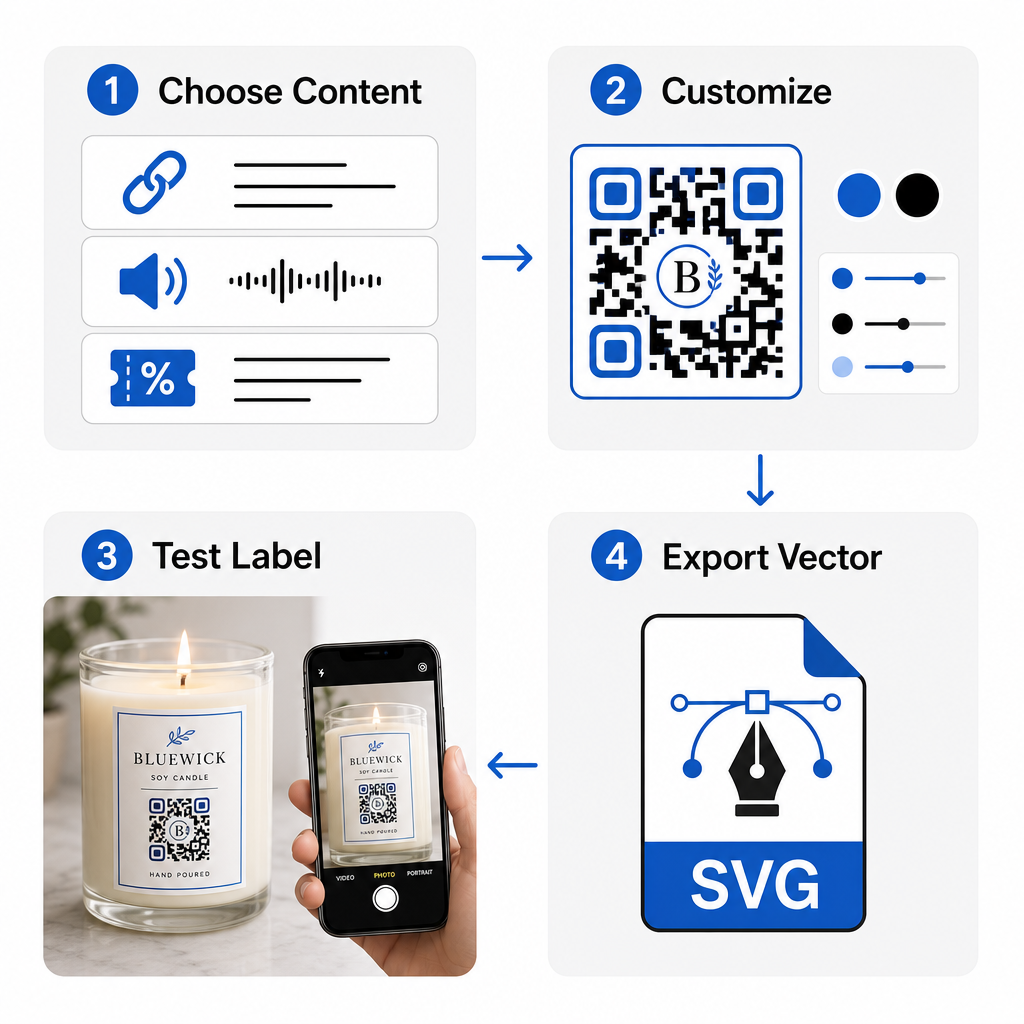
- Auswahl Ihres QR-Code-Typs: Entscheiden Sie, ob Käufer über unsere [QR Code generator tools] auf eine Website, eine Audiodatei, eine PDF-Anleitung oder einen Gutschein geleitet werden sollen. QR-Code erstellen kostenlos.
- Eingabe Ihrer Zieldaten: Geben Sie die Ziel-Webadresse ein oder laden Sie Ihre digitale Mediendatei hoch.
- Anpassen des visuellen Designs: Wenden Sie benutzerdefinierte Markenfarben, Rahmen und Logos mit einem [brand kit] an. QR-Code Generator mit Logo um visuelles Vertrauen aufzubauen.
- Testen auf mehreren Geräten: Überprüfen Sie die Scanleistung auf Testdrucken mit verschiedenen Smartphones und Beleuchtungsumgebungen.
- Herunterladen von druckfertigen Dateien: Exportieren Sie Vektordateien im SVG- oder EPS-Format für den hochauflösenden Druck.
Die Integration von scannbaren Codes in Ihre Kerzenverpackung verwandelt standardmäßige physische Produkte in interaktive Markenkontaktpunkte, ohne den benötigten Etikettenplatz zu überfüllen. Egal, ob Sie saisonale Audio-Playlists einbetten, Werberabatte anbieten oder personalisierte Kundennachrichten übermitteln, digitale Links verleihen Ihrer Marke langfristige Flexibilität. Beginnen Sie noch heute mit der Erstellung verfolgbarer, anpassbarer Codes mit Pageloots QR-Code erstellen kostenlos um Ihre Kerzenverpackungsstrategie zu verbessern.
Häufig gestellte Fragen
Ja. Sie können einen QR-Code auf der unteren Sicherheitstafel neben den Brandwarnungen drucken, vorausgesetzt, Sie gewährleisten einen ausreichenden Farbkontrast, eine angemessene Ruhezone und einen klaren Aufruf zum Handeln auf dem Hauptetikett, der Kunden dazu auffordert, die Unterseite zu scannen.
Die minimal empfohlene Größe für einen gedruckten QR-Code auf einem primären Kerzenetikett beträgt 0,8 x 0,8 Zoll (2 x 2 cm). Für sekundäre Umverpackungen oder Versandkartons gewährleistet eine Größe von 3 x 3 cm ein schnelleres und konsistenteres Scannen.
Wenn Sie dynamische QR-Codes verwenden, können Sie die Ziel-URL oder den digitalen Inhalt jederzeit in Ihrem Verwaltungs-Dashboard ändern, ohne Ihre physischen Kerzenetiketten oder Verpackungsschachteln neu drucken zu müssen.