Wie gibt man den Betrachtern mehr, als auf ein Schild passt – ohne das Kunstwerk selbst zu überladen? Statische Etiketten können keine Künstlerinterviews, mündlichen Überlieferungen oder Augmented-Reality-Erlebnisse transportieren, und diese Lücke lässt das Publikum von der vollständigen Geschichte hinter dem Werk getrennt. Dieser Leitfaden behandelt praktische Strategien zur Integration von QR-Codes in öffentliche Kunst und Wandmalereien, von Design und Platzierung bis hin zu Inhaltstypen und Analysen.
Warum QR-Codes in öffentlichen Kunstumgebungen funktionieren
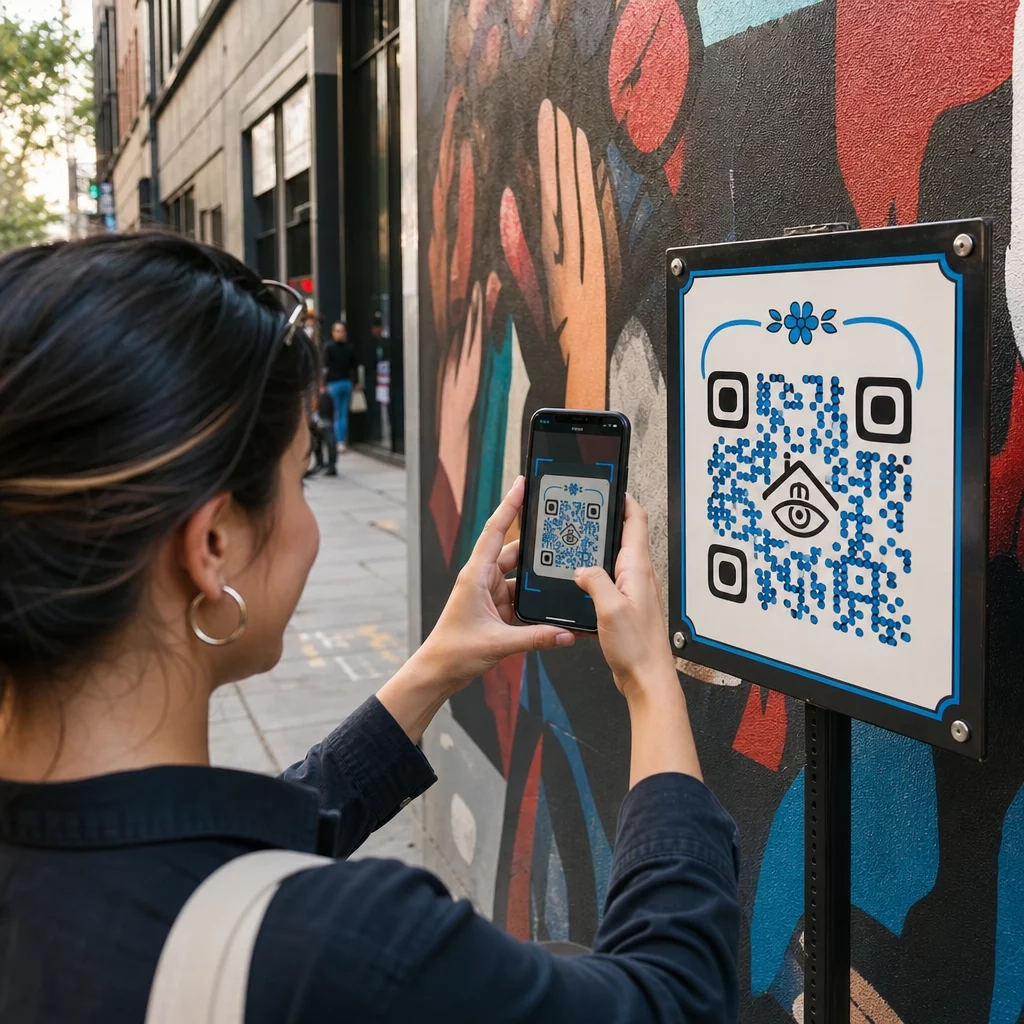
Ein QR-Code, der neben – oder in – ein Wandgemälde platziert oder eingewebt wird, fungiert als Brücke zwischen dem physischen Werk und einer Fülle digitaler Inhalte. Betrachter mit Smartphones können sofort scannen, ohne eine separate App herunterzuladen, und werden zu Audioguides, Videointerviews, Spendenseiten oder interaktiven AR-Erlebnissen weitergeleitet.
Mehrere öffentliche Kunstprogramme haben das Modell demonstriert:
- In Raleigh, North Carolina, hat das Q-Art Code Project QR-Smart-Codes bei öffentlichen Kunstwerken in der ganzen Stadt platziert, damit Gemeindemitglieder sofort Informationen über jedes Werk und seinen Schöpfer abrufen konnten.
- Im Wynwood-Viertel von Miami bettete der Künstler Ruben Ubiera einen QR-Code direkt in ein Wandgemälde ein, das acht Einwanderer darstellt, und verknüpfte jedes Gesicht mit einer aufgezeichneten mündlichen Geschichte – einschließlich Berichten über Familientrennung und Abschiebung.
- In der Innenstadt von Syracuse ist das S.Alt City Wandgemälde vollständig aus QR-Code-Kacheln aufgebaut, wobei jede Kachel mit einer anderen zeitgenössischen Kunstorganisation in der Region verknüpft ist, wodurch die Wand effektiv zu einem scannbaren Verzeichnis wird.
- In Punta Gorda, Florida, brachte eine lokale Wandmalereigesellschaft QR-Code-Schilder an historischen Wandmalereien an, damit Besucher außerhalb der Saison selbstständig durch die Sammlung geführt werden können und kurze Geschichtsstunden von ihren Telefonen abrufen können.
Diese Projekte teilen ein gemeinsames Prinzip: Der QR-Code ersetzt die Kunst nicht – er erweitert sie.
Verbinden Sie Ihre öffentliche Kunst mit digitalen Inhalten Verwenden Sie die Link QR-Code-Generator um einen scannbaren Code zu erstellen, der Betrachter zu Künstlerbiografien, Audioguides, Videointerviews oder jedem beliebigen Webziel führt.
Welche Inhalte von QR-Codes für öffentliche Kunst verlinkt werden sollen
Der Wert eines Scans hängt vollständig davon ab, was er liefert. Die Wahl des richtigen Inhaltsformats für den Kontext macht den Unterschied zwischen einem neugierigen Antippen und einer bedeutungsvollen Interaktion aus.
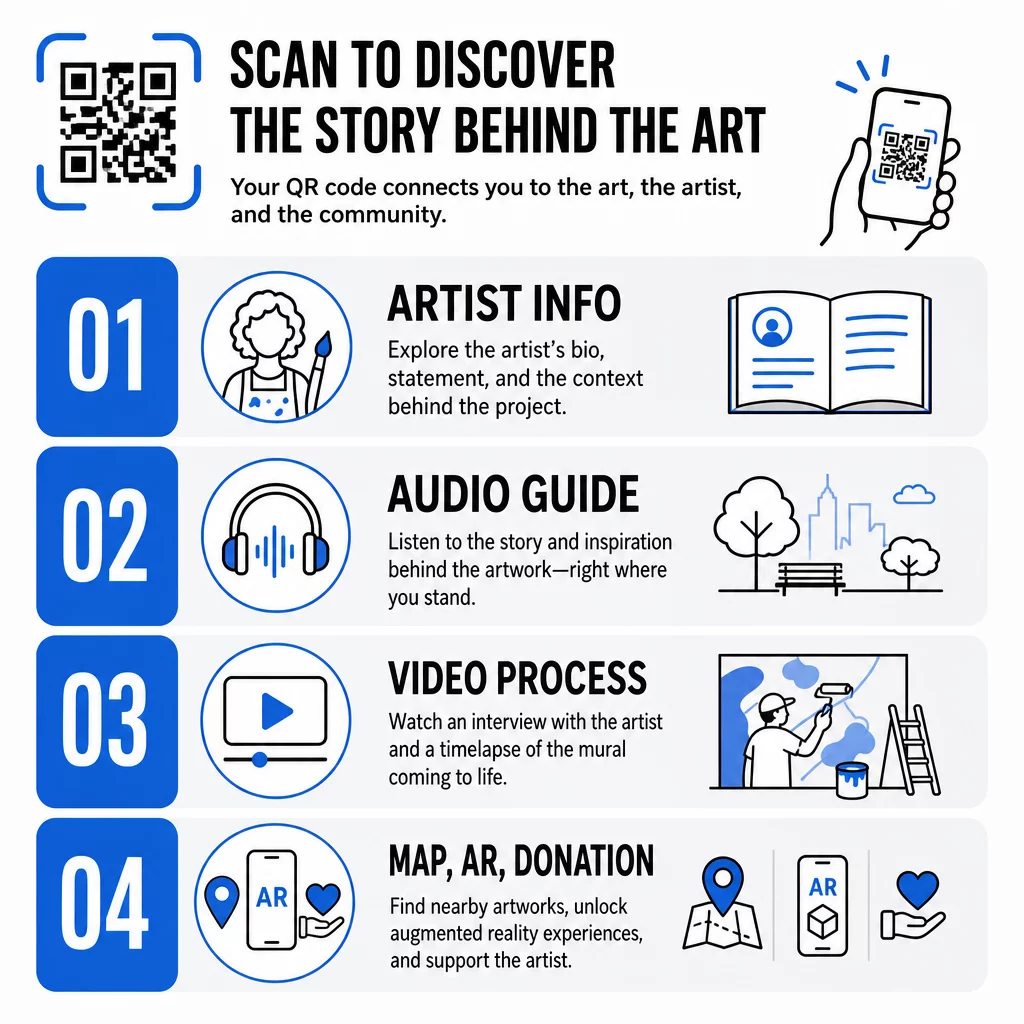
Künstlerinformationen und Kontext
Link zu einer Kurzbiografie, einer Stellungnahme zum Werk oder einer Zeitleiste, die die Entwicklung des Projekts zeigt. Dies ist besonders wertvoll für temporäre Installationen, bei denen der Wandplatz begrenzt ist.
Audioguides
Gesprochene Erzählungen funktionieren gut im Freien, wo Besucher sich bewegen oder in lauten Umgebungen sein können. Sie können Audiodateien direkt über ein MP3-QR-Code hosten, das auf jedem Smartphone abgespielt wird.
Videointerviews und Prozessdokumentation
Das Verlinken auf ein Künstlerinterview oder einen Zeitraffer des gemalten Wandbildes gibt den Betrachtern eine Perspektive hinter den Kulissen, die die Wertschätzung des fertigen Werkes vertieft.
PDF-Führer und Tourenkarten
Für Installationen, die Teil eines größeren Pfades oder Bezirks sind, kann ein PDF QR-Code eine herunterladbare Wanderkarte oder einen gedruckten Reiseführer liefern – ohne Druckkosten.
Standort und Wegfindung
Für öffentliche Kunstsammlungen an mehreren Standorten kann ein Google Maps QR-Code Besuchern ermöglichen, von einem Werk zum nächsten zu navigieren, ohne manuell suchen zu müssen.
Augmented-Reality-Erlebnisse
AR-verknüpfte QR-Codes ermöglichen es den Betrachtern, Animationen, 3D-Overlays oder sich entwickelnde Erzählungen freizuschalten, die über dem physischen Werk liegen. Museen wie das Smithsonian und interaktive Orte wie Meow Wolfs Convergence Station in Denver haben diesen Ansatz genutzt, um statische Ausstellungen in partizipative Erlebnisse zu verwandeln. Für einen tieferen Einblick, wie AR das Geschichtenerzählen in Kunsträumen verändert, siehe wie AR-QR-Codes das Geschichtenerzählen in Museen transformieren.
Spenden- und Unterstützungslinks
Der französische Streetart-Künstler Pascal “PBOY” Boyart bettete Bitcoin-QR-Codes in seine Wandgemälde ein, die es den Betrachtern ermöglichten, Kryptowährungsspenden durch Scannen zu senden. Die Codes wurden als integrale Elemente des Kunstwerks und nicht als nachträgliche Ergänzungen konzipiert und führten zu direkter Unterstützung seiner Arbeit durch die Gemeinschaft.
QR-Codes gestalten, die zur Kunst gehören
Ein QR-Code, der visuell mit dem umgebenden Werk kollidiert, stört die Immersion des Betrachters. Durchdachtes Design hält den Code funktionsfähig und respektiert gleichzeitig den künstlerischen Kontext.
Kontrast ist nicht verhandelbar
Dunkle Muster auf hellem Hintergrund lassen sich zuverlässig scannen. Invertierte Farbschemata – hell auf dunkel – sind für die meisten Lesegeräte schwerer zu erkennen. Welche Farbpalette Sie auch wählen, priorisieren Sie einen ausreichenden Kontrast zwischen Vordergrund und Hintergrund des Codes.
Die Ruhezone freihalten
Lassen Sie mindestens vier Module Leerraum um den äußeren Rand des Codes. Text, Bilder und dekorative Elemente, die in diesen Rand eindringen, stören das Scannen.
Hohe Fehlerkorrektur verwenden, wenn Logos hinzugefügt werden
Das Einbetten eines Logos oder Symbols in die Mitte eines QR-Codes ist eine gängige Methode, um Branding oder die Signatur des Künstlers zu integrieren. Stellen Sie die Fehlerkorrektur auf Stufe H ein, bevor Sie eine Überlagerung hinzufügen – diese Stufe kann bis zu 30 % beschädigter Daten wiederherstellen, was den durch das Logo verdeckten Teil des Codes kompensiert.
Größe für die Betrachtungsentfernung
Die allgemeine Regel besagt, dass der Code ungefähr ein Zehntel der Breite der erwarteten Scan-Entfernung betragen sollte. Ein Besucher, der 10 Fuß von einem Wandgemälde entfernt steht, benötigt einen Code von mindestens 12 Zoll Breite, um bequem scannen zu können. Für Nahbereichsbeschilderungen gilt ein Minimum von 1 × 1 Zoll. Für großformatige Wandgemälde planen Sie Codes von 1 bis 1,5 Fuß Breite ein.
Robuste Materialien für den Außenbereich wählen
UV-beständige Tinten, graviertes Metall oder Kunststoff und wetterfeste Laminate verlängern alle die funktionale Lebensdauer von Outdoor-Codes. Glänzende Oberflächen erzeugen Blendung; matte Substrate funktionieren bei unterschiedlichen Lichtverhältnissen besser. Testen Sie den Code zu verschiedenen Tageszeiten und unter den Lichtverhältnissen, denen die Installation tatsächlich ausgesetzt sein wird.
Im Vektorformat für den Druck exportieren
Laden Sie Ihren QR-Code als SVG-, EPS- oder PDF-Datei herunter, anstatt als niedrigauflösendes Rasterbild. Vektorformate skalieren sauber auf jede Größe ohne Pixelbildung, was für große Außenanwendungen unerlässlich ist.
Für eine vollständige Aufschlüsselung von Kontrastverhältnissen, Ruhezonen und Fehlerkorrekturstufen, siehe Best Practices für die Benutzerfreundlichkeit von QR-Codes und Best Practices für die Lesbarkeit von QR-Codes.
Wo QR-Codes auf Wandgemälden und Installationen platziert werden sollten
Selbst ein perfekt entworfener Code wird nicht gescannt, wenn er sich am falschen Ort befindet. Platzierungsentscheidungen beeinflussen sowohl die Auffindbarkeit als auch die Benutzerfreundlichkeit.
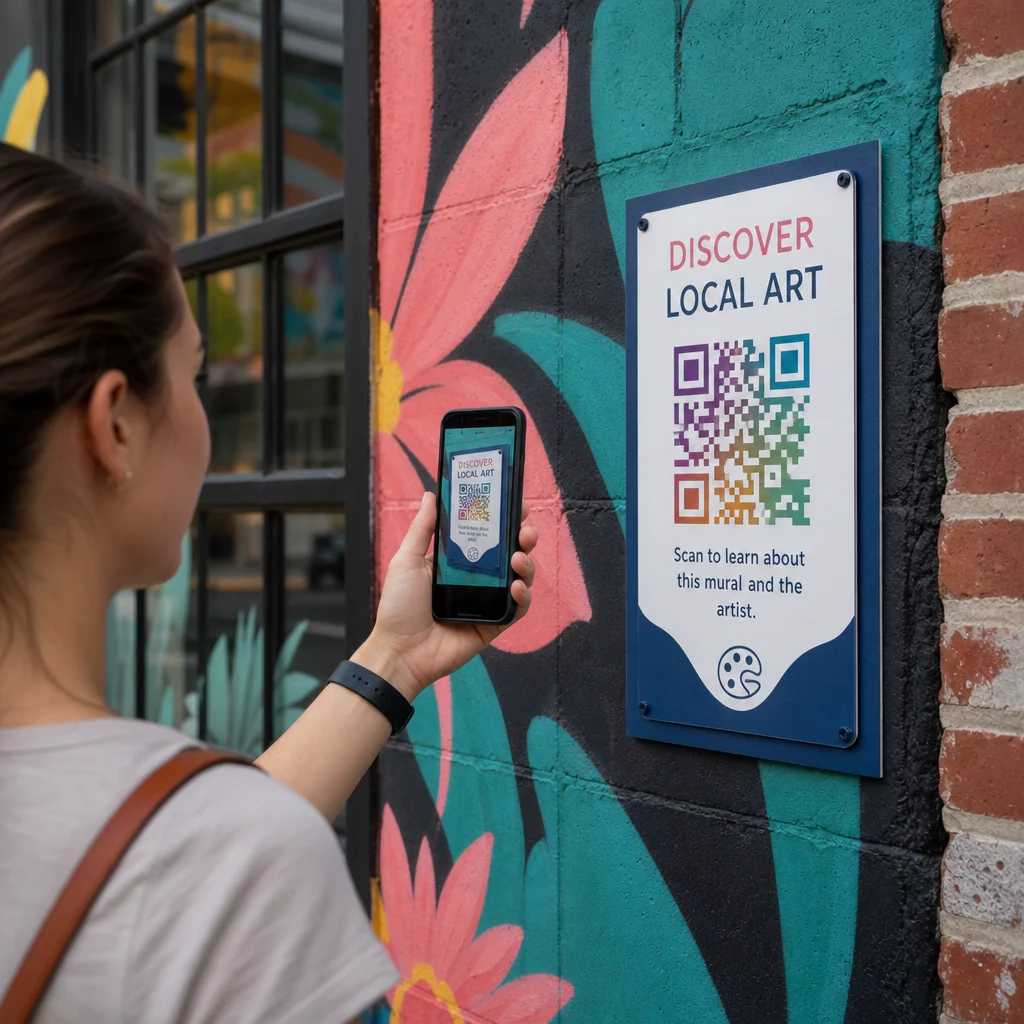
Auf Augenhöhe und erreichbar
Positionieren Sie Codes in etwa 1,2 bis 1,5 Metern Höhe – der natürlichen Scanposition für die meisten Erwachsenen. Zu hoch platzierte Codes erfordern, dass Betrachter ihre Telefone unbeholfen anheben; auf Bodenniveau platzierte Codes sind leicht zu übersehen.
Wo Menschen bereits innehalten
Betrachter, die stehen bleiben, scannen weitaus eher als vorbeigehende Betrachter. Identifizieren Sie natürliche Haltepunkte – Sitzbereiche, schattige Plätze, Ecken, wo sich Menschen versammeln – und platzieren Sie Codes dort, anstatt an Positionen mitten im Schritt entlang eines belebten Gehwegs.
Flache, stabile Oberflächen
Flache Oberflächen ermöglichen Scannern ein sauberes, unverzerrtes Lesen. Leicht gekrümmte oder texturierte Oberflächen können funktionieren, wenn der Code groß genug ist, erhöhen aber die Wahrscheinlichkeit eines Scanfehlers. Vermeiden Sie stark reflektierende Oberflächen, die Blendung erzeugen.
Klare Beschilderungshinweise
Fügen Sie einen kurzen Call-to-Action in der Nähe des Codes hinzu: “Scannen Sie, um die Geschichte des Künstlers zu hören” oder “Scannen Sie für den vollständigen Leitfaden.” Betrachter, die nicht sofort erkennen, was der Code bewirkt, werden ihn seltener ausprobieren. Hinweise zum Schreiben effektiver CTAs finden Sie unter Best Practices für die Platzierung von QR-Codes.
Dynamische QR-Codes zur Verwaltung und Verfolgung von Kunst im öffentlichen Raum nutzen
Statische QR-Codes kodieren ein festes Ziel. Einmal gedruckt oder installiert, kann der verknüpfte Inhalt nicht geändert werden, ohne den physischen Code zu ersetzen. Für langfristige Kunstinstallationen im öffentlichen Raum – oder Projekte, bei denen sich Inhalte entwickeln – entsteht dadurch ein echtes Wartungsproblem.
Dynamische QR-Codes lösen Sie dies, indem Sie auf eine kurze Weiterleitungs-URL verweisen, die Sie kontrollieren. Der physische Code bleibt derselbe, aber Sie können das Ziel jederzeit über ein Dashboard aktualisieren. Wenn sich die Website eines Künstlers ändert, ein Video neu gehostet wird oder ein saisonaler Reiseführer einen älteren ersetzt, erfolgt die Aktualisierung in der Plattform, ohne den installierten Code zu berühren.
Dynamische Codes bieten auch Analysen. Sie können verfolgen, wie oft ein Code gescannt wurde, wann Scans erfolgen und wo auf der Welt sich die Scanner befinden. Für Kuratoren und Ausstellungsveranstalter zeigen diese Daten, welche Werke in einer Sammlung das größte Engagement erzeugen, zu welchen Tageszeiten die höchste Aktivität zu verzeichnen ist und ob bestimmte Standorte andere übertreffen. Diese Erkenntnisse unterstützen bessere Platzierungsentscheidungen und relevantere Inhaltsaktualisierungen im Laufe der Zeit.
Für Künstler, die temporäre Installationen oder sich entwickelnde Projekte verwalten, fördert die Möglichkeit, Inhalte zu schichten – grundlegende Informationen beim ersten Scan bereitzustellen und tiefergehendes Material bei wiederholten Besuchen freizuschalten – eine fortlaufende Auseinandersetzung mit demselben Werk.
Jeden Scan in Ihrer öffentlichen Kunstsammlung verfolgen Die Dynamischer QR-Code Generator ermöglicht es Ihnen, verknüpfte Inhalte ohne Neudruck zu aktualisieren und bietet ein vollständiges Analyse-Dashboard zur Überwachung der Interaktion bei jeder Installation.
QR-Codes in Museen und Kultureinrichtungen
Kulturelle Einrichtungen in Innenräumen unterliegen anderen Einschränkungen als Wandgemälde im Freien, aber es gelten die gleichen Prinzipien. Museen haben QR-Codes eingeführt, um die Kommunikationsmöglichkeiten von Ausstellungsbeschriftungen zu erweitern, mehrsprachige Inhalte für internationale Besucher anzubieten und gedruckte Broschüren durch aktualisierbare digitale Alternativen zu ersetzen.
Anwendungsfälle in Museen umfassen:
- Interaktive Audioguides und selbstgeführte Touren
- Digitale Karten des Ausstellungsraums
- AR-Erlebnisse, die Artefakte animieren oder verborgene Schichten von Gemälden enthüllen
- Workshop-Zeitpläne, Anmeldungen für Vorträge und Veranstaltungsaktionen
- Besucher-Feedback-Formulare, die an Ausgängen oder in der gesamten Galerie verlinkt sind
Das M+ Museum in Hongkong verzeichnete 148.000 Besucherinteraktionen über QR-Codes, was eine starke Bereitschaft des Publikums für smartphone-basierte Interaktion in Kunsträumen zeigt. Musea Brugge hat Pageloot QR-Codes speziell eingesetzt, um die Besucherbindung zu bereichern und den Zugang zu Ausstellungsinformationen zu optimieren.
Für einen umfassenderen Überblick, wie Institutionen diese Technologie anwenden, siehe QR-Codes für Museen, QR-Codes für Kunstgalerien: Best Practicesund Fallstudien zu QR-Codes in modernen Kunstinstallationen.
Sicherheit, Datenschutz und langfristige Wartung
Öffentliche QR-Codes sind jederzeit und für alle Zielgruppen zugänglich, was eine fortlaufende Wartung unerlässlich macht. Ein defekter Link oder ein veraltetes Ziel untergräbt das Vertrauen der Betrachter und verschwendet die durch den Scan geschaffene Gelegenheit.
Schlüsselpraktiken für einen verantwortungsvollen Langzeiteinsatz:
- Regelmäßig testen auf verschiedenen Geräten und unter unterschiedlichen Lichtverhältnissen, um sicherzustellen, dass die Codes scannbar bleiben und die Links aktiv sind.
- HTTPS-Ziele verwenden um Legitimität zu signalisieren und Besucher vor unsicheren Weiterleitungen zu schützen.
- Deutliche Beschilderung anbringen darüber, welche Daten, falls vorhanden, beim Scannen durch Betrachter gesammelt werden, und die geltenden Datenschutzbestimmungen einhalten.
- Robuste physische Materialien verwenden die für die Außenumgebung geeignet sind – UV-beständige Tinten, wetterfeste Laminate oder geschützte digitale Bildschirme für dauerhafte Installationen.
- Verlinkte Inhalte regelmäßig überprüfen um sicherzustellen, dass Videos, PDFs und Künstlerseiten aktuell und zugänglich bleiben.
Dynamische QR-Codes reduzieren den Wartungsaufwand erheblich, da Inhaltsaktualisierungen und Linkänderungen auf der Plattform erfolgen, anstatt einen physischen Austausch der installierten Codes zu erfordern. Wenn QR-Codes mit der gleichen Sorgfalt wie die Kunstwerke, die sie begleiten, gestaltet werden – richtig dimensioniert, angemessen kontrastiert, durchdacht platziert und mit wirklich wertvollen Inhalten verknüpft – verlängern sie die Lebensdauer und Reichweite der öffentlichen Kunst weit über das hinaus, was eine einmalige Betrachtung bieten kann. Ob Sie ein Straßenwandbild dokumentieren, einen interaktiven Skulpturenpfad aufbauen oder eine Museumssammlung digitalisieren, die QR-Code-Tools für die Kunst die über Pageloot verfügbar sind, bieten Ihnen einen einfachen Weg von der physischen Installation zu messbarem digitalem Engagement.
Häufig gestellte Fragen
Die Größe hängt von der Scan-Entfernung ab. Eine Faustregel besagt, dass der Code mindestens ein Zehntel so breit sein sollte wie die Entfernung, aus der Betrachter ihn voraussichtlich scannen werden. Für jemanden, der 10 Fuß entfernt steht, sollte der Code mindestens 12 Zoll breit sein. Für Nahbereichsbeschilderung genügen mindestens 1 × 1 Zoll. Großflächige Wandgemälde benötigen in der Regel Codes zwischen 1 und 1,5 Fuß Breite, damit sie aus einer bequemen Entfernung scanbar bleiben.
QR-Codes in der öffentlichen Kunst können mit fast jedem digitalen Inhalt verknüpft werden: Künstlerbiografien, Audioguides, Videointerviews, AR-Erlebnisse, PDF-Wanderführer, Spendenseiten, Google Maps-Navigation, Social-Media-Profile oder Feedback-Formulare. Die richtige Art von Inhalt hängt vom Kontext des Kunstwerks ab – Außenwandbilder profitieren oft von Audio oder kurzen Videos, während Museumsinstallationen detailliertere Multimedia-Guides unterstützen können.
Ein statischer QR-Code kodiert ein festes Ziel, das nach dem Drucken oder Installieren des Codes nicht mehr geändert werden kann. Ein dynamischer QR-Code verweist auf eine Weiterleitungs-URL, die Sie jederzeit über ein Verwaltungs-Dashboard aktualisieren können, sodass der physische Code an Ort und Stelle bleibt, während sich der verknüpfte Inhalt weiterentwickelt. Dynamische Codes bieten auch Analysen – Scan-Zahlen, Zeitpunkt und geografische Daten – die Kuratoren helfen zu verstehen, welche Installationen das größte Engagement erzeugen und ihren Ansatz im Laufe der Zeit zu verfeinern.