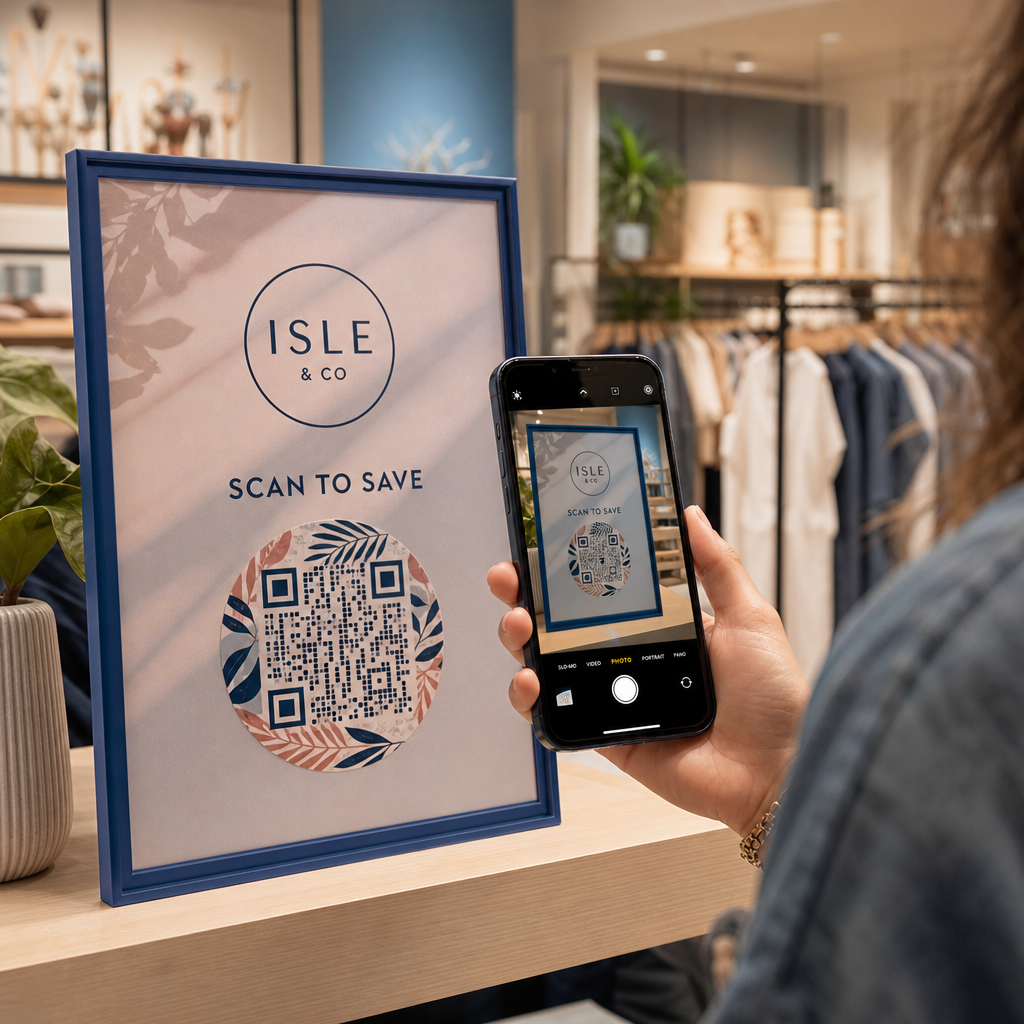
สื่อการตลาดทางกายภาพของคุณไม่สามารถดึงดูดผู้เข้าชมไปยังเนื้อหาดิจิทัลของคุณได้หรือไม่? รหัส QR ขาวดำทั่วไปมักจะกลมกลืนไปกับความรกทางสายตาในพื้นหลัง ส่งผลให้พลาดการปฏิสัมพันธ์กับลูกค้าและงบประมาณแคมเปญที่สูญเปล่า ด้วยการใช้คอนทราสต์สีเชิงกลยุทธ์ การสร้างแบรนด์แบบกำหนดเอง คำกระตุ้นการตัดสินใจที่ชัดเจน และการติดตามแบบไดนามิก คุณสามารถเปลี่ยนรหัสธรรมดาให้เป็นสินทรัพย์ภาพที่มีประสิทธิภาพสูง
ให้ความสำคัญกับการสแกนได้ด้วยคอนทราสต์สีสูง
การออกแบบภาพไม่ควรลดทอนความสามารถในการสแกน เซ็นเซอร์กล้องถอดรหัสรูปแบบ QR โดยการวัดความแตกต่างของการสะท้อนแสงระหว่างโมดูลส่วนหน้าและพื้นผิวพื้นหลัง สีที่เข้มกว่าจะดูดซับแสงในขณะที่สีที่อ่อนกว่าจะสะท้อนแสง ทำให้เลนส์ออปติคัลสามารถอ่านจุดข้อมูลที่ฝังไว้ได้อย่างชัดเจน
เพื่อรักษาความสามารถในการอ่านสูงสุดภายใต้สภาพแสงที่แตกต่างกัน ให้ใช้หลักเกณฑ์ที่กำหนดไว้ แนวทางการใช้คอนทราสต์สีของรหัส QR:
- รักษาพื้นหน้าสีเข้มบนพื้นหลังสีอ่อน: เลือกสีลวดลายทึบและเข้ม เช่น สีกรมท่า สีเทาเข้ม หรือสีแดงเบอร์กันดีเข้ม บนพื้นหลังที่สะอาดและสว่าง สีดำมาตรฐานบนสีขาวให้ค่าอัตราส่วนคอนทราสต์ที่เหมาะสมที่สุด 21:1
- ปฏิบัติตามข้อกำหนดอัตราส่วนคอนทราสต์มาตรฐาน: รักษาอัตราส่วนคอนทราสต์ขั้นต่ำที่ 4.5:1 สำหรับสื่อสิ่งพิมพ์ขนาดเล็ก และอย่างน้อย 3:1 สำหรับป้ายแสดงผลขนาดใหญ่
- หลีกเลี่ยงการไล่ระดับสีภายในและเงาตกกระทบ: ข้ามการไล่ระดับสีแบบหลายโทนและเงาตกกระทบนุ่มๆ เนื่องจากเฉดสีกลางสร้างความรกทางสายตาที่ทำให้เซ็นเซอร์ออปติคัลสับสน
- ข้ามการออกแบบสลับสี: หลีกเลี่ยงการใช้ลวดลายสีอ่อนบนพื้นหลังสีเข้ม เนื่องจากการออกแบบกลับด้านมักจะล้มเหลวในการสแกนด้วยกล้องสมาร์ทโฟนหลายรุ่น
ผสานรวมโลโก้แบรนด์ของคุณโดยไม่ลดทอนความสามารถในการอ่าน
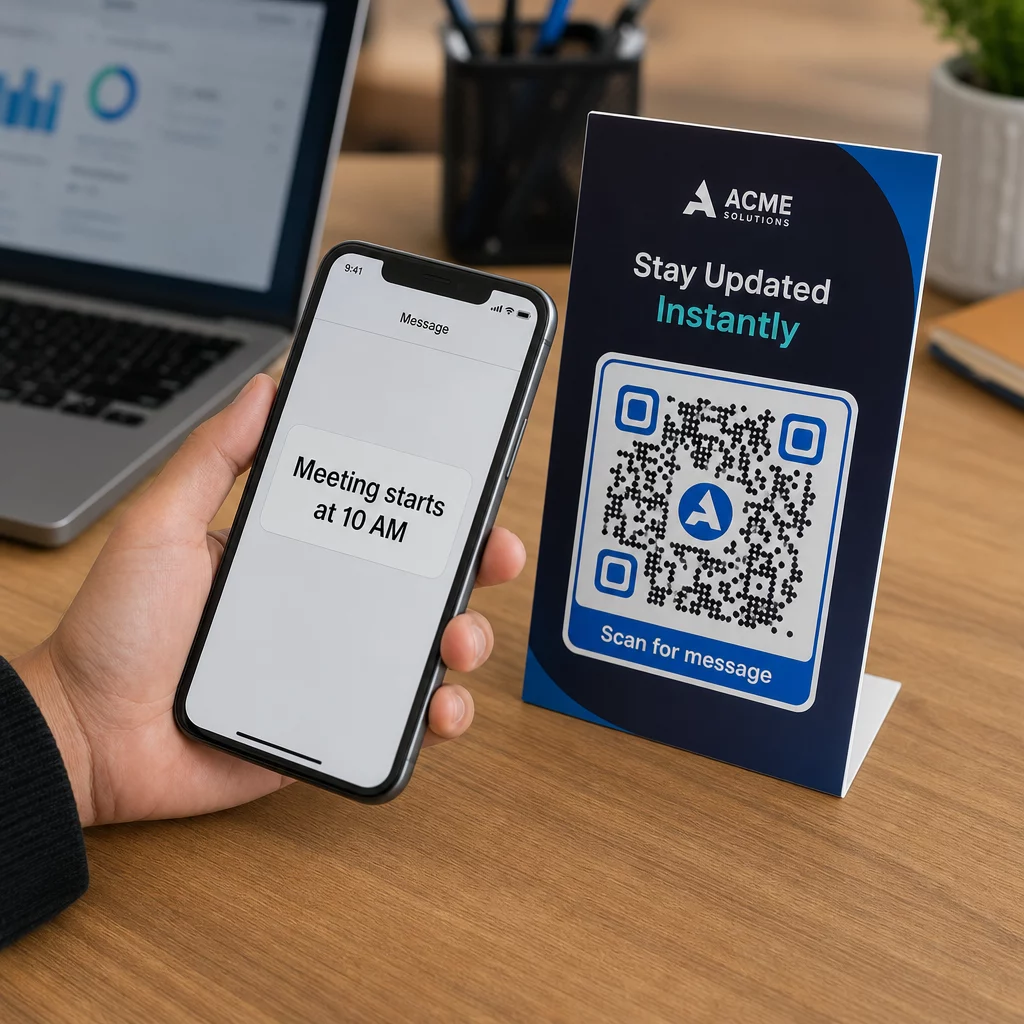
การวางโลโก้บริษัทไว้ภายในเมทริกซ์ QR ช่วยสร้างการจดจำแบรนด์ได้ทันที และทำให้ผู้ใช้มั่นใจว่า URL ปลายทางนั้นถูกต้องตามกฎหมาย การตรวจสอบตัวอย่างจริง ตัวอย่างรหัส QR ที่มีแบรนด์ แสดงให้เห็นว่าการออกแบบที่กำหนดเองสร้างการมีส่วนร่วมของผู้ใช้ได้สูงกว่ากล่องขาวดำธรรมดา
เมื่อเรียนรู้ วิธีเพิ่มโลโก้ลงในคิวอาร์โค้ด, ปกป้องโซนตรวจจับที่สำคัญของเครื่องสแกนเพื่อให้โค้ดของคุณอ่านง่าย:
- จัดตำแหน่งโลโก้ให้อยู่ตรงกลาง: วางกราฟิกไว้ตรงกลางของตารางโดยตรง เพื่อให้แน่ใจว่ารูปแบบการจัดตำแหน่งสี่เหลี่ยมขนาดใหญ่สามรูปแบบที่มุมยังคงไม่ถูกบดบังโดยสมบูรณ์
- จำกัดพื้นที่ครอบคลุมของโลโก้ทั้งหมด: รักษาขนาดโลโก้ให้ไม่เกิน 25% ของความกว้างและความสูงของ QR ทั้งหมด และไม่เกิน 30% ของพื้นที่ผิวโดยรวม
- เลือกระดับการแก้ไขข้อผิดพลาดที่สูงขึ้น: ตั้งค่าการแก้ไขข้อผิดพลาด Reed-Solomon เป็นระดับ Q (กู้คืนข้อมูลที่ถูกบดบังได้สูงสุด 25%) หรือระดับ H (กู้คืนได้สูงสุด 30%) เพื่อให้เครื่องสแกนสามารถสร้างข้อมูลรูปแบบที่ขาดหายไปได้ใหม่
- ปกป้องคอนทราสต์พื้นหลังโลโก้: เพิ่มขอบสีขาวทึบรอบไอคอนแบรนด์สีเข้มเพื่อป้องกันขอบโลโก้รวมเข้ากับโมดูลรูปแบบโดยรอบ
สร้าง QR โค้ดที่มีแบรนด์ของคุณในไม่กี่วินาที ต้องการยกระดับสื่อการตลาดของคุณด้วยสีสัน โลโก้ และเฟรมที่ช่วยเพิ่มยอดคอนเวอร์ชันหรือไม่? เริ่มออกแบบโค้ดที่สแกนได้แล้ววันนี้ด้วย สร้าง QR Code ใส่โลโก้.
ใส่กรอบ QR โค้ดของคุณด้วยคำกระตุ้นการตัดสินใจที่ชัดเจน
QR โค้ดที่ไม่มีป้ายกำกับไม่สามารถกระตุ้นให้ลูกค้าสแกนได้ การเพิ่มกรอบคำกระตุ้นการตัดสินใจ (CTA) จะให้บริบททันที โดยบอกผู้ใช้ว่ามีคุณค่าหรือเนื้อหาอะไรรออยู่
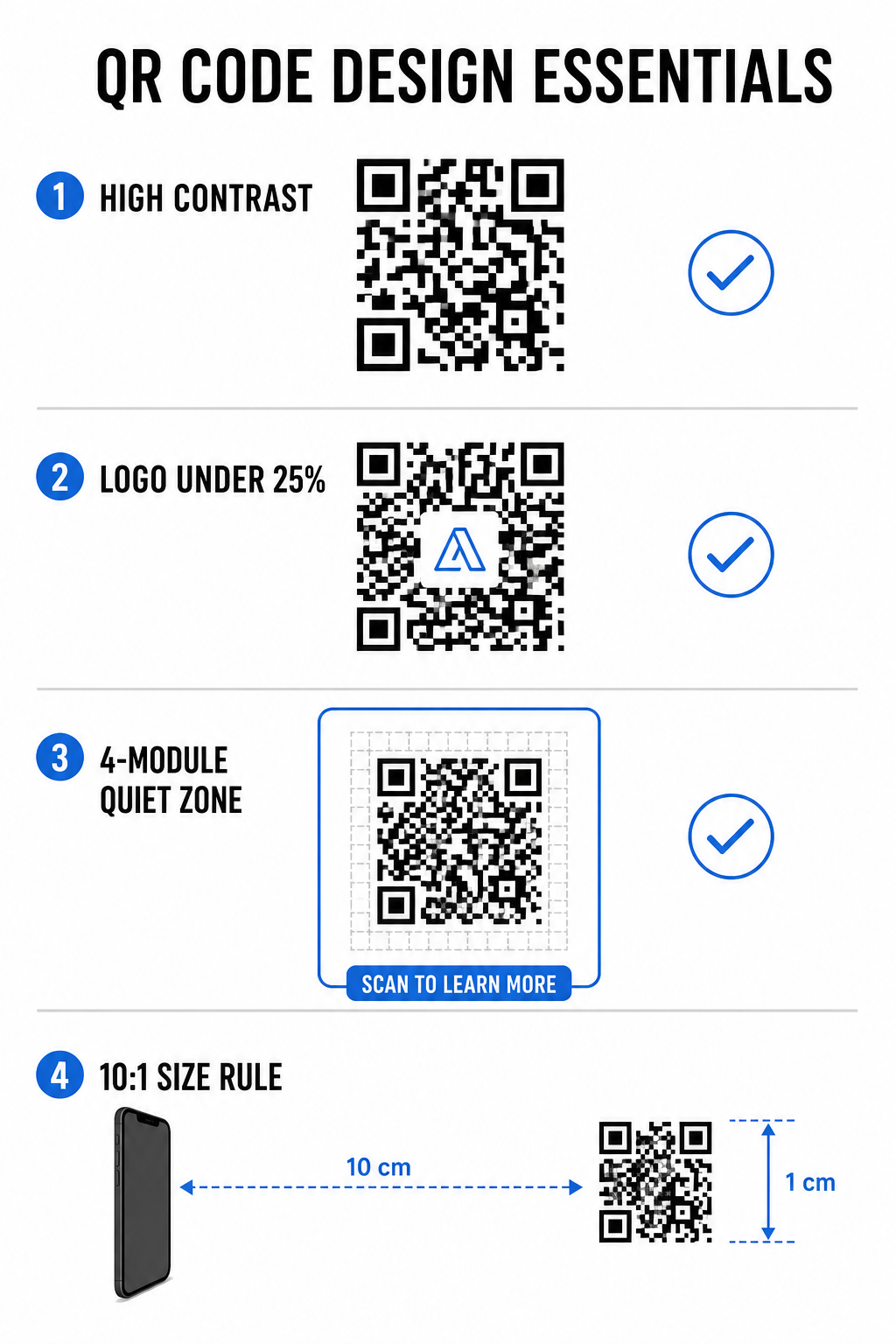
การใช้ กรอบ CTA ของ QR โค้ดที่มีประสิทธิภาพ ช่วยแนะนำพฤติกรรมผู้ใช้และเพิ่มอัตราการแปลง:
- เพิ่มข้อความสั้นที่เน้นประโยชน์: แทนที่ป้ายกำกับทั่วไปด้วยคำแนะนำที่ชัดเจน เช่น “สแกนเพื่อรับส่วนลด 20%,” “สแกนเพื่อดูเมนู” หรือ “สแกนเพื่อ Wi-Fi ฟรี”
- ปกป้อง Quiet Zone: รักษาระยะขอบที่ไม่ถูกบดบังอย่างน้อยสี่โมดูลในทั้งสี่ด้านของโค้ด โดยเก็บขอบเฟรมและข้อความไว้นอกพื้นที่นี้
- ใช้เทมเพลตภาพสำเร็จรูป: ใช้ เทมเพลต QR Code เพื่อให้แน่ใจว่าการจัดกรอบเข้ากับสื่อสิ่งพิมพ์ของคุณในขณะที่ยังคงปฏิบัติตามกฎ Quiet Zone ทางเทคนิค
| องค์ประกอบ | มาตรฐานที่แนะนำ | ทำไมจึงสำคัญ |
|---|---|---|
| ระยะขอบเขตเงียบ | อย่างน้อย 4 โมดูลในทุกด้าน | ป้องกันกราฟิกโดยรอบรบกวนการจดจำของกล้อง |
| พื้นที่ครอบคลุมโลโก้ | 20% ถึง 25% ของพื้นที่ผิวโดยรวม | รักษาโมดูลข้อมูลที่จำเป็นให้อ่านได้ในขณะที่ยังคงรักษากำหนดแบรนด์ |
| อัตราส่วนคอนทราสต์ | อัตราส่วนขั้นต่ำ 4.5:1 (ตัวพิมพ์เล็ก) / 3:1 (ตัวพิมพ์ใหญ่) | รับรองความแตกต่างที่ชัดเจนระหว่างจุดพื้นหน้าและพื้นหลัง |
| ขนาดพิมพ์ขั้นต่ำ | 0.8 x 0.8 นิ้ว (2 x 2 ซม.) | ช่วยให้เลนส์กล้องมือถือทั่วไปสามารถโฟกัสได้อย่างถูกต้องในระยะใกล้ |
ปรับขนาดโค้ดเพื่อการจัดวางตำแหน่งทางกายภาพเชิงกลยุทธ์
แม้แต่ QR โค้ดที่ดูสวยงามก็จะใช้งานไม่ได้หากการจัดวางทางกายภาพขัดขวางการสแกนที่สะดวกสบาย การจัดตำแหน่งที่มีประสิทธิภาพต้องประเมินระยะการมองเห็น พื้นผิว ความสูงในการติดตั้ง และการปรับขนาดการพิมพ์
การปฏิบัติตามแนวทางที่กำหนดสำหรับ รหัส QR ในการตลาด ช่วยให้มั่นใจถึงประสิทธิภาพที่เชื่อถือได้:
- คำนวณขนาดโดยใช้ระยะการมองเห็น: ใช้กฎอัตราส่วน 10:1 โดยที่ทุกๆ ระยะการสแกน 10 ซม. ต้องใช้ความกว้างของ QR โค้ดอย่างน้อย 1 ซม.
- วางตำแหน่งวัสดุในระดับความสูงที่มองเห็นได้ตามธรรมชาติ: ติดตั้งป้ายและสิ่งพิมพ์แสดงผลระหว่าง 3.5 ถึง 5.5 ฟุตจากพื้น เพื่อให้ผู้ใช้สามารถสแกนได้โดยไม่ต้องก้มหรือเอื้อมในมุมที่ลำบาก
- เลือกวัสดุพิมพ์ที่เรียบ ไม่สะท้อนแสง: เลือกพื้นผิวแบบด้านแทนการเคลือบมันหรือบรรจุภัณฑ์โค้ง เพื่อลดแสงสะท้อนและการบิดเบือนของลวดลาย
- ส่งออกกราฟิกในรูปแบบเวกเตอร์ความละเอียดสูง: ตรวจสอบเพิ่มเติมเกี่ยวกับ เคล็ดลับการออกแบบ QR โค้ดเพื่อการสแกนที่ดีขึ้น เพื่อให้แน่ใจว่ากราฟิกถูกส่งออกเป็นไฟล์ SVG หรือ EPS เพื่อการพิมพ์ที่คมชัด
ใช้ QR โค้ดแบบไดนามิกเพื่อติดตามและเพิ่มประสิทธิภาพแคมเปญ
QR โค้ดแบบคงที่ (Static QR codes) จะเข้ารหัส URL เป้าหมายโดยตรงลงในรูปแบบเมทริกซ์ ทำให้เกิดตารางที่หนาแน่นและสแกนได้ยากจากระยะไกล QR โค้ดแบบไดนามิก (Dynamic QR codes) จะนำผู้สแกนผ่าน URL แบบสั้น ทำให้รูปแบบเมทริกซ์สะอาดตา ในขณะที่ยังคงความยืดหยุ่นหลังการพิมพ์
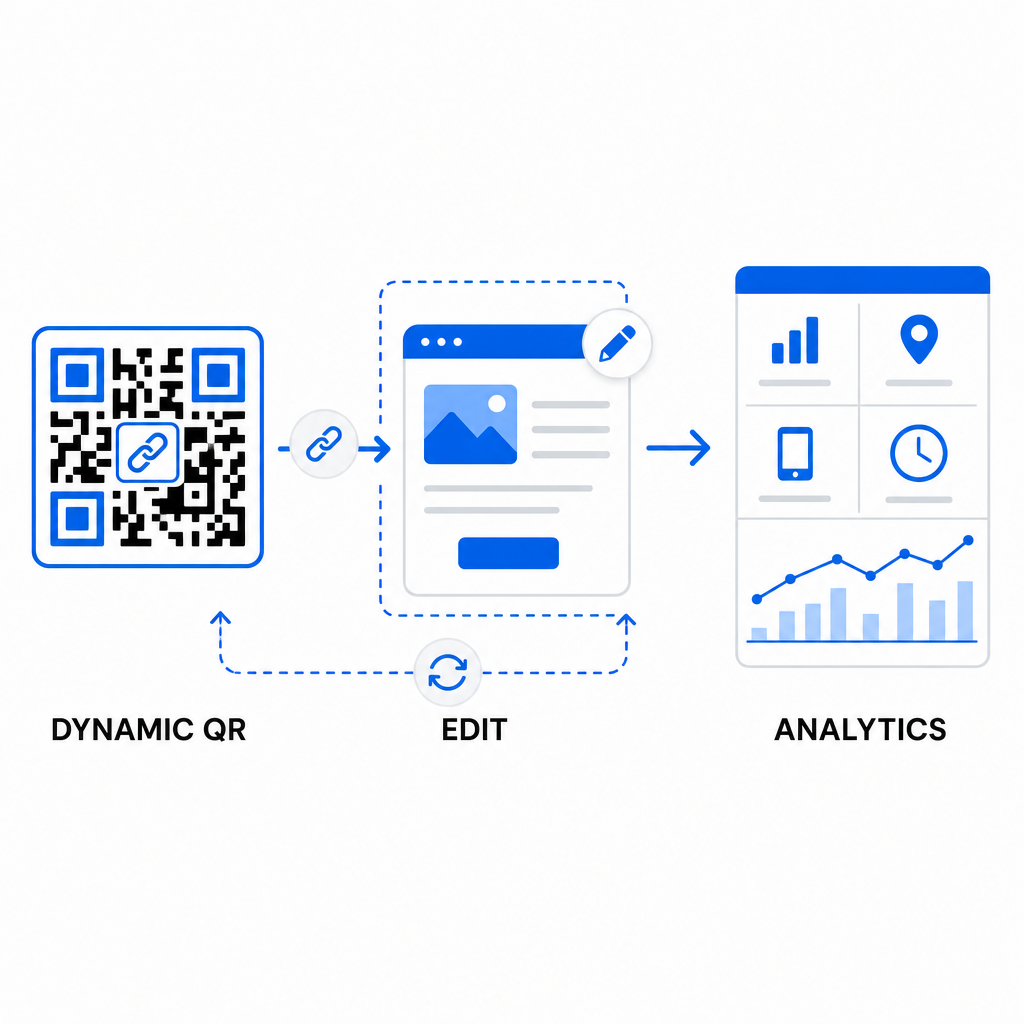
การนำเวิร์กโฟลว์แบบไดนามิกมาใช้ช่วยสนับสนุนการเพิ่มประสิทธิภาพอย่างต่อเนื่องสำหรับ การปรับปรุงอัตราการแปลงรหัส QR:
- อัปเดต URL ปลายทางโดยไม่ต้องพิมพ์ซ้ำ: แก้ไขลิงก์หน้า Landing Page, ข้อเสนอโปรโมชัน หรือไฟล์ดิจิทัลได้ตลอดเวลาโดยไม่ต้องเปลี่ยนสินทรัพย์สิ่งพิมพ์จริง
- บันทึกข้อมูลการสแกนที่นำไปใช้ได้: ติดตามจำนวนการสแกนทั้งหมด, ตำแหน่งทางภูมิศาสตร์, ประเภทอุปกรณ์ และเวลาการสแกน เพื่อวัดประสิทธิภาพของแคมเปญแบบเรียลไทม์
- ทำการทดสอบ A/B แบบมีโครงสร้าง: เปรียบเทียบการออกแบบกรอบ, CTA หรือหน้า Landing page ที่แตกต่างกัน โดยเปลี่ยนตัวแปรทีละหนึ่งและติดตาม URL ที่ไม่ซ้ำกัน
การออกแบบโค้ด QR แบบภาพจำเป็นต้องสร้างสมดุลระหว่างการสร้างแบรนด์เชิงสร้างสรรค์กับข้อกำหนดทางเทคนิคหลัก ด้วยการรวมความแตกต่างของสีที่ชัดเจน, พื้นที่เงียบที่ได้รับการป้องกัน, กรอบ CTA ที่เน้นการกระทำ และการติดตามแบบไดนามิก คุณสามารถเปลี่ยนจุดสัมผัสทางกายภาพให้เป็นการโต้ตอบทางดิจิทัลที่วัดผลได้
สำรวจคุณสมบัติทั้งหมดของ คุณสมบัติโค้ด QR แบบกำหนดเอง เพื่อออกแบบชิ้นงานภาพที่แปลงได้สูง หรือเริ่มสร้างแคมเปญถัดไปของคุณด้วย Pageloot เครื่องสร้างรหัส QR วันนี้.
คำถามที่พบบ่อย
สำหรับวัสดุที่ใช้ในระยะใกล้ เช่น นามบัตร หรือเมนูร้านอาหาร คิวอาร์โค้ดควรมีขนาดอย่างน้อย 0.8 x 0.8 นิ้ว (2 x 2 ซม.) สำหรับป้ายที่มองจากระยะไกล ให้ปฏิบัติตามกฎอัตราส่วน 10:1 โดยทุก ๆ ระยะการสแกน 10 ซม. ต้องมีขนาดความกว้างของคิวอาร์โค้ดอย่างน้อย 1 ซม.
การเพิ่มโลโก้จะไม่รบกวนการสแกน ตราบใดที่คุณตั้งค่าระดับการแก้ไขข้อผิดพลาดเป็น Q หรือ H (ซึ่งสามารถกู้คืนข้อมูลได้ถึง 25% หรือ 30%) และรักษาพื้นที่ครอบคลุมของโลโก้ให้น้อยกว่า 25% ของพื้นที่รหัส โดยไม่บดบังเครื่องหมายตำแหน่งมุม
ได้ หากคุณใช้คิวอาร์โค้ดแบบไดนามิก คิวอาร์โค้ดประเภทนี้จะเก็บ URL แบบย่อที่แก้ไขได้ ซึ่งช่วยให้คุณอัปเดตลิงก์ปลายทางหรือเนื้อหาดิจิทัลได้ตลอดเวลาจากแดชบอร์ดการจัดการของคุณ โดยไม่ต้องพิมพ์สื่อทางกายภาพซ้ำ