
ホーム > 産業 > How to Use QR Codes in Auto Repair Shops
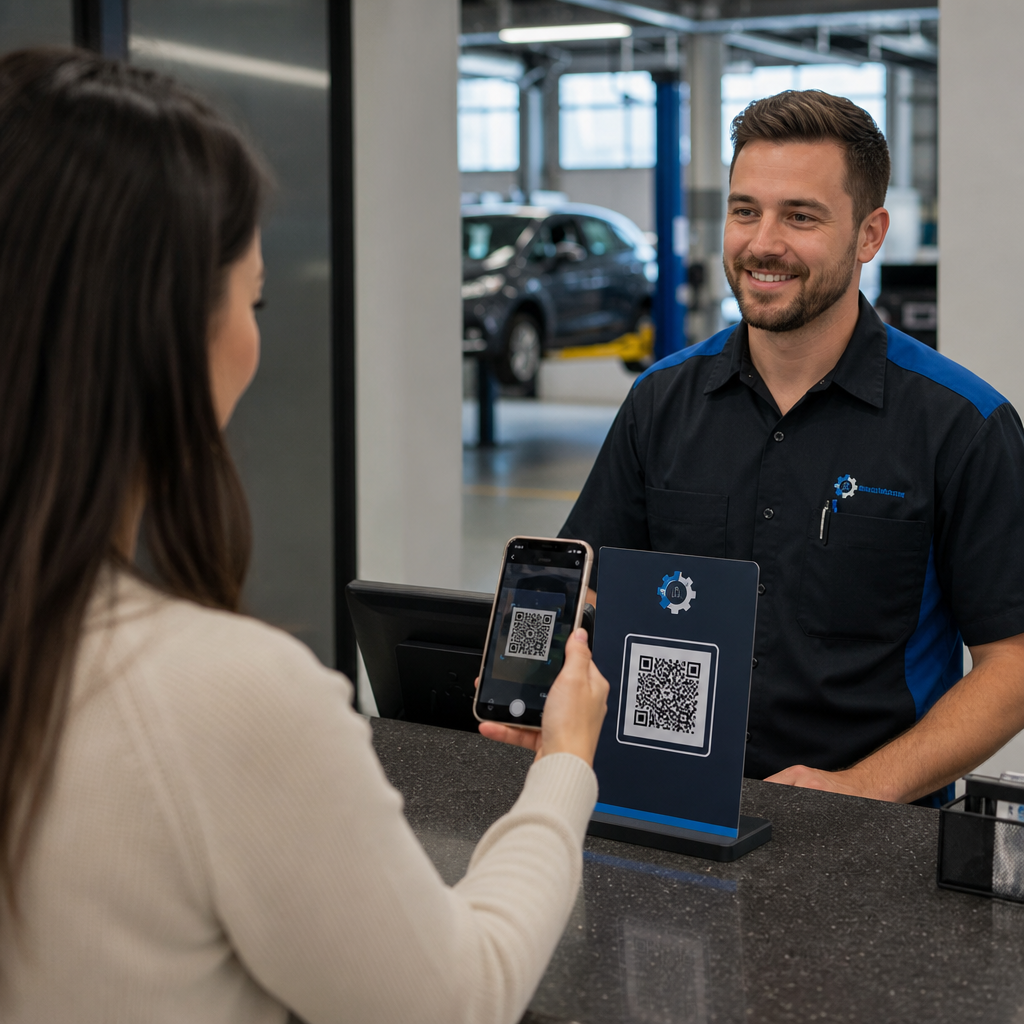
Scanning auto shop check-in

How to Use QR Codes in Auto Repair Shops

Learn how auto repair shops use QR codes to speed up customer intake, share digital inspection reports, deliver estimates, and get more Google reviews.
Updated on 7月 27, 2026
目次

Are long intake queues, missed maintenance reminders, and sparse online reviews slowing down your auto repair shop? Manual paperwork and fragmented client communication waste valuable service advisor hours and let repeat revenue slip away. Integrating scannable QR codes into your physical touchpoints turns routine drop-offs and service follow-ups into fast, automated digital interactions.

Accelerate Customer Check-In and Intake Operations

Vehicle drop-offs create bottlenecks when customers must manually fill out paper intake forms or wait for a service advisor to record vehicle mileage and symptoms line-by-line. Automating this initial contact reduces waiting room friction and gets repair orders to your technicians faster.

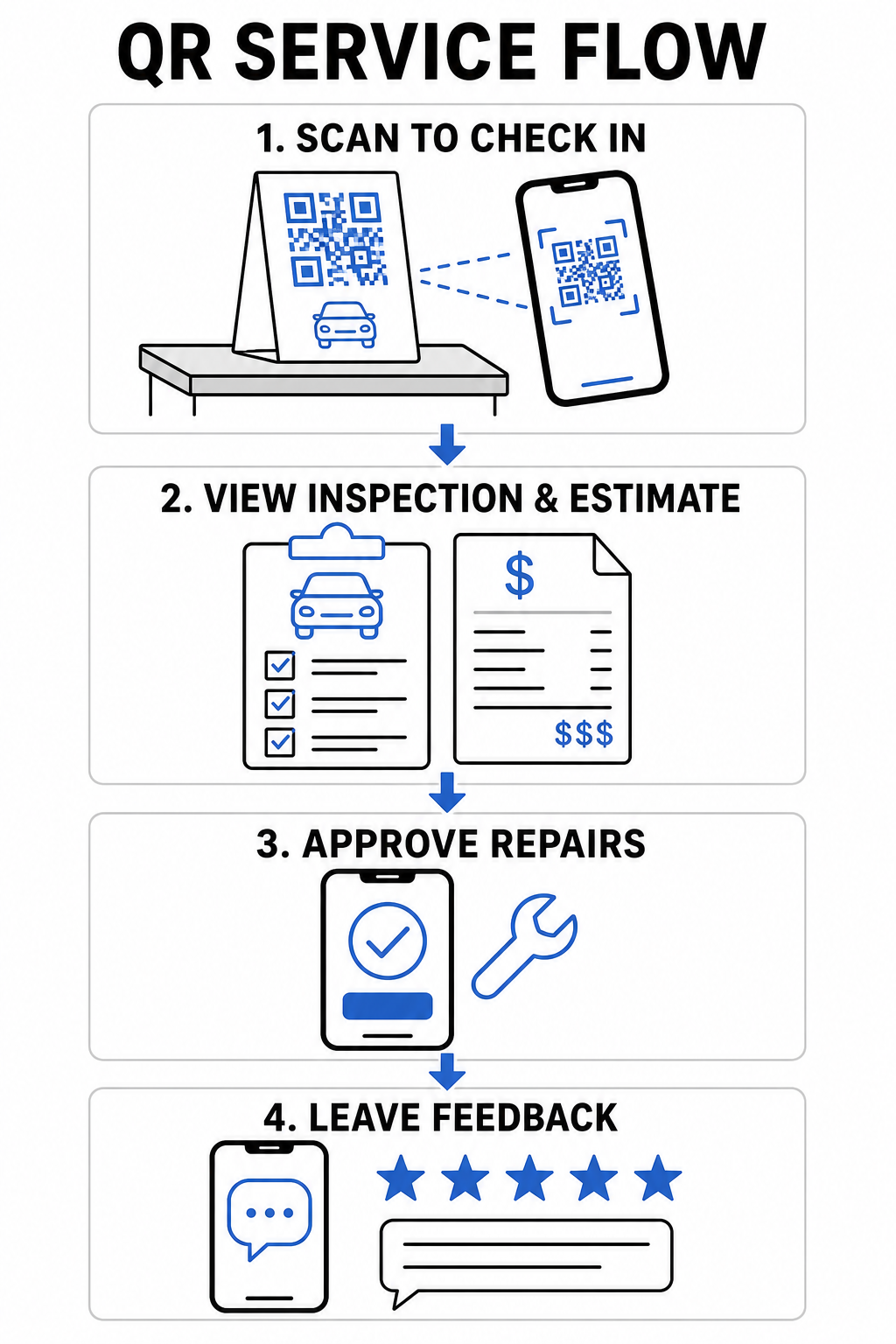
  • Digitize customer check-in: Display counter signs linked to a GoogleフォームQRコードジェネレーター so arriving drivers can submit contact details, vehicle information, and repair requests directly from their mobile devices.
  • Provide instant waiting room Wi-Fi: Place scannable Wi-Fi codes on waiting area counter displays so customers can connect automatically without typing network passwords.
  • Share digital inspection reports: Upload detailed vehicle diagnostic reports to a PDF QRコードジェネレーター link on work orders so drivers can review fluid health, tire tread depth, and recommended services on their phone screens.

Streamline Your Service Intake Process Reduce waiting room paperwork and speed up drop-offs by creating custom digital registration forms with the GoogleフォームQRコードジェネレーター.

Improve Customer Communication and Digital Touchpoints

Building long-term customer loyalty requires transparent communication regarding complex automotive repairs. Providing immediate digital access to estimate breakdowns, shop contacts, and feedback channels fosters driver confidence throughout the service cycle.

QR service workflow infographic
  • Store complete shop contacts: Print a vCard code on windshield service reminder stickers or key tags so customers can save your phone number, address, and towing details directly to their phone address books.
  • Consolidate repair estimates: Direct vehicle owners to custom landing pages that outline repair options, parts breakdowns, and inspection photos in a single mobile view.
  • Gather immediate service feedback: Add links from a customer feedback QR code tool to finalized invoices to measure customer satisfaction before drivers leave your shop.
Touchpoint Recommended QR Code Type Operational Benefit
Service Counter Form or Link QR Eliminates paper intake sheets and shortens morning drop-off lines.
Final Invoice Review or Feedback QR Captures immediate client feedback and boosts public online ratings.
Reminder Sticker vCard or Calendar QR Makes saving shop contacts and booking next oil changes effortless.
Courtesy Fleet Dynamic Marketing QR Converts local shuttle routes into trackable marketing opportunities.

Drive Local Marketing and Customer Reviews

Most drivers search online when they encounter unexpected vehicle trouble or need routine maintenance. Connecting your shop’s print advertising and offline customer interactions to your digital profiles expands your local footprint and generates consistent booking volume.

Generate More Google Reviews at Checkout Make it effortless for satisfied drivers to rate your shop online by creating a dedicated review link with the GoogleレビューQRコードジェネレーター.

Technical Guidelines for Code Printing and Placement

Auto repair shops present unique environmental challenges, including low lighting in service bays, oily surfaces, and high-glare reception counters. Adhering to technical print standards ensures your codes scan instantly across all mobile devices.

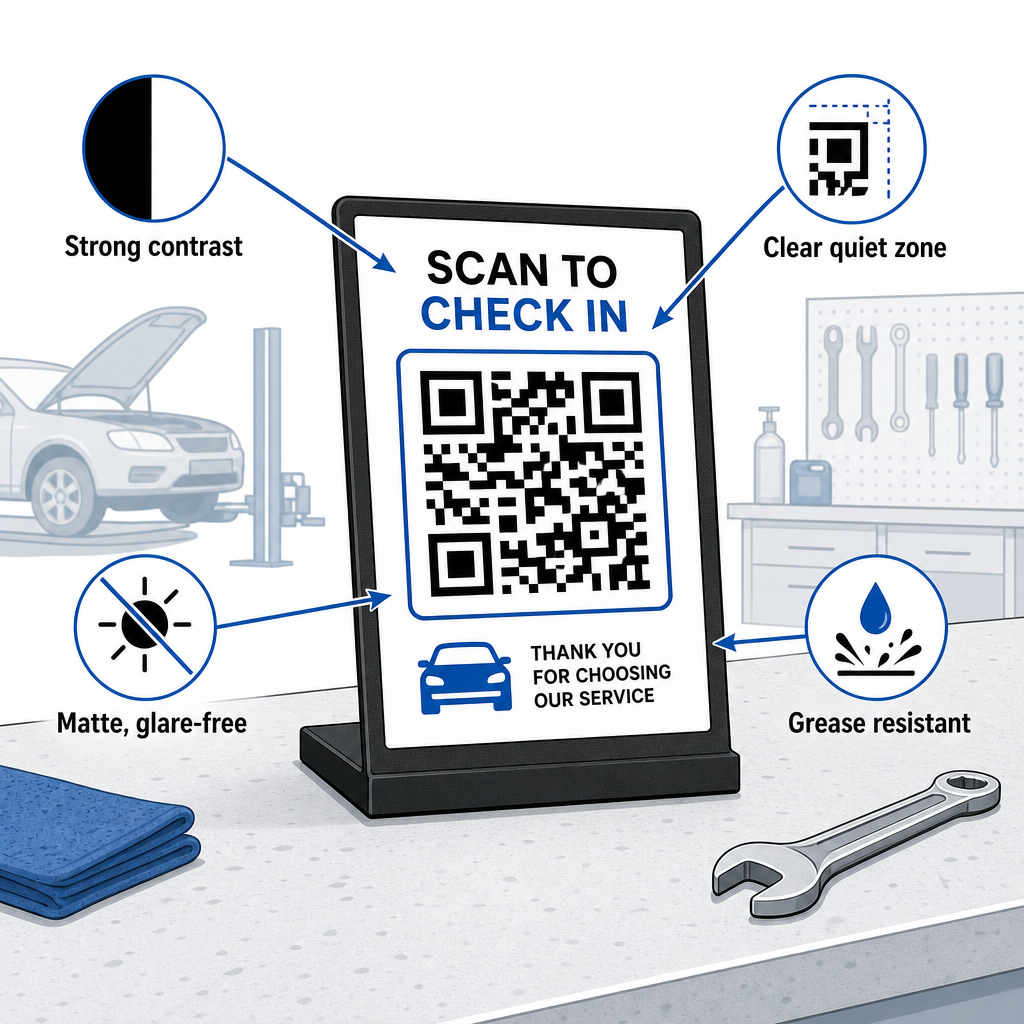
Durable QR printing guide
  • Maintain proper sizing ratios: Apply a 10:1 scan-distance-to-code-size ratio so a receipt scanned from 10 inches away uses a code at least 0.8 × 0.8 inches (2 × 2 cm) wide.
  • Ensure strong visual contrast: Print dark patterns on a uniformly light background with a contrast ratio of at least 4:1 to help smartphone cameras read modules accurately.
  • クワイエットゾーンを保護する: Leave a clear border of at least 4 module widths around all four sides of the code as outlined in the guide to QRコードの読みやすさに関するベストプラクティス.
  • Select durable, matte materials: Use matte laminates or grease-resistant vinyl instead of glossy coatings to stop shop lights from creating scan-blocking reflections, following recommendations on 印刷技術がQRコードのスキャン可能性にどのように影響するか.
  • Position codes at eye level: Place counter displays between 3.5 and 5.5 feet high in reception areas according to research on マーケティングにおけるQRコードの配置.
  • Export vector artwork: Download code artwork in SVG, EPS, or PDF formats to prevent blurring when scaling designs for large signage or vehicle graphics.

Replacing paper intake sheets, manual review collection, and static flyers with scannable links builds a smoother workflow for your automotive service team and a modern experience for vehicle owners. Updating physical touchpoints across your shop turns routine service calls into trackable digital growth.

Explore Pageloot’s comprehensive tools for service industry QR codes or utilize the online QRコードジェネレーター to launch your dynamic shop campaigns today.

よくある質問

Why should auto repair shops use dynamic QR codes instead of static ones?

Dynamic QR codes let you update destination URLs, digital documents, or promotional offers without reprinting physical counter signs or stickers. They also include scan tracking so you can monitor customer engagement across your marketing channels.

Where is the best place to put a review QR code in an auto repair shop?

The most effective location is directly on the payment counter near the card terminal, or printed on the final service invoice. You can also place review prompts on key tags or dashboard thank-you cards.

Will oil smudges or shop grease prevent a printed QR code from scanning?

Heavy smudging can obscure modules, but using high error correction levels (Q or H) allows codes to scan even if up to 30% of the graphic is damaged. Applying clear matte protective covers over printed counter displays also prevents grease buildup.

著者について

Siim KostabiはPagelootのコンテンツリードです。Pagelootの革新的なQRコード生成サービスについて執筆しています。5年以上にわたるQRコードに関する深い専門知識を持つSiimは、この分野の専門家です。QRテクノロジーを活用してデジタルインタラクションを簡素化・拡張する上で、大きな進歩を遂げています。.

カテゴリー
について詳しくはこちら
利用者が図書館QRをスキャン
QRコード 図書館
AR QRを使用している顧客
のQRコードを作る 拡張現実
✅ QRコードの#1ソリューション

オンラインでQRコードを作成する必要がある場合は QRコードを作る ここで無料で
ページルートは #1のGo-Toソリューション でQRコードを作成してスキャンすることができます。

BL-0339

ブログジェネ

売上、レビュー、フォロワーを増やすために 20,000 を超えるブランドから信頼されています。

クライアントのロゴ
トップブランドから信頼される
5 のうち 4.8 と評価しました

4.86 / 5つ星評価

ユーゴ・ローラン
ユーゴ・ローラン
レストランオーナー
最も簡単で信頼性の高いQRコードジェネレータです。PDFファイルを即座にアップロードできます。レストランのメニューがデジタル化されました。
ルーカス・ジャンセン
ルーカス・ジャンセン
不動産開発業者
これは優れたツールで、QRコードでちょうど欲しいところに連れて行ってくれます。私たちは位置情報のQRコードしか使っていませんが、とても便利な機能がたくさんあります。
エマ・モレッティ
エマ・モレッティ
小売製品
使いやすいし、早い。素晴らしい機能で、完璧な画像を作成してくれるので、社員は私のvCardをダウンロードすることができます。
ユーゴ・ローラン
ユーゴ・ローラン
レストランオーナー
最も簡単で信頼性の高いQRコードジェネレータです。PDFファイルを即座にアップロードできます。レストランのメニューがデジタル化されました。
ルーカス・ジャンセン
ルーカス・ジャンセン
不動産開発業者
これは優れたツールで、QRコードでちょうど欲しいところに連れて行ってくれます。私たちは位置情報のQRコードしか使っていませんが、とても便利な機能がたくさんあります。
エマ・モレッティ
エマ・モレッティ
小売製品
使いやすいし、早い。素晴らしい機能で、完璧な画像を作成してくれるので、社員は私のvCardをダウンロードすることができます。
QRコードをもっと見る
QRコードタイプの選択
使用方法 動的QRコード
QRチケットイベント入場
QRコードの チケット&フェスティバルパス
あらゆるものをデジタル体験に変えよう 3分以内に。

14日間の無料トライアル。

クレジットカードは必要ありません。

初回購入で30%オフ

次のコードを使用してください:

MP3ファイルを共有

PDF QRコードを作成するにはサインアップしてください

必要なものをすべてアップロードして表示する。

  • オーディオファイル
  • ポッドキャスト
  • 音楽

サインアップで14日間無料トライアル。.
トライアル終了後、QRコードは期限切れになります。.

オーディオmp3 QRコードを作成するにはサインアップしてください

フレームでより多くのスキャンを獲得

QRコードにフレームを追加するにはサインアップしてください

コールトゥアクションフレームは、お客様が簡単にQRコードと対話できるようにします。ぜひお試しください。

サインアップで14日間無料トライアル。.
トライアル終了後、QRコードは期限切れになります。.

QRコードにフレームを追加するにはサインアップしてください

シェイプでスタイルを追加

より多くの図形を作成するにはサインアップしてください

QRコードは四角いものである必要はありません。あなたのブランドのイメージに合わせて変えてみてください。

サインアップで14日間無料トライアル。.
トライアル終了後、QRコードは期限切れになります。.

より多くの図形を作成するにはサインアップしてください

QRコードにロゴを追加

QRコードにロゴを追加するにはサインアップしてください

QRコードにロゴやブランドを入れることで、目立たせることができます。

サインアップで14日間無料トライアル。.
トライアル終了後、QRコードは期限切れになります。.

QRコードにロゴを追加するにはサインアップしてください

スマートなApp Storeリダイレクト

アプリストアのQRコードを作成するにはサインアップしてください

スマートなApp StoreのQRコードに、あなたのアプリのリンクを追加します。ユーザーは、デバイスに応じてリダイレクトされます。

サインアップで14日間無料トライアル。.
トライアル終了後、QRコードは期限切れになります。.

アプリストアのQRコードを作成するにはサインアップしてください

QRコードに画像をアップロード

画像QRコードを作成するにはサインアップしてください

画像を簡単に共有できます。どんな画像も、数秒でダイナミックに変化します。

サインアップで14日間無料トライアル。.
トライアル終了後、QRコードは期限切れになります。.

画像QRコードを作成するにはサインアップしてください

PDFファイルを共有

PDF QRコードを作成するにはサインアップしてください

必要なものをすべてアップロードして表示する。

  • メニュー&プライスリスト
  • 指示
  • 任意の書類

サインアップで14日間無料トライアル。.
トライアル終了後、QRコードは期限切れになります。.

PDF QRコードを作成するにはサインアップしてください

印刷せずに後で編集

再度印刷せずにQRコードを編集するにはサインアップしてください

ダイナミックQRコードは、新たにQRコードを印刷することなく、QRコードの内容を変更することができます。

サインアップで14日間無料トライアル。.
トライアル終了後、QRコードは期限切れになります。.

再度印刷せずにQRコードを編集するにはサインアップしてください

いつ?どこで?QRコードのスキャンを追跡

QRコードを追跡するにはサインアップしてください

どのQRコードが最も多くスキャンされ、何が最も顧客を喜ばせているのかを知ることができます。

サインアップで14日間無料トライアル。.
トライアル終了後、QRコードは期限切れになります。.

QRコードを追跡するにはサインアップしてください

印刷可能なファイルが利用可能

PDFやSVGのようなベクターQRコードを作成するにはサインアップしてください

.eps、.pdf、.svg

QRコードをHD解像度でダウンロードしたいですか?すぐに印刷できるベクターまたはピクセル形式を入手しましょう。

サインアップで14日間無料トライアル。.
トライアル終了後、QRコードは期限切れになります。.

PDFやSVGのようなベクターQRコードを作成するにはサインアップしてください

しばらくお待ちください。あなたのQRコードは ロード... ロード...

あなただけのものに

サインアップしてQRコードを後で保存してください

異なる色、ロゴ、コールトゥアクションフレームで素晴らしいQRコードを作成することで、より多くのスキャンを得ることができます。

サインアップで14日間無料トライアル。.
トライアル終了後、QRコードは期限切れになります。.

サインアップしてQRコードを後で保存してください