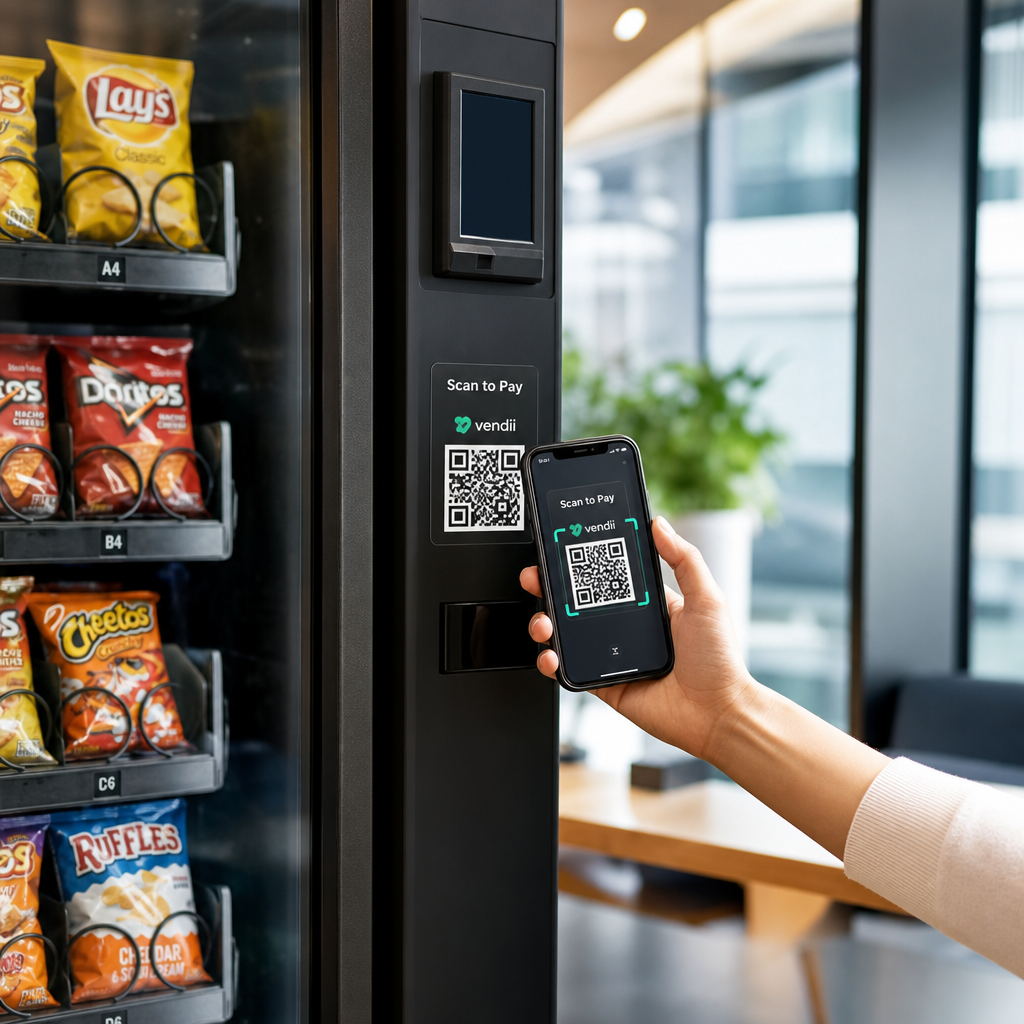
Vos distributeurs automatiques repoussent-ils les clients qui n'ont pas d'argent liquide ? Alors que les distributeurs automatiques sans espèces représentent 75 % des revenus de la distribution automatique aux États-Unis en 2024, les opérateurs qui ne comptent que sur les pièces et les billets laissent de l'argent réel sur la table. Ce guide explique comment les codes QR fonctionnent dans les distributeurs automatiques, ce qu'ils peuvent faire au-delà des paiements, et comment les mettre en œuvre efficacement.
Comment les paiements par code QR fonctionnent dans un distributeur automatique
Le concept de base est simple : au lieu d'insérer une carte ou de l'argent liquide, un client scanne un code QR affiché sur la machine, effectue le paiement sur son téléphone, et la machine reçoit un signal de confirmation avant de distribuer le produit.
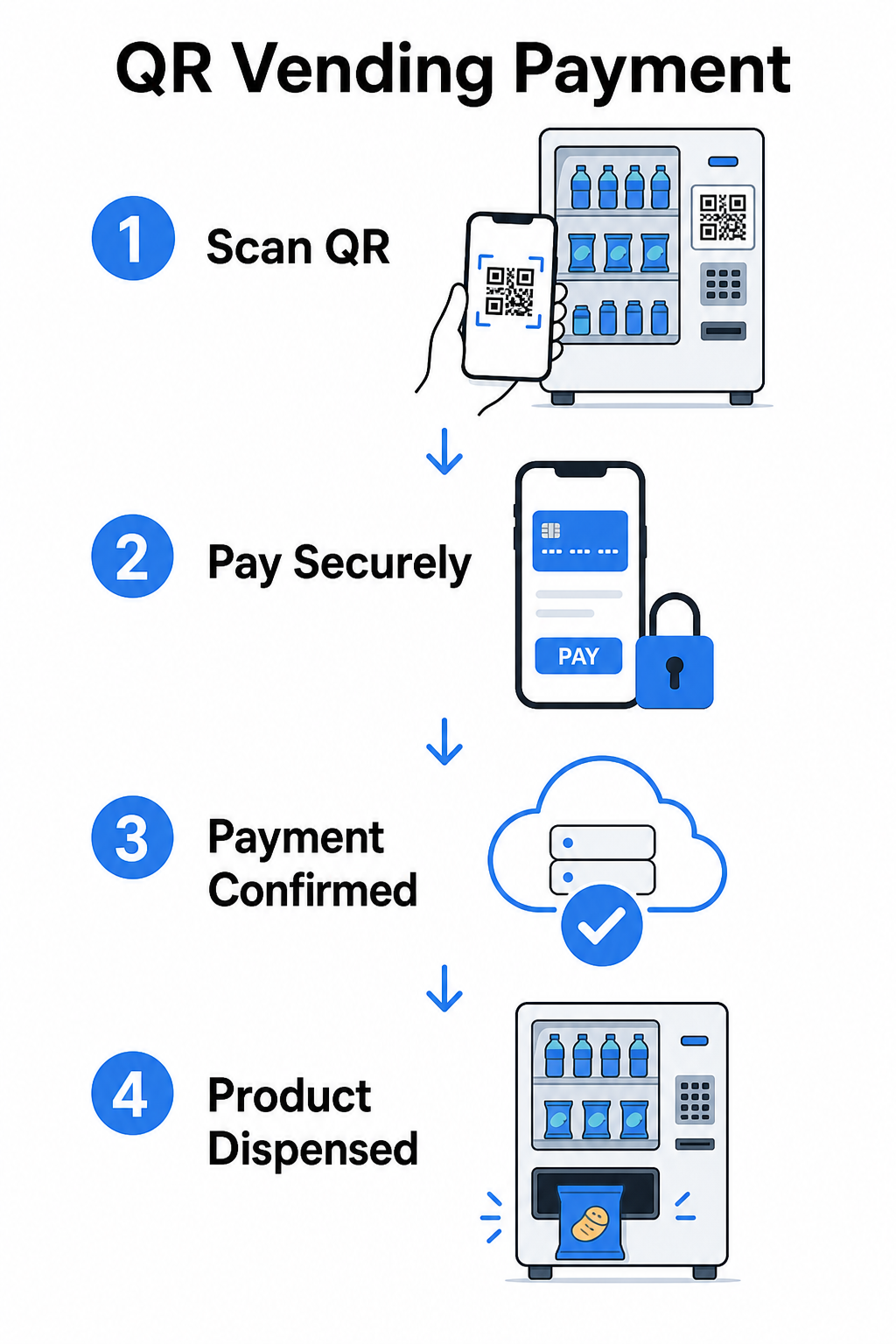
Il existe deux approches principales pour ce flux.
Le consommateur scanne le QR de la machine – La machine affiche un code QR statique ou dynamique. Le client ouvre son application appareil photo, scanne le code et arrive sur une page de paiement hébergée qui prend en charge les cartes, PayPal, Apple Pay, Google Pay ou d'autres portefeuilles mobiles. Une fois que la passerelle de paiement autorise la transaction, elle envoie une confirmation à la machine via une API, déclenchant la distribution.
La machine scanne le QR du consommateur – L'application du client génère un code QR représentant une valeur stockée ou des crédits de compte. Le scanner de la machine le lit, le système déduit le montant approprié et la machine s'active. Ce modèle est courant dans les systèmes en boucle fermée comme les comptes de campus ou d'entreprise.
Les deux architectures reposent sur des API backend pour confirmer les transactions, synchroniser l'inventaire et enregistrer les données au niveau des articles. La différence pratique réside dans qui effectue le scan et où résident les identifiants de paiement.
Accepter les paiements sans lecteur de carte Besoin d'un moyen simple de transformer une URL en un point de contact de paiement scannable ? Le Générateur de QR code PayPal vous permet de créer un QR de paiement personnalisé en quelques minutes – aucun matériel requis.
Codes QR statiques vs. dynamiques pour la distribution automatique
Tous les codes QR ne se comportent pas de la même manière, et la distinction est importante pour les opérateurs de distributeurs automatiques.
| FONCTIONNALITÉ | Code QR statique | Code QR dynamique |
|---|---|---|
| Destination modifiable après impression | Non | Oui |
| Suivi et analyse des scans | Non | Oui |
| Désactiver si compromis | Non | Oui |
| Nécessite une réimpression pour la mise à jour | Oui | Non |
| Convient aux autocollants permanents de machine | Limitée | Recommandé |
UNE code QR statique encode une URL fixe directement dans le motif. Si votre fournisseur de paiement change, si votre URL de paiement est mise à jour, ou si vous souhaitez rediriger vers une promotion, vous devez imprimer un nouveau code et le remplacer physiquement sur chaque machine.
UNE code QR dynamique pointe vers un lien de redirection court que vous contrôlez. Vous pouvez mettre à jour la destination à tout moment sans toucher au code physique sur la machine. Pour un opérateur de distributeurs automatiques gérant des dizaines ou des centaines de machines sur plusieurs sites, cette flexibilité élimine les coûts de réimpression et réduit les visites de maintenance.
Les codes dynamiques capturent également des analyses de scan – nombre total de scans, scans uniques, heures de scan et données géographiques – vous donnant une visibilité sur les machines qui génèrent une activité de paiement et à quel moment.
Au-delà des paiements : autres façons dont les codes QR ajoutent de la valeur à la distribution automatique
Le paiement sans espèces est le cas d'utilisation le plus évident, mais les codes QR ouvrent plusieurs autres possibilités opérationnelles et marketing.
Engagement client et fidélité
Un code QR sur un distributeur automatique peut renvoyer à plus qu'une page de paiement. Vous pouvez diriger les clients vers un programme de fidélité où ils scannent pour gagner des points, accéder à des récompenses et échanger des avantages instantanément – remplaçant la friction des cartes de fidélité physiques par une expérience basée sur smartphone. Ces programmes prennent en charge l'inscription instantanée, les récompenses en temps réel et les offres personnalisées basées sur le comportement d'achat.
Vous pouvez également proposer des coupons numériques ou des réductions à durée limitée aux clients qui scannent, créant ainsi une incitation qui favorise les visites répétées à des machines spécifiques. Lier un code QR à un paiement ou pass numérique compatible avec Apple Wallet ou Google Wallet va plus loin, permettant aux clients d'enregistrer leurs identifiants de fidélité directement sur leur téléphone.
Support de gestion à distance des machines
Les codes QR peuvent remplir une fonction opérationnelle qui n'a rien à voir avec le client. Placer un code QR unique sur chaque machine – lié à la page de gestion ou au portail de service de cette machine – donne aux techniciens et aux chauffeurs-livreurs un accès instantané au bon dossier de machine lorsqu'ils arrivent sur site, sans avoir à chercher dans des feuilles de calcul ou à appeler le bureau pour identifier une unité.
Lorsqu'elle est combinée à un système de télémétrie, cette approche signifie que la personne se tenant devant une machine peut immédiatement consulter son historique de transactions, son état d'inventaire ou son journal de pannes en scannant le code.
Raccourcis de maintenance et de rapport
Un code QR lié à un formulaire de signalement permet aux clients de signaler un produit bloqué, un lecteur de paiement défaillant ou une machine en rupture de stock – sans nécessiter de numéro de téléphone ou d'adresse e-mail. La soumission est liée à la machine spécifique, donnant à votre équipe des opérations des informations exploitables sans une visite sur site pour diagnostiquer le problème.
Gardez vos codes QR flexibles Si vous voulez un code qui peut servir à plusieurs fins au fil du temps – paiements aujourd'hui, un programme de fidélité le trimestre prochain – utilisez le Générateur de QR code dynamique pour mettre à jour les destinations sans réimpression.
Ce que l'analyse des codes QR vous dit sur vos machines
Un avantage sous-estimé des codes QR dynamiques est les données qu'ils génèrent. Chaque scan est enregistré avec un horodatage, un emplacement et un type d'appareil. Pour les opérateurs de distributeurs automatiques, cela crée une couche légère de données comportementales qui complète votre télémétrie.
Le volume de scans sur une machine spécifique peut vous dire :
- Quand les clients sont les plus actifs à cet emplacement, vous aidant à optimiser les plannings de réapprovisionnement
- Si une machine est ignorée, ce qui pourrait indiquer un problème de placement ou un problème d'assortiment de produits
- Comment les changements promotionnels performent, puisque vous pouvez comparer les taux de scan avant et après la mise à jour de la destination liée
Pour un examen plus approfondi de la façon de configurer et d'interpréter ces données, voir le guide de le suivi des codes QR.
Considérations de sécurité et de conformité
Les paiements par code QR sur les machines sans surveillance introduisent des responsabilités de sécurité spécifiques que les opérateurs doivent comprendre avant le déploiement.
Le PCI DSS s'applique à vous
Si vos distributeurs automatiques acceptent les paiements par carte de crédit ou de débit via un flux de travail par code QR, vous êtes tenu de vous conformer au PCI DSS – la norme de sécurité des données de l'industrie des cartes de paiement. Ceci s'applique que le paiement soit traité ou non par une passerelle tierce. Le guide de conformité PCI DSS pour les paiements par code QR couvre cela en détail, mais les exigences clés incluent :
- Chiffrement des données du titulaire de carte pendant la transmission en utilisant des protocoles comme TLS
- Ne jamais stocker de données d'authentification sensibles telles que les codes CVV, les PINs ou les données de bande magnétique après autorisation
- Validation de votre niveau de conformité par le biais de questionnaires d'auto-évaluation ou d'audits tiers, en fonction de votre volume de transactions
Les opérateurs qui redirigent les clients vers une page de paiement hébergée gérée par une passerelle conforme au PCI réduisent considérablement leur portée de conformité, car les données du titulaire de carte ne touchent jamais leurs propres systèmes.
La falsification physique est un risque réel
Les machines sans surveillance sont vulnérables à un vecteur de fraude spécifique : quelqu'un place un autocollant de code QR frauduleux sur votre code légitime. Le client scanne ce qui semble être votre code de paiement mais est redirigé vers une page de phishing qui capture ses détails de paiement. Les mesures d'atténuation incluent :
- Utilisation de matériaux inviolables pour la signalisation des codes QR
- Application de codes QR de marque qui incluent votre logo et vos couleurs, rendant les remplacements non autorisés visuellement évidents
- Demander aux chauffeurs de tournée d'inspecter les codes QR lors des visites régulières
- Activation de l'analyse des scans en temps réel afin que des schémas de scan géographiques inhabituels – par exemple, des scans provenant de loin de l'emplacement connu de la machine – déclenchent une alerte
Pour une analyse complète des risques de paiement par QR et comment les aborder, voir le guide sur les risques liés aux codes QR dans les paiements et comment les atténuer.
Directives de conception pour les codes QR des distributeurs automatiques
Un code QR qui ne scanne pas de manière fiable crée de la frustration chez le client précisément au moment où il veut une transaction rapide. Suivez ces directives pratiques pour bien faire les choses.
Taille et distance de scan – Utilisez le rapport 10:1 comme référence : un code scanné à 20 pouces de distance devrait mesurer au moins 2 pouces de large. La plupart des interactions avec les distributeurs automatiques se produisent à bout de bras, donc un code d'une taille comprise entre 2 et 3 pouces carrés est approprié pour un placement à hauteur de visage. Le guide des tailles de codes QR couvre cette formule en détail pour différents contextes.
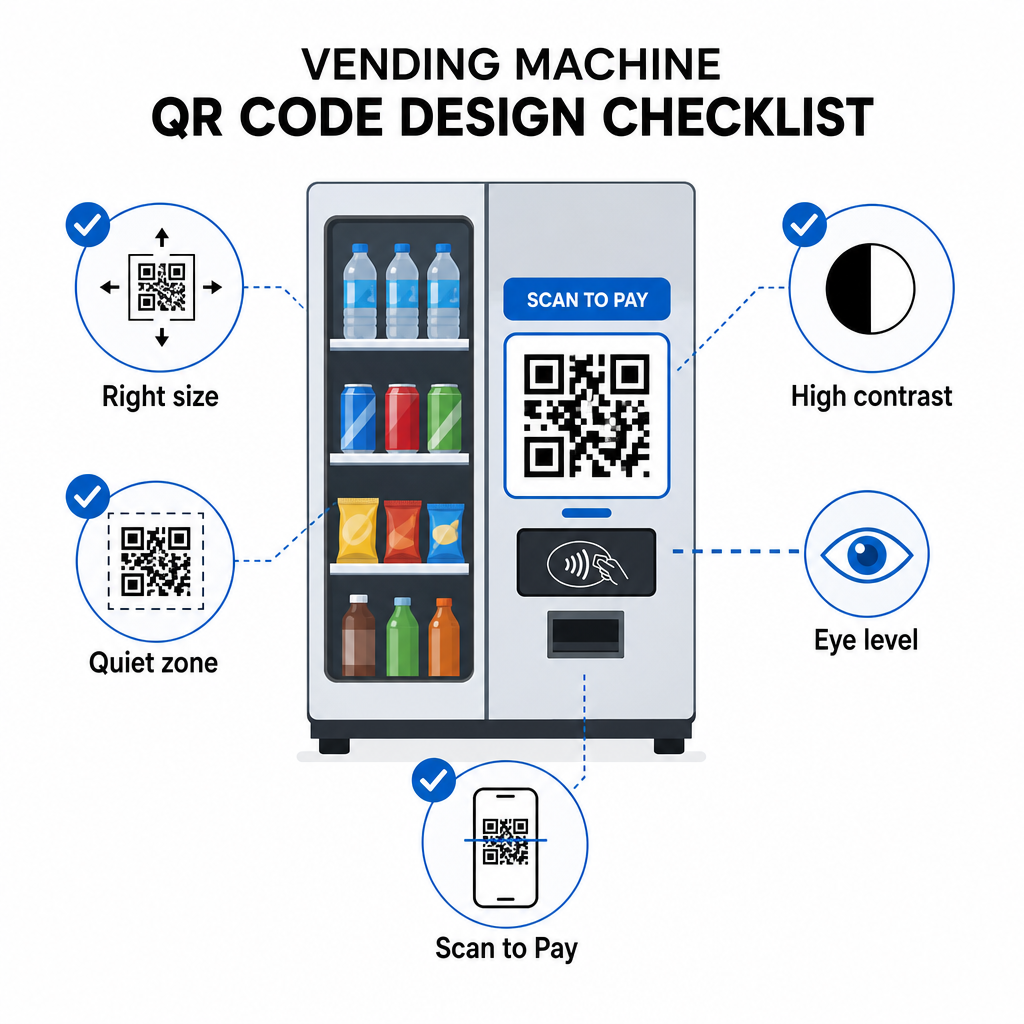
Couleur et contraste – Les motifs sombres sur un fond clair scannent le plus fiablement. Le noir sur blanc est la combinaison la plus cohérente. Si vous utilisez des couleurs de marque, visez un rapport de contraste d'au moins 4:1 entre la couleur du module QR et l'arrière-plan, avec 4.5:1 préféré. Les directives pour la lisibilité du code QR expliquent pourquoi le contraste affecte directement si un scanner peut détecter le motif du code dans différentes conditions d'éclairage.
Zone de silence – Maintenez une marge vierge claire autour du code QR. Placer des éléments de design, du texte ou de la marque à l'intérieur de cette bordure peut empêcher les scanners d'identifier correctement les limites du code.
Format d'impression – Pour une application physique sur les machines, exportez les codes QR dans des formats vectoriels tels que SVG, EPS ou PDF pour s'assurer qu'ils restent nets à toute taille et ne perdent pas leur scannabilité en raison de la pixellisation.
Ne pas déformer – Les codes QR doivent rester carrés. Étirer ou compresser le code pour l'adapter à un modèle désalignera les modules internes et le rendra illisible.
Fournir un appel à l'action clair – Étiquetez clairement le code : “ Scanner pour payer ”, “ Scanner pour paiement sans espèces ” ou “ Scanner pour gagner des points ”. Les clients à un distributeur automatique ne naviguent pas – ils veulent accomplir une tâche rapidement, et une étiquette directe élimine l'hésitation.
Démarrage : Étapes de mise en œuvre
Si vous ajoutez des paiements par code QR à des machines existantes, le cheminement typique ressemble à ceci :
- Choisir une passerelle de paiement qui prend en charge le paiement par code QR et est certifiée PCI DSS. La passerelle fournit la page de paiement hébergée vers laquelle votre code QR pointera.
- Générer un code QR dynamique pour chaque machine, pointant vers l'URL de paiement unique de cette machine. L'utilisation de les codes QR dynamiques signifie que vous pouvez mettre à jour les destinations de paiement ou ajouter des fonctionnalités plus tard sans remplacer la signalisation physique.
- Marquez le code avec votre logo et votre palette de couleurs pour le rendre reconnaissable et plus difficile à falsifier.
- Appliquer le code à chaque machine à hauteur des yeux en utilisant des matériaux inviolables.
- Tester sur plusieurs appareils avant le déploiement complet – scannez le code avec des appareils iOS et Android dans les conditions d'éclairage présentes à chaque emplacement de machine.
- Surveillez les analyses de scan après le lancement pour identifier les machines à faible engagement, suivre l'activité de paiement et détecter tout modèle de scan anormal.
Pour les opérateurs acceptant les méthodes de paiement internationales comme Alipay ou WeChat Pay, il existe des étapes d'intégration supplémentaires couvertes dans le guide de l'intégration des codes QR d'Alipay et WeChat Pay.
Les codes QR offrent aux opérateurs de distributeurs automatiques un chemin à faible barrière vers les paiements sans espèces, des outils d'engagement client et une meilleure visibilité opérationnelle – le tout sans remplacer le matériel existant. Les implémentations les plus durables utilisent des codes dynamiques, afin que l'autocollant physique sur la machine puisse servir à des fins changeantes au fil du temps sans visite de technicien. Commencez par un seul emplacement, mesurez les performances grâce à l'analyse des scans et développez-vous en fonction de ce que les données révèlent.
Créez votre premier code QR de distributeur automatique Utilisez le Générateur de codes QR pour créer un code de marque et traçable pour vos machines – ou explorez la gamme complète de solutions QR spécifiques à l'industrie pour trouver la bonne approche pour votre opération.
Questions fréquentes
Dans la plupart des implémentations, non. Lorsqu'une machine affiche un code QR lié à une page de paiement hébergée, les clients peuvent le scanner à l'aide de l'application appareil photo native de leur téléphone et effectuer la transaction dans leur navigateur en utilisant une carte enregistrée ou un portefeuille mobile. Certains systèmes en boucle fermée – comme les applications de compte de campus – nécessitent une application spécifique, mais les flux de paiement ouverts sont conçus pour fonctionner sans.
Oui. Un code QR statique ou dynamique lié à une page de paiement hébergée peut être appliqué comme un autocollant ou un encart imprimé à la plupart des machines existantes. L'autorisation de paiement est gérée par le backend de la passerelle, qui communique avec l'interface sans espèces de la machine pour déclencher la distribution. Cela fait du QR une mise à niveau relativement peu coûteuse par rapport à l'installation d'un nouveau lecteur de carte.
Un client qui scanne le code frauduleux sera redirigé vers une page différente plutôt que votre page de paiement. Vous pouvez réduire ce risque en utilisant des codes QR de marque qui incluent votre logo – rendant la falsification visuellement évidente – et en appliquant des matériaux inviolables qui montrent des dommages lorsque l'autocollant est retiré. L'analyse des codes QR dynamiques peut également aider : si les scans tombent soudainement à zéro ou proviennent d'emplacements inattendus, c'est un signal pour enquêter sur le code physique de cette machine.