Weren uw verkoopautomaten klanten af die geen contant geld bij zich hebben? Nu contactloze verkoopautomaten in 2024 goed zijn voor 75% van de Amerikaanse verkoopopbrengsten, laten exploitanten die uitsluitend afhankelijk zijn van munten en biljetten echt geld liggen. Deze gids legt uit hoe QR-codes werken in verkoopautomaten, wat ze kunnen doen naast betalingen, en hoe ze effectief te implementeren.
Hoe QR-codebetalingen werken bij een verkoopautomaat
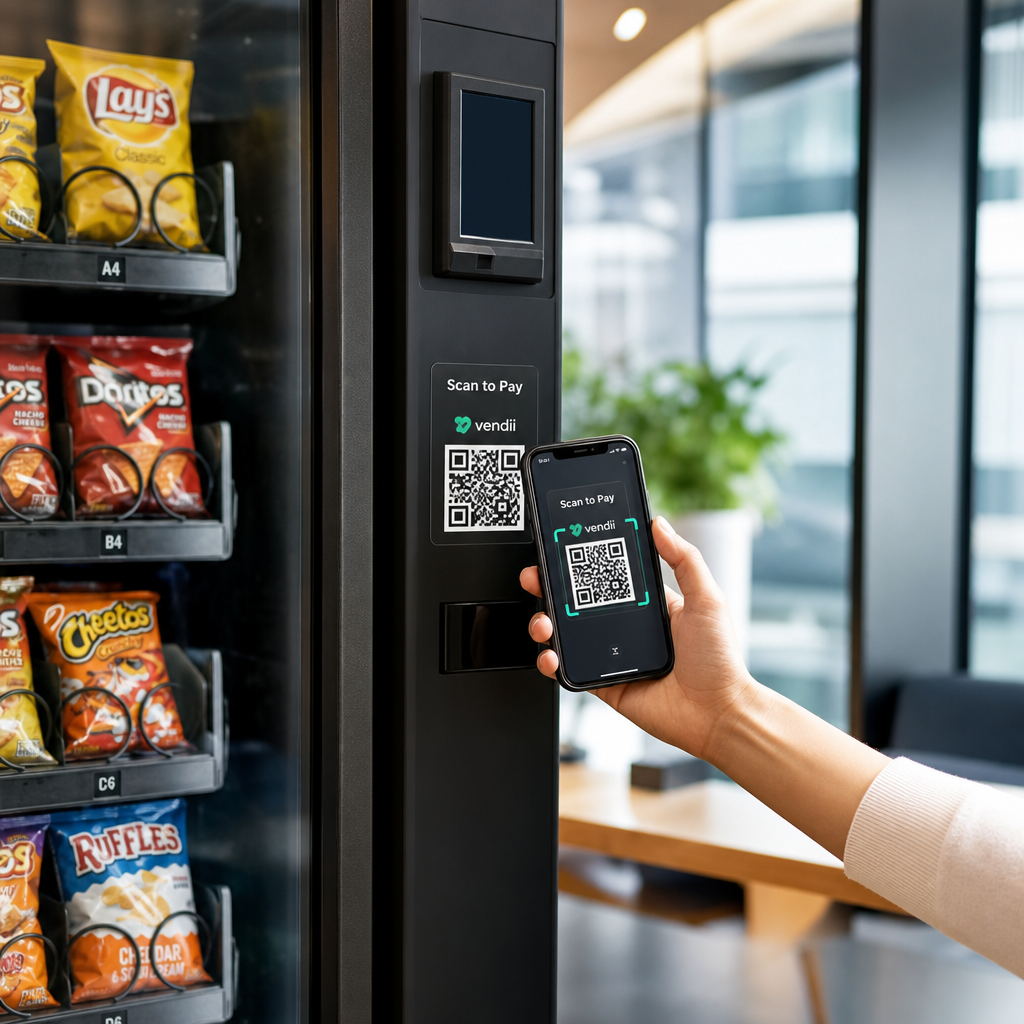
Het kernconcept is eenvoudig: in plaats van een kaart of contant geld in te voeren, scant een klant een QR-code die op de automaat wordt weergegeven, voltooit de betaling op hun telefoon, en de automaat ontvangt een bevestigingssignaal voordat het product wordt uitgegeven.
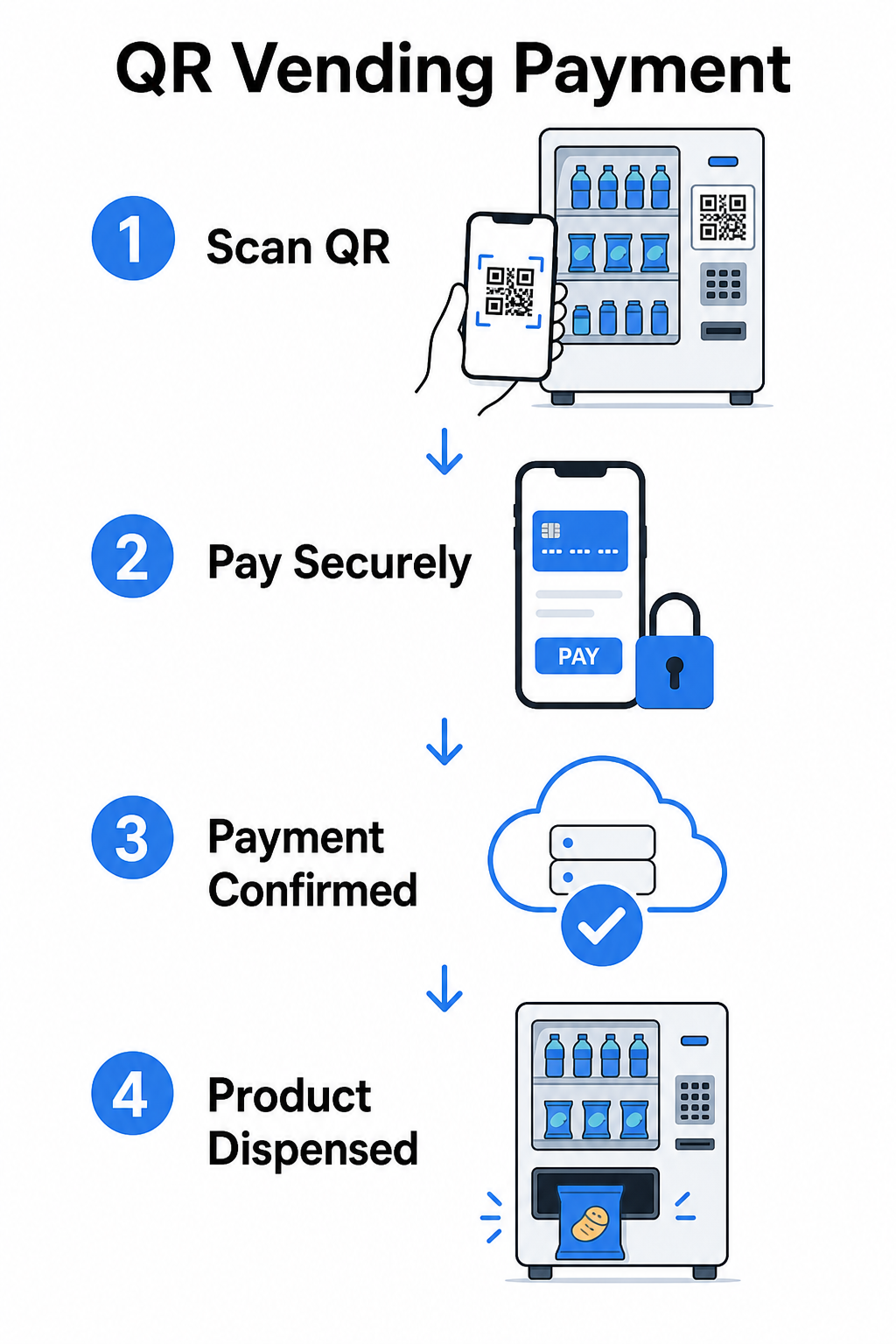
Er zijn twee belangrijke benaderingen voor deze stroom.
Consument scant automaat-QR – De automaat toont een statische of dynamische QR-code. De klant opent hun camera-app, scant de code en komt terecht op een gehoste betaalpagina die kaarten, PayPal, Apple Pay, Google Pay of andere mobiele portemonnees ondersteunt. Zodra de betaalgateway de transactie autoriseert, stuurt deze een bevestiging terug naar de automaat via een API, waardoor de verkoop wordt geactiveerd.
Automaat scant consument-QR – De app van de klant genereert een QR-code die opgeslagen waarde of tegoeden vertegenwoordigt. De scanner van de automaat leest deze, het systeem trekt het juiste bedrag af, en de automaat wordt geactiveerd. Dit model is gebruikelijk in gesloten systemen zoals campus- of bedrijfsaccounts.
Beide architecturen vertrouwen op backend API's om transacties te bevestigen, voorraad te synchroniseren en gegevens op itemniveau te loggen. Het praktische verschil is wie het scannen uitvoert en waar de betalingsgegevens zich bevinden.
Betalingen accepteren zonder kaartlezer Een eenvoudige manier nodig om een URL om te zetten in een scanbaar betaalpunt? De PayPal QR code maken laat u binnen enkele minuten een branded betaal-QR maken – geen hardware vereist.
Statische versus dynamische QR-codes voor verkoopautomaten
Niet alle QR-codes gedragen zich op dezelfde manier, en het onderscheid is van belang voor exploitanten van verkoopautomaten.
| FUNCTIE | Statische QR Code | Dynamische QR-code |
|---|---|---|
| Bestemming bewerkbaar na afdrukken | Geen | Ja |
| Scanregistratie en -analyse | Geen | Ja |
| Deactiveren indien gecompromitteerd | Geen | Ja |
| Vereist opnieuw afdrukken om te updaten | Ja | Geen |
| Geschikt voor permanente automaatstickers | Beperkt | Aanbevolen |
EEN statische QR-code codeert een vaste URL direct in het patroon. Als uw betaalprovider verandert, uw checkout-URL wordt bijgewerkt, of u wilt omleiden naar een promotie, moet u een nieuwe code afdrukken en deze fysiek op elke automaat vervangen.
EEN dynamische QR-code wijst naar een korte omleidingslink die u beheert. U kunt de bestemming op elk moment bijwerken zonder de fysieke code op de automaat aan te raken. Voor een verkoopautomaat-exploitant die tientallen of honderden automaten op meerdere locaties beheert, elimineert deze flexibiliteit de kosten voor opnieuw afdrukken en vermindert het onderhoudsbezoeken.
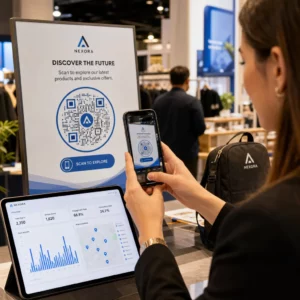
Dynamische codes leggen ook scananalyses vast – totaal aantal scans, unieke scans, scantijden en geografische gegevens – waardoor u inzicht krijgt in welke automaten betaalactiviteit genereren en wanneer.
Naast betalingen: andere manieren waarop QR-codes waarde toevoegen aan verkoopautomaten
Contactloos betalen is de meest voor de hand liggende use case, maar QR-codes openen verschillende andere operationele en marketingmogelijkheden.
Klantbetrokkenheid en loyaliteit
Een QR-code op een verkoopautomaat kan naar meer linken dan alleen een afrekenpagina. U kunt klanten doorverwijzen naar een loyaliteitsprogramma waar ze kunnen scannen om punten te verdienen, beloningen te openen en voordelen direct in te wisselen – de wrijving van fysieke klantenkaarten vervangen door een smartphone-gebaseerde ervaring. Deze programma's ondersteunen directe inschrijving, real-time beloningen en gepersonaliseerde aanbiedingen op basis van aankoopgedrag.
U kunt ook digitale coupons of tijdelijke kortingen aanbieden aan klanten die scannen, waardoor een stimulans wordt gecreëerd die herhaalde bezoeken aan specifieke automaten stimuleert. Een QR-code koppelen aan een betaling of digitale pas compatibel met Apple Wallet of Google Wallet gaat een stap verder, waardoor klanten hun loyaliteitsgegevens direct op hun telefoon kunnen opslaan.
Ondersteuning voor beheer op afstand van automaten
QR-codes kunnen een operationele functie vervullen die niets met de klant te maken heeft. Het plaatsen van een unieke QR-code op elke automaat – gekoppeld aan de beheerpagina of het serviceportaal van die automaat – geeft technici en routechauffeurs direct toegang tot het juiste automaatrecord wanneer ze ter plaatse aankomen, zonder te hoeven zoeken in spreadsheets of het kantoor te bellen om een eenheid te identificeren.
In combinatie met een telemetriesysteem betekent deze aanpak dat de persoon die voor een automaat staat, onmiddellijk de transactiegeschiedenis, voorraadstatus of foutenlogboek kan oproepen door de code te scannen.
Snelkoppelingen voor onderhoud en rapportage
Een QR-code gekoppeld aan een meldingsformulier laat klanten een vastgelopen product, een defecte betaallezer of een machine die niet op voorraad is melden – zonder een telefoonnummer of e-mailadres te vereisen. De melding is gekoppeld aan de specifieke machine, waardoor uw operationele team bruikbare informatie krijgt zonder een bezoek ter plaatse om het probleem te diagnosticeren.
Houd uw QR-codes flexibel Als u één code wilt die in de loop van de tijd meerdere doelen kan dienen – betalingen vandaag, een loyaliteitsprogramma volgend kwartaal – gebruik de Dynamische QR code generator om bestemmingen bij te werken zonder opnieuw af te drukken.
Wat QR-codeanalyses u vertellen over uw machines
Een ondergewaardeerd voordeel van dynamische QR-codes is de data die ze genereren. Elke scan wordt gelogd met een tijdstempel, locatie en apparaattype. Voor automaatbeheerders creëert dit een lichtgewicht laag van gedragsdata die uw telemetrie aanvult.
Scanvolume bij een specifieke machine kan u vertellen:
- Wanneer klanten het meest actief zijn op die locatie, waardoor u de aanvullingsschema's kunt optimaliseren
- Of een machine wordt genegeerd, wat kan duiden op een plaatsingsprobleem of een probleem met het productassortiment
- Hoe promotionele wijzigingen presteren, aangezien u scanpercentages kunt vergelijken voor en na het bijwerken van de gekoppelde bestemming
Voor een diepere blik op hoe u deze data instelt en interpreteert, zie de gids voor het bijhouden van QR-codes.
Beveiligings- en nalevingsoverwegingen
QR-codebetalingen bij onbeheerde machines introduceren specifieke beveiligingsverantwoordelijkheden die operators moeten begrijpen vóór implementatie.
PCI DSS is op u van toepassing
Als uw automaten creditcard- of betaalpasbetalingen accepteren via een QR-codeworkflow, bent u verplicht te voldoen aan PCI DSS – de Payment Card Industry Data Security Standard. Dit geldt ongeacht of de betaling wordt verwerkt door een externe gateway. De handleiding voor PCI DSS-naleving van QR-codebetalingen behandelt dit in detail, maar de belangrijkste vereisten zijn onder andere:
- Versleutelen van kaarthouderdata tijdens verzending met behulp van protocollen zoals TLS
- Nooit gevoelige authenticatiedata opslaan zoals CVV-codes, pincodes of magneetstripdata na autorisatie
- Valideren van uw nalevingsniveau via Self-Assessment Questionnaires of audits door derden, afhankelijk van uw transactievolume
Operators die klanten omleiden naar een gehoste betaalpagina beheerd door een PCI-compatibele gateway verminderen hun nalevingsbereik aanzienlijk, aangezien kaarthouderdata nooit hun eigen systemen raakt.
Fysieke manipulatie is een reëel risico
Onbeheerde machines zijn kwetsbaar voor een specifieke fraudevorm: iemand plakt een frauduleuze QR-codesticker over uw legitieme code. De klant scant wat uw betaalcode lijkt te zijn, maar wordt omgeleid naar een phishingpagina die hun betaalgegevens vastlegt. Mitigatiestappen omvatten:
- Gebruik van fraudebestendige materialen voor QR-codebewegwijzering
- Toepassen van gebrande QR-codes die uw logo en kleuren bevatten, waardoor ongeautoriseerde vervangingen visueel duidelijk worden
- Routechauffeurs instrueren om QR-codes te inspecteren tijdens reguliere bezoeken
- Realtime scananalyses inschakelen, zodat ongebruikelijke geografische scanpatronen – bijvoorbeeld scans die ver van de bekende locatie van de machine afkomstig zijn – een waarschuwing activeren
Voor een volledige uiteenzetting van QR-betalingsrisico's en hoe deze aan te pakken, zie de gids over QR-coderisico's bij betalingen en hoe deze te beperken.
Ontwerprichtlijnen voor QR-codes van automaten
Een QR-code die niet betrouwbaar scant, creëert klantfrustratie precies op het moment dat ze een snelle transactie willen. Volg deze praktische richtlijnen om het goed te doen.
Grootte en scanafstand – Gebruik de 10:1 verhouding als uw basislijn: een code gescand vanaf 20 inch afstand moet minstens 2 inch breed zijn. De meeste interacties met automaten vinden plaats op armlengte, dus een code van 2 tot 3 inch vierkant is geschikt voor plaatsing op gezichtshoogte. De gids voor QR-codeformaten behandelt deze formule in detail voor verschillende contexten.
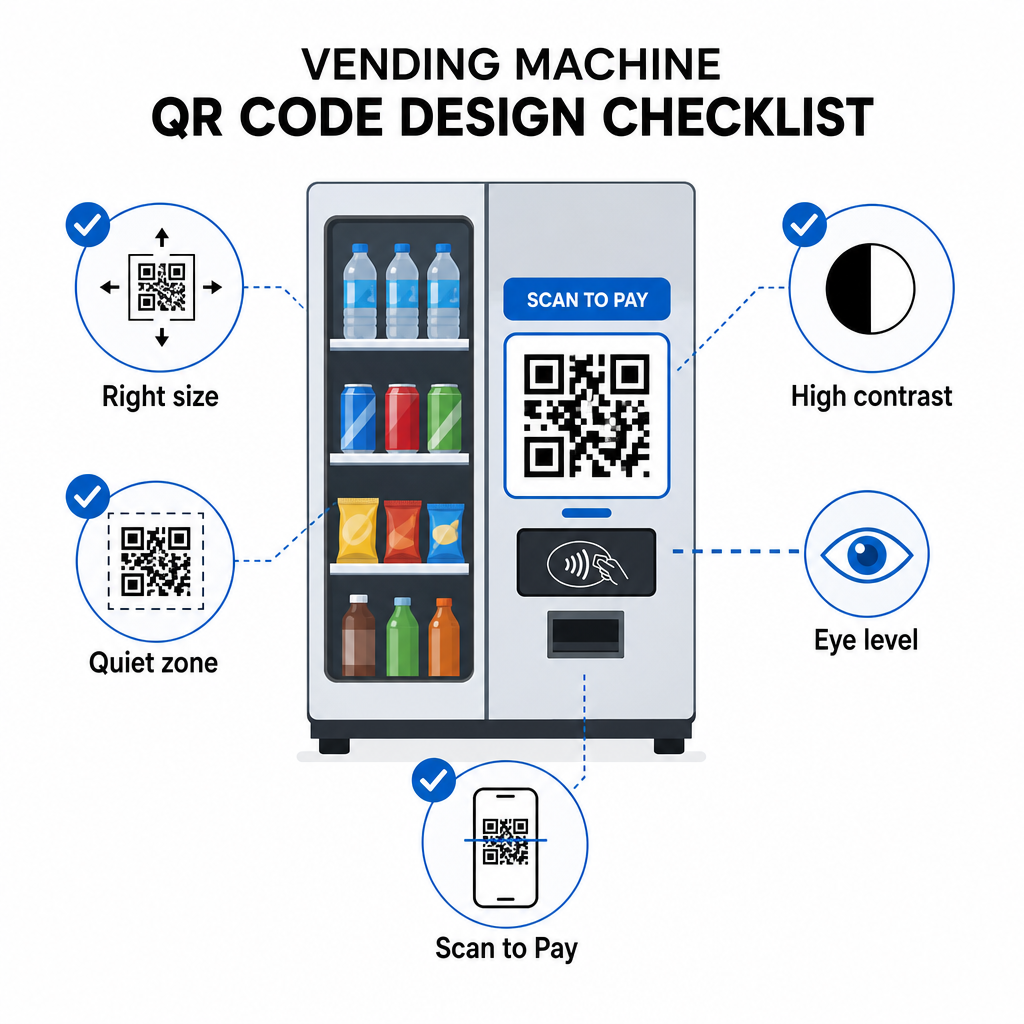
Kleur en contrast – Donkere patronen op een lichte achtergrond scannen het meest betrouwbaar. Zwart op wit is de meest consistente combinatie. Als u merkkleuren gebruikt, streef dan naar een contrastverhouding van minimaal 4:1 tussen de QR-modulekleur en de achtergrond, met 4.5:1 als voorkeur. De richtlijnen voor de leesbaarheid van de QR-code leggen uit waarom contrast direct van invloed is op of een scanner het codepatroon kan detecteren onder verschillende lichtomstandigheden.
Stille zone – Handhaaf een duidelijke blanco marge rond de QR-code. Het plaatsen van ontwerpelementen, tekst of branding binnen deze rand kan voorkomen dat scanners de codebegrenzingen correct identificeren.
Printformaat – Voor fysieke toepassing op machines, exporteer QR-codes in vectorformaten zoals SVG, EPS of PDF om ervoor te zorgen dat ze scherp blijven op elk formaat en de scanbaarheid niet verliezen door pixelatie.
Niet vervormen – QR-codes moeten vierkant blijven. Het uitrekken of comprimeren van de code om in een sjabloon te passen, zal de interne modules verkeerd uitlijnen en deze onscanbaar maken.
Zorg voor een duidelijke oproep tot actie – Label de code duidelijk: “Scan om te betalen”, “Scan voor contactloze betaling” of “Scan om punten te verdienen”. Klanten bij een verkoopautomaat browsen niet – ze willen snel een taak voltooien, en een direct label neemt aarzeling weg.
Aan de slag: Implementatiestappen
Als u QR-codebetalingen toevoegt aan bestaande machines, ziet het typische traject er als volgt uit:
- Kies een betaalgateway die QR-gebaseerde afrekening ondersteunt en PCI DSS-gecertificeerd is. De gateway biedt de gehoste betaalpagina waarnaar uw QR-code zal linken.
- Genereer een dynamische QR-code voor elke machine, gekoppeld aan de unieke afreken-URL van die machine. Het gebruik van dynamische QR-codes betekent dat u later betaalbestemmingen kunt bijwerken of functies kunt toevoegen zonder fysieke bewegwijzering te vervangen.
- Geef de code een merkuitstraling met uw logo en kleurenschema om het herkenbaar en moeilijker te manipuleren te maken.
- Breng de code aan op elke machine op ooghoogte met behulp van fraudebestendige materialen.
- Test op meerdere apparaten vóór volledige implementatie – scan de code met zowel iOS- als Android-apparaten onder de lichtomstandigheden die aanwezig zijn op elke machinelocatie.
- Monitor scananalyses na de lancering om machines met lage betrokkenheid te identificeren, betalingsactiviteit te volgen en afwijkende scanpatronen te detecteren.
Voor operators die internationale betaalmethoden zoals Alipay of WeChat Pay accepteren, zijn er aanvullende integratiestappen beschreven in de gids voor Alipay en WeChat Pay QR-code-integratie.
QR-codes bieden verkoopautomaatoperators een laagdrempelige weg naar contactloze betalingen, klantbetrokkenheidstools en betere operationele zichtbaarheid – allemaal zonder bestaande hardware te vervangen. De meest duurzame implementaties maken gebruik van dynamische codes, zodat de fysieke sticker op de machine in de loop van de tijd verschillende doeleinden kan dienen zonder een technicusbezoek. Begin met één locatie, meet de prestaties via scananalyses en breid uit op basis van wat de gegevens laten zien.
Maak uw eerste QR-code voor verkoopautomaten Gebruik de QR-codegenerator om een gebrandmerkte, traceerbare code voor uw machines te bouwen – of verken het volledige aanbod van branchespecifieke QR-oplossingen om de juiste aanpak voor uw operatie te vinden.
Veelgestelde vragen
In de meeste implementaties, nee. Wanneer een machine een QR-code weergeeft die is gekoppeld aan een gehoste betaalpagina, kunnen klanten deze scannen met de native camera-app van hun telefoon en de transactie in hun browser voltooien met behulp van een opgeslagen kaart of mobiele portemonnee. Sommige gesloten-lus systemen – zoals campusaccount-apps – vereisen wel een specifieke app, maar open betaalstromen zijn ontworpen om zonder een te werken.
Ja. Een statische of dynamische QR-code gekoppeld aan een gehoste afrekenpagina kan worden aangebracht als een sticker of gedrukte invoeging op de meeste bestaande machines. De betalingsautorisatie wordt afgehandeld door de backend van de gateway, die communiceert met de contactloze interface van de machine om de verkoop te activeren. Dit maakt QR een relatief goedkope upgrade vergeleken met het installeren van een nieuwe kaartlezer.
Een klant die de frauduleuze code scant, wordt doorgestuurd naar een andere pagina dan uw afrekenpagina. U kunt dit risico verminderen door gebrandmerkte QR-codes te gebruiken die uw logo bevatten – waardoor manipulatie visueel duidelijk wordt – en fraudebestendige materialen aan te brengen die schade vertonen wanneer de sticker wordt verwijderd. Dynamische QR-codeanalyses kunnen ook helpen: als scans plotseling tot nul dalen of afkomstig zijn van onverwachte locaties, is dat een signaal om de fysieke code bij die machine te onderzoeken.