
首页 > 行业 > How to Track Moving Box Inventory Using QR Code Labels
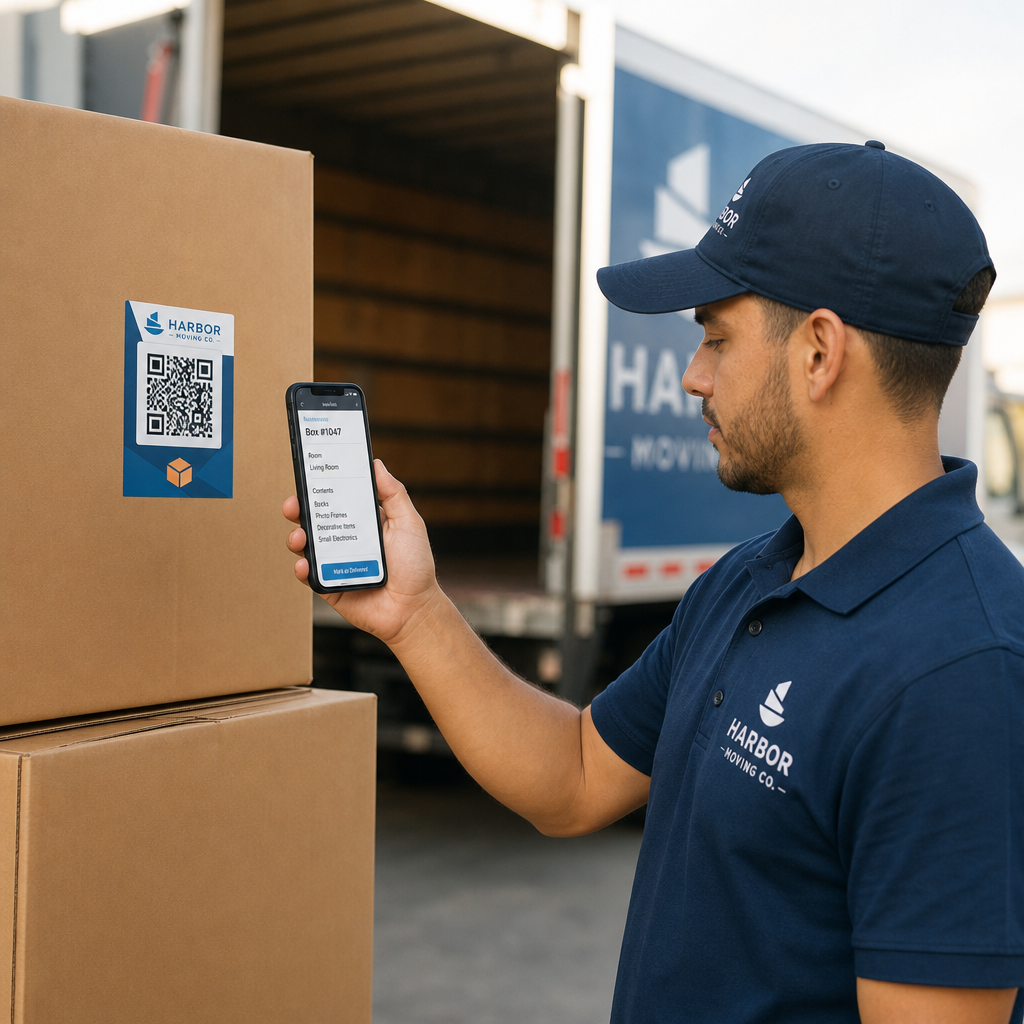
Scanning moving box label

How to Track Moving Box Inventory Using QR Code Labels

Streamline your moving company operations with dynamic QR code labels. Track box inventory digitally, simplify delivery verification, and avoid disputes.
Updated on 7 月 27, 2026
目录

Are lost boxes and disorganized inventory lists slowing down your moving company’s operations? Inaccurate logs lead to costly claim disputes, lost transit time, and frustrated clients. Using dynamic QR code labels allows your crew to organize inventory digitally and track box contents in real time.

The Operational Risks of Paper Moving Inventories

Managing household goods shipments requires meticulous record-keeping. Under federal regulations for interstate movers, crews must prepare a written, itemized inventory that assigns identification numbers to every carton and uncartoned item before loading. Traditional handwritten paper manifests present significant operational bottlenecks:

  • Illegible handwriting: Crew members often struggle to read hastily scribbled box contents or room designations during unloading.
  • Missing or damaged paperwork: Physical inventory sheets easily get misplaced, stained, or torn during transit.
  • Slow delivery verification: Shippers and crews waste valuable job hours manually checking off paper items.
  • Dispute exposure: Unclear paper records create friction when clients file written loss or damage claims after delivery.

Digitizing this workflow with 实时库存追踪 modernizes your moving operations and provides clear, auditable records for every shipment.

How Digital Labels Improve Moving Workflows

QR code labels transform plain corrugated boxes into digital tracking points. Instead of writing item lists directly on cardboard or paper forms, crew members attach a pre-printed QR code label to each box.

When scanned with a smartphone or tablet, the label opens a secure digital manifest detailing the box ID, destination room, handling notes, and a photo record of the packed contents.

Upgrade Your Moving Inventory Management Looking to digitize your box tracking and update manifests on the fly? Use the 动态二维码生成器 to create trackable, editable labels for your entire fleet.

使用 动态二维码 gives moving teams complete flexibility on job sites. If a customer changes their drop-off room or adds items to a packed carton, crew members can update the digital file attached to the code without reprinting or replacing the physical label.

Best Practices for Printing Scannable QR Labels

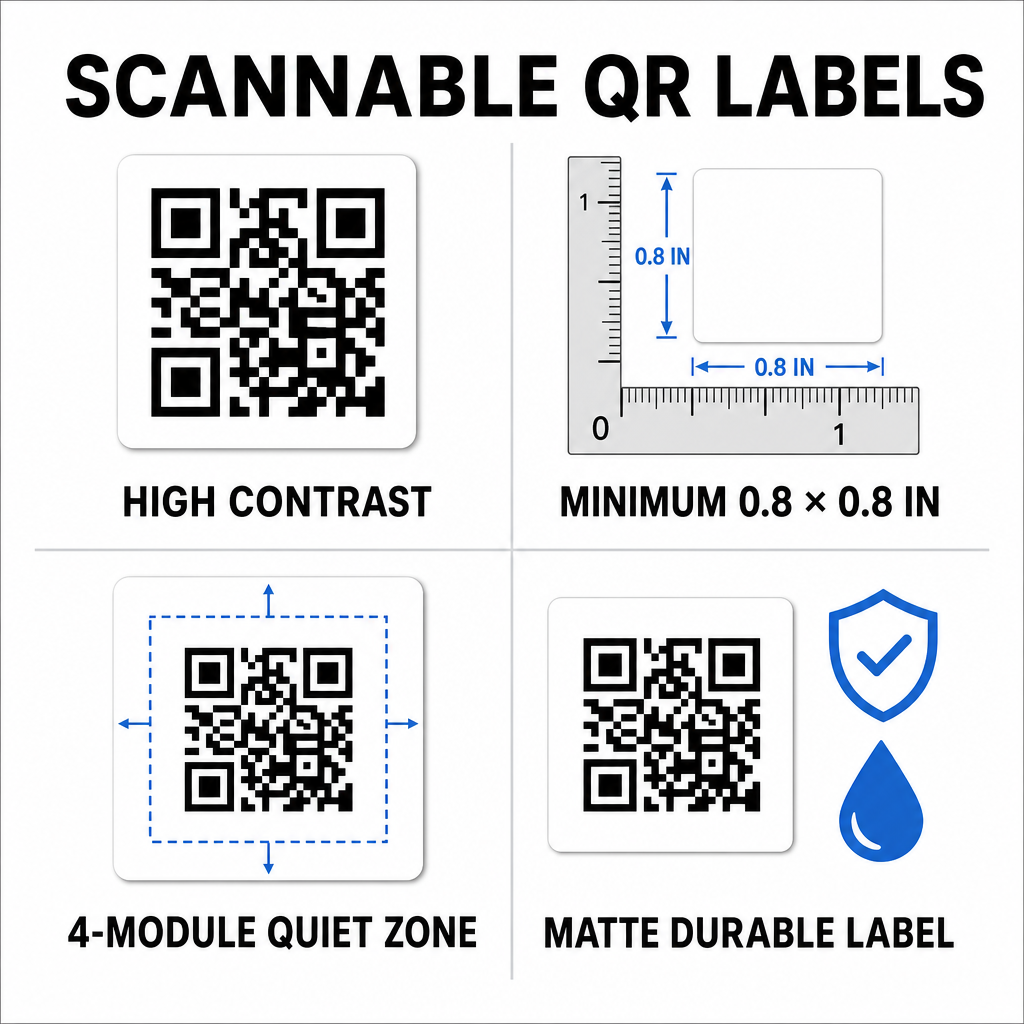
Moving trucks and warehouses present demanding environments for printed graphics. Dust, friction, moisture, and dim lighting can affect barcode readability. Following strict scannability standards ensures your team scans labels effortlessly on the job site:

Scannable QR label standards
  • Maintain high contrast: Print dark codes on light backgrounds, maintaining at least a 50% contrast ratio (4:1 contrast).
  • Size labels correctly: Keep standard box labels at least 0.8 x 0.8 英寸 (2 x 2 厘米) and apply the one-tenth rule for larger storage containers.
  • 保护静区: Leave a blank margin equal to at least 4 modules wide around the outer edge of the code.
  • Choose non-reflective materials: Use matte, durable synthetic substrates to prevent glare and tearing during rough handling.
  • Use vector print files: Export graphics as SVG, EPS, or high-resolution PDF files to prevent blurry edges. You can learn more about formatting in our guide on printing QR codes on labels.

Step-by-Step Implementation for Moving Crews

Transitioning from traditional carbon-copy forms to a digital inventory system requires minimal equipment and training. The transition significantly improves efficiency across every operational task.

Operational Task Paper Inventory System QR Code Digital System
Box Cataloging Writing item lists manually on carbon forms Assigning items digitally to a scanned QR code
Loading & Offloading Checking off item numbers on paper clipboards Instant camera scanning at the truck ramp
Manifest Updates Crossing out text and scribbling paper updates Updating dynamic destinations online without reprinting
Claim Verification Searching physical files months after delivery Accessing digital photos and logs immediately

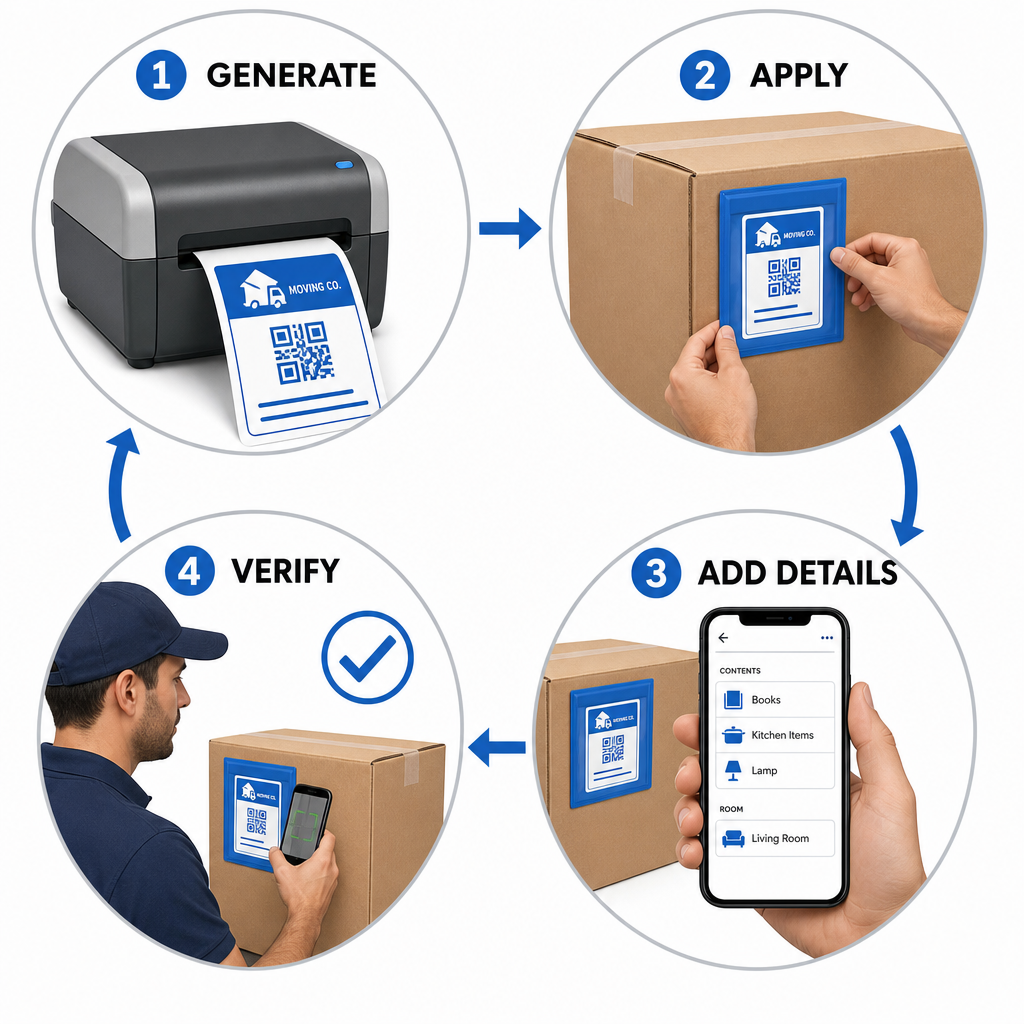
Setting up an efficient box-labeling workflow involves four core actions:

Four-step box tracking workflow
  • Generate box labels:使用 二维码生成器 to create batch QR labels formatted for standard adhesive sheets.
  • Apply labels strategically: Place labels on upper side panels of boxes, keeping them clear of seams, tape, and folds.
  • Scan and build the manifest: Use a camera app or a 免费的二维码扫描器 to record box contents, room locations, and photos.
  • Verify offloading at delivery: Scan each label as boxes enter the destination room to generate an accurate digital delivery log.

Businesses establishing modern inventory workflows can also adapt these methods for warehouse operations by following our guide on creating product inventory QR codes or printing custom product label QR codes.

Scalable Labeling Solutions Across Different Industries

Digital inventory tracking is not limited to residential household moves. Commercial relocations, warehouse shifts, and logistics providers rely on serialized QR tracking to manage high asset volumes. Moving managers can explore tailored applications and workflow strategies across various sectors by visiting Pageloot’s breakdown of QR code solutions by industry.

Replacing manual paper tracking with dynamic QR code labels eliminates lost box disputes, speeds up loading workflows, and provides clear digital verification for clients. Take control of your inventory management today by generating custom QR labels with Pageloot’s complete suite of QR code tools.

常见问题

Can moving crews scan QR code labels without downloading special apps?

Yes. Crews can scan labels using standard smartphone camera apps or open a web-based tool like the Pageloot camera scanner directly in their mobile browser without installing separate applications.

What happens if a QR label on a moving box gets lightly scratched or dirty?

QR codes feature built-in error correction capabilities. Depending on the error correction level chosen during creation, a scanner can accurately decode the label even if 15% to 30% of the surface area is damaged or obscured.

Why should moving companies use dynamic QR codes instead of static ones?

Dynamic QR codes link to editable web destinations. This allows moving managers to change room designations, edit item manifests, or update client contact details in real time without having to reprint or replace physical labels on the boxes.

关于作者

Siim Kostabi 是 Pageloot 的内容主管,负责撰写关于我们创新型二维码生成器服务的文章。凭借五年多来在二维码领域积累的深厚专业知识,Siim 是该领域的专家。他致力于利用二维码技术简化和增强数字交互,并取得了显著的成果。.

类别
了解更多关于
QR QR码的#1解决方案

如果您需要在线创建QR码,则可以 制作二维码 就在这里免费!
Pageloot是 #1转到解决方案 创建和扫描QR码。

BL-0349

博客生成器

受到超过 20,000 个品牌的信赖,可获得更多销售、评论和关注者。

客户徽标
受到顶级品牌的信赖
评分为 4.8(共 5)

4.86 / 5 星评级

雨果·劳伦特
雨果·劳伦特
餐馆老板
有史以来最容易和最可靠的QR码生成器。PDF文件可以立即上传。我们的餐厅菜单现在是数字化的。
卢卡斯-詹森
卢卡斯-詹森
房地产开发商
这是一个很好的工具,二维码带你到你想要的地方。我们只使用位置二维码,但有许多有用的功能。
艾玛-莫雷蒂
艾玛-莫雷蒂
零售产品
易于使用和快速。它工作得很好,创造了一个完美的图像,所以员工可以下载我的vCard。
雨果·劳伦特
雨果·劳伦特
餐馆老板
有史以来最容易和最可靠的QR码生成器。PDF文件可以立即上传。我们的餐厅菜单现在是数字化的。
卢卡斯-詹森
卢卡斯-詹森
房地产开发商
这是一个很好的工具,二维码带你到你想要的地方。我们只使用位置二维码,但有许多有用的功能。
艾玛-莫雷蒂
艾玛-莫雷蒂
零售产品
易于使用和快速。它工作得很好,创造了一个完美的图像,所以员工可以下载我的vCard。
查看更多QR码
包装商品的QR码
的QR码 包装产品
将一切转化为数字体验 不到3分钟。

免费试用 14 天。

无需信用卡。

首次购买可享受 30% 折扣

使用代码:

分享您的 MP3 文件

注册以创建 PDF QR 码

上传和显示你需要的一切。

  • 音频文件
  • 播客
  • 音乐

注册即可享 14 天免费试用。.
试用期结束后,二维码将失效。.

注册以创建音频 mp3 二维码

使用边框获得更多扫描

注册以向您的二维码添加更多框架

呼叫行动框架帮助您的客户与QR码轻松互动。试试吧!

注册即可享 14 天免费试用。.
试用期结束后,二维码将失效。.

注册以向您的二维码添加更多框架

使用形状添加更多样式

注册以创建更多形状

二维码不一定是方形的。试着改变它以适应你的品牌形象。

注册即可享 14 天免费试用。.
试用期结束后,二维码将失效。.

注册以创建更多形状

为您的二维码添加徽标

注册以将您的徽标添加到二维码中

通过在二维码上添加你的标志和品牌,使你的二维码脱颖而出。

注册即可享 14 天免费试用。.
试用期结束后,二维码将失效。.

注册以将您的徽标添加到二维码中

智能应用商店重定向

注册以创建应用商店二维码

将您的应用程序链接添加到我们的智能应用程序商店QR码。用户会根据他们的设备被重新定向。

注册即可享 14 天免费试用。.
试用期结束后,二维码将失效。.

注册以创建应用商店二维码

将图片上传到二维码

注册以创建图像二维码

轻松分享你的图像。在几秒钟内动态地改变任何图像。

注册即可享 14 天免费试用。.
试用期结束后,二维码将失效。.

注册以创建图像二维码

分享您的 PDF 文件

注册以创建 PDF QR 码

上传和显示你需要的一切。

  • 菜单和价格表
  • 使用说明
  • 任何文件

注册即可享 14 天免费试用。.
试用期结束后,二维码将失效。.

注册以创建 PDF QR 码

稍后编辑,无需打印

注册即可编辑您的二维码,无需再次打印

动态QR码让你改变你的QR码的内容,而不需要打印新的QR码。

注册即可享 14 天免费试用。.
试用期结束后,二维码将失效。.

注册即可编辑您的二维码,无需再次打印

何时?何地?追踪您的二维码扫描

注册以追踪您的二维码

发现你的哪些二维码收到了最多的扫描,以及什么最能让你的客户兴奋。

注册即可享 14 天免费试用。.
试用期结束后,二维码将失效。.

注册以追踪您的二维码

提供可打印文件

注册以创建 PDF 和 SVG 等矢量二维码

.EPS, .PDF, .SVG

想下载高清分辨率的QR码吗?获得矢量或像素格式,可随时打印。

注册即可享 14 天免费试用。.
试用期结束后,二维码将失效。.

注册以创建 PDF 和 SVG 等矢量二维码

请等待。您的二维码是 正在加载... 正在加载...

打造专属

注册以保存您的二维码以供日后使用

通过创建具有不同颜色、标识和行动呼吁框架的出色的QR码,获得更多的扫描。

注册即可享 14 天免费试用。.
试用期结束后,二维码将失效。.

注册以保存您的二维码以供日后使用