
> 산업 > How to Track Moving Box Inventory Using QR Code Labels
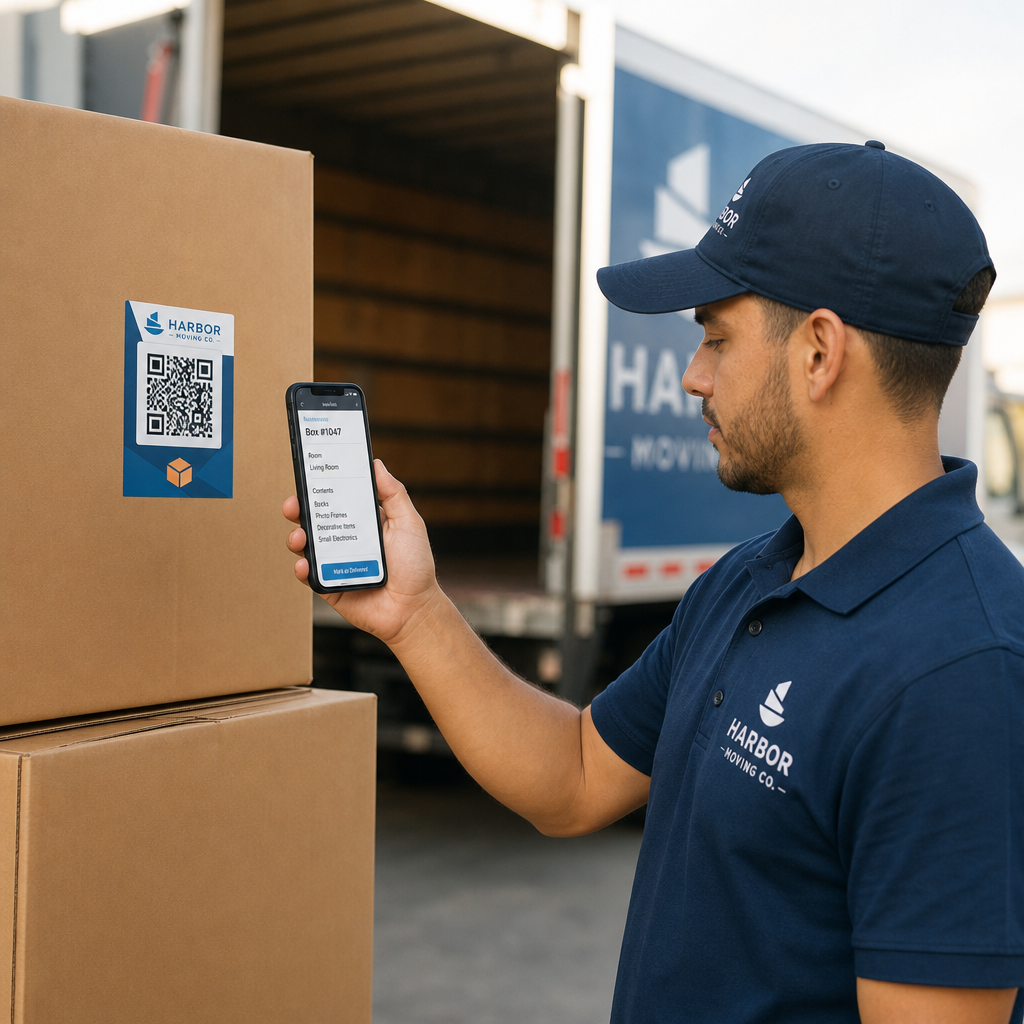
Scanning moving box label

How to Track Moving Box Inventory Using QR Code Labels

Streamline your moving company operations with dynamic QR code labels. Track box inventory digitally, simplify delivery verification, and avoid disputes.
Updated on 7월 27, 2026
목차

Are lost boxes and disorganized inventory lists slowing down your moving company’s operations? Inaccurate logs lead to costly claim disputes, lost transit time, and frustrated clients. Using dynamic QR code labels allows your crew to organize inventory digitally and track box contents in real time.

The Operational Risks of Paper Moving Inventories

Managing household goods shipments requires meticulous record-keeping. Under federal regulations for interstate movers, crews must prepare a written, itemized inventory that assigns identification numbers to every carton and uncartoned item before loading. Traditional handwritten paper manifests present significant operational bottlenecks:

  • Illegible handwriting: Crew members often struggle to read hastily scribbled box contents or room designations during unloading.
  • Missing or damaged paperwork: Physical inventory sheets easily get misplaced, stained, or torn during transit.
  • Slow delivery verification: Shippers and crews waste valuable job hours manually checking off paper items.
  • Dispute exposure: Unclear paper records create friction when clients file written loss or damage claims after delivery.

Digitizing this workflow with 실시간 재고 추적 modernizes your moving operations and provides clear, auditable records for every shipment.

How Digital Labels Improve Moving Workflows

QR code labels transform plain corrugated boxes into digital tracking points. Instead of writing item lists directly on cardboard or paper forms, crew members attach a pre-printed QR code label to each box.

When scanned with a smartphone or tablet, the label opens a secure digital manifest detailing the box ID, destination room, handling notes, and a photo record of the packed contents.

Upgrade Your Moving Inventory Management Looking to digitize your box tracking and update manifests on the fly? Use the 동적 QR 코드 생성기 to create trackable, editable labels for your entire fleet.

사용 동적 QR 코드 gives moving teams complete flexibility on job sites. If a customer changes their drop-off room or adds items to a packed carton, crew members can update the digital file attached to the code without reprinting or replacing the physical label.

Best Practices for Printing Scannable QR Labels

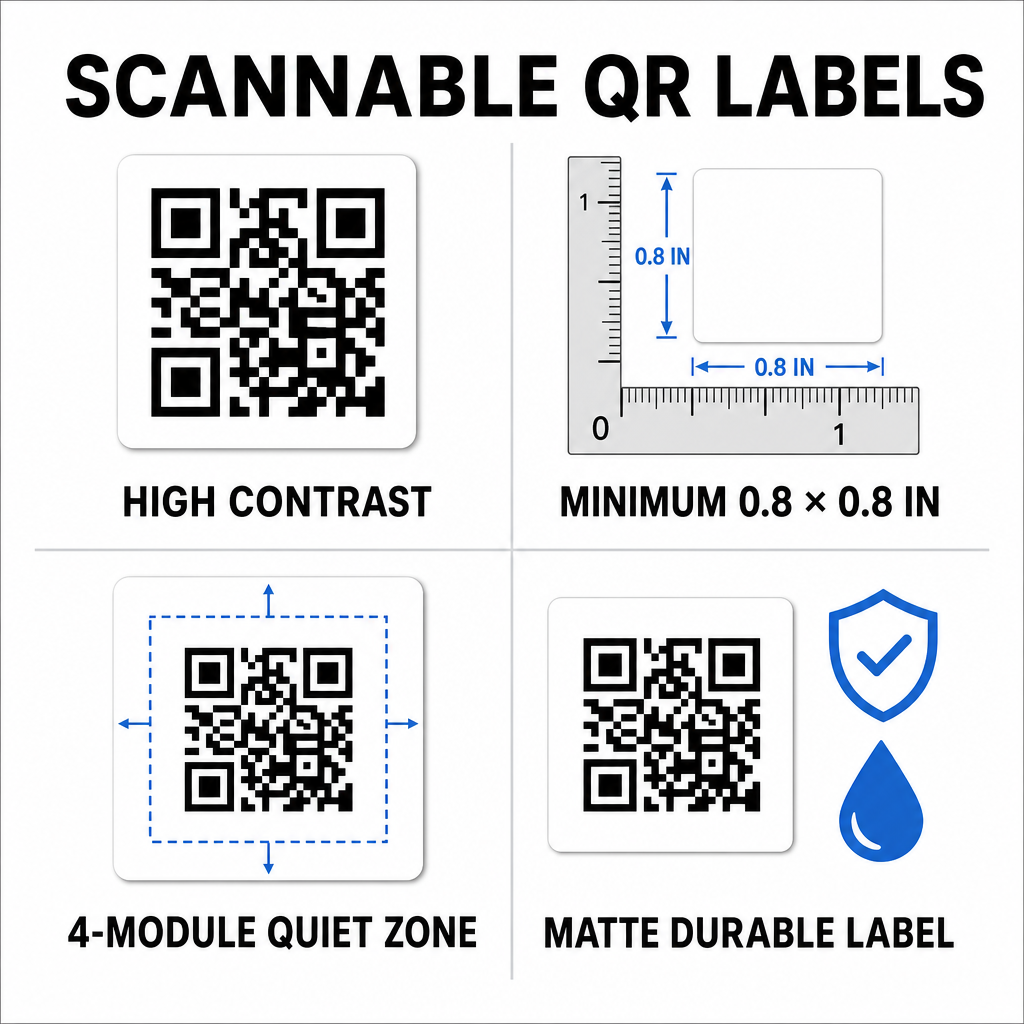
Moving trucks and warehouses present demanding environments for printed graphics. Dust, friction, moisture, and dim lighting can affect barcode readability. Following strict scannability standards ensures your team scans labels effortlessly on the job site:

Scannable QR label standards
  • Maintain high contrast: Print dark codes on light backgrounds, maintaining at least a 50% contrast ratio (4:1 contrast).
  • Size labels correctly: Keep standard box labels at least 0.8 x 0.8인치 (2 x 2 cm) and apply the one-tenth rule for larger storage containers.
  • 콰이어트 존 보호: Leave a blank margin equal to at least 4 modules wide around the outer edge of the code.
  • Choose non-reflective materials: Use matte, durable synthetic substrates to prevent glare and tearing during rough handling.
  • Use vector print files: Export graphics as SVG, EPS, or high-resolution PDF files to prevent blurry edges. You can learn more about formatting in our guide on printing QR codes on labels.

Step-by-Step Implementation for Moving Crews

Transitioning from traditional carbon-copy forms to a digital inventory system requires minimal equipment and training. The transition significantly improves efficiency across every operational task.

Operational Task Paper Inventory System QR Code Digital System
Box Cataloging Writing item lists manually on carbon forms Assigning items digitally to a scanned QR code
Loading & Offloading Checking off item numbers on paper clipboards Instant camera scanning at the truck ramp
Manifest Updates Crossing out text and scribbling paper updates Updating dynamic destinations online without reprinting
Claim Verification Searching physical files months after delivery Accessing digital photos and logs immediately

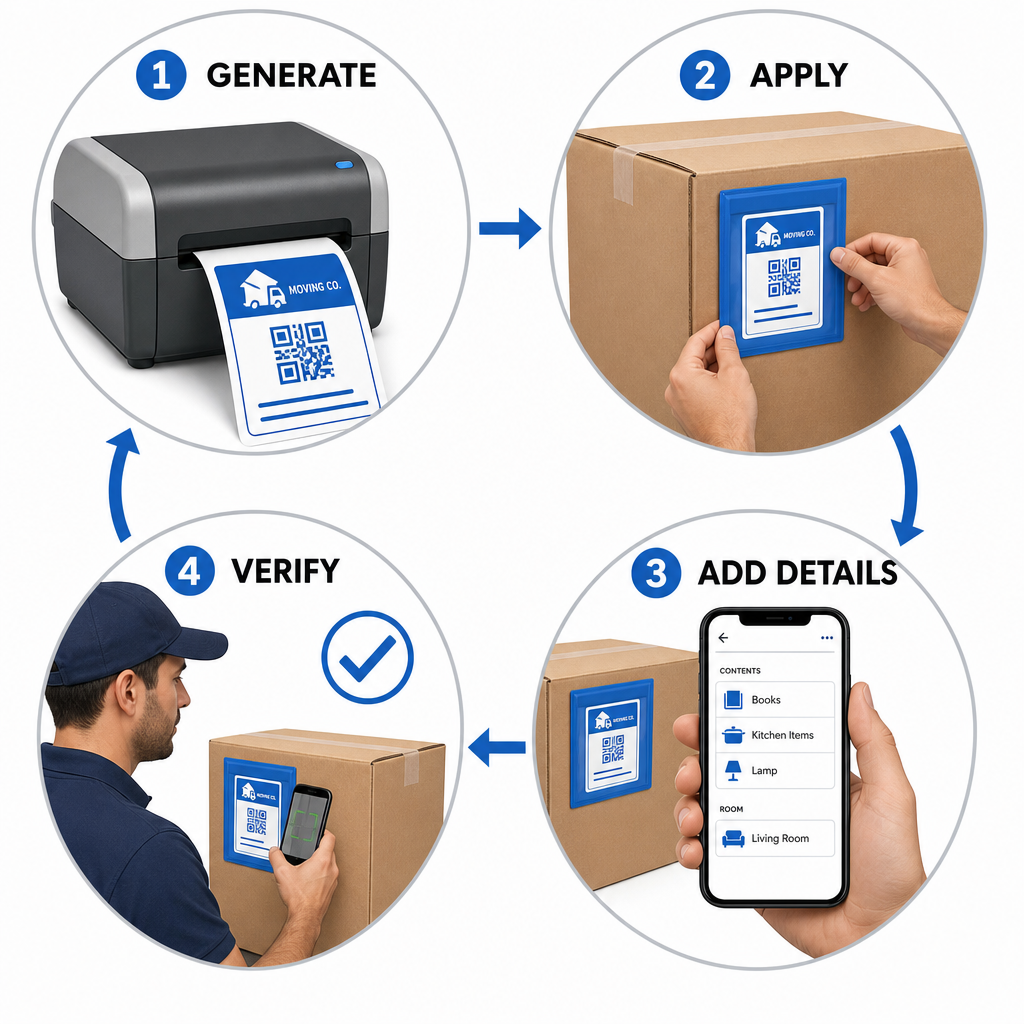
Setting up an efficient box-labeling workflow involves four core actions:

Four-step box tracking workflow
  • Generate box labels: ~을 사용하세요 QR 코드 생성기 to create batch QR labels formatted for standard adhesive sheets.
  • Apply labels strategically: Place labels on upper side panels of boxes, keeping them clear of seams, tape, and folds.
  • Scan and build the manifest: Use a camera app or a 무료 QR 코드 스캐너 to record box contents, room locations, and photos.
  • Verify offloading at delivery: Scan each label as boxes enter the destination room to generate an accurate digital delivery log.

Businesses establishing modern inventory workflows can also adapt these methods for warehouse operations by following our guide on creating product inventory QR codes or printing custom product label QR codes.

Scalable Labeling Solutions Across Different Industries

Digital inventory tracking is not limited to residential household moves. Commercial relocations, warehouse shifts, and logistics providers rely on serialized QR tracking to manage high asset volumes. Moving managers can explore tailored applications and workflow strategies across various sectors by visiting Pageloot’s breakdown of QR code solutions by industry.

Replacing manual paper tracking with dynamic QR code labels eliminates lost box disputes, speeds up loading workflows, and provides clear digital verification for clients. Take control of your inventory management today by generating custom QR labels with Pageloot’s complete suite of QR code tools.

자주 묻는 질문

Can moving crews scan QR code labels without downloading special apps?

Yes. Crews can scan labels using standard smartphone camera apps or open a web-based tool like the Pageloot camera scanner directly in their mobile browser without installing separate applications.

What happens if a QR label on a moving box gets lightly scratched or dirty?

QR codes feature built-in error correction capabilities. Depending on the error correction level chosen during creation, a scanner can accurately decode the label even if 15% to 30% of the surface area is damaged or obscured.

Why should moving companies use dynamic QR codes instead of static ones?

Dynamic QR codes link to editable web destinations. This allows moving managers to change room designations, edit item manifests, or update client contact details in real time without having to reprint or replace physical labels on the boxes.

작성자 정보

시임 코스타비는 페이지루트의 콘텐츠 책임자입니다. 그는 페이지루트의 혁신적인 QR 코드 생성 서비스에 대한 글을 쓰고 있습니다. 5년 이상 QR 코드 분야에서 쌓아온 깊이 있는 전문 지식을 바탕으로, 시임은 이 분야의 전문가로 인정받고 있습니다. 그는 QR 기술을 활용하여 디지털 상호작용을 간소화하고 향상시키는 데 크게 기여하고 있습니다.

범주
에 대해 자세히 알아보기
Students scanning QR codes
QR 코드 학교 교육

온라인으로 QR 코드를 생성해야하는 경우 QR 코드 만들기 무료로 여기!
Pageloot는 #1 Go-To 솔루션 QR 코드를 만들고 스캔합니다.

BL-0349

블로그 세대

20,000개 이상의 브랜드로부터 신뢰를 받아 더 많은 매출, 리뷰, 팔로워를 확보했습니다.

클라이언트 로고
최고 브랜드의 신뢰
5 중 4.8 평가

4.86 / 5 별점

휴고 로랑
휴고 로랑
레스토랑 주인
가장 쉽고 안정적인 QR 코드 생성기. PDF 파일을 즉시 업로드할 수 있습니다. 이제 레스토랑 메뉴가 디지털화되었습니다.
루카스 얀센
루카스 얀센
부동산 개발사
이것은 훌륭한 도구이며 QR 코드를 사용하면 원하는 곳으로 이동할 수 있습니다. 우리는 위치 QR 코드만 사용하지만 유용한 기능이 너무 많습니다.

엠마 모레티
엠마 모레티
소매 제품
사용하기 쉽고 빠릅니다. 그것은 훌륭하게 작동하고 완벽한 이미지를 생성하므로 직원들이 내 vCard를 다운로드할 수 있습니다.

휴고 로랑
휴고 로랑
레스토랑 주인
가장 쉽고 안정적인 QR 코드 생성기. PDF 파일을 즉시 업로드할 수 있습니다. 이제 레스토랑 메뉴가 디지털화되었습니다.
루카스 얀센
루카스 얀센
부동산 개발사
이것은 훌륭한 도구이며 QR 코드를 사용하면 원하는 곳으로 이동할 수 있습니다. 우리는 위치 QR 코드만 사용하지만 유용한 기능이 너무 많습니다.
엠마 모레티
엠마 모레티
소매 제품
사용하기 쉽고 빠릅니다. 그것은 훌륭하게 작동하고 완벽한 이미지를 생성하므로 직원들이 내 vCard를 다운로드할 수 있습니다.
더 많은 QR 코드보기
인쇄된 QR 광고 스캔
QR 코드 만들기 인쇄 매체
포스터 QR 코드 스캔
QR 코드 사용 포스터
무엇이든 디지털 경험으로 전환하세요 3분 이내에.

14일 무료 체험.

신용카드는 필요 없습니다.

첫 구매 시 30% 할인

코드를 사용하세요:

MP3 파일 공유

PDF QR 코드를 생성하려면 가입하세요

필요한 모든 것을 업로드하고 표시합니다.

  • 오디오 파일
  • 팟캐스트
  • 음악

가입 시 14일 무료 체험.
체험 기간 후 QR 코드 만료.

오디오 mp3 QR 코드를 생성하려면 가입하세요

프레임으로 더 많은 스캔 확보

QR 코드에 더 많은 프레임을 추가하려면 가입하세요

클릭 유도 문안 프레임은 고객이 QR 코드와 쉽게 상호 작용할 수 있도록 도와줍니다. 사용해 보세요!

가입 시 14일 무료 체험.
체험 기간 후 QR 코드 만료.

QR 코드에 더 많은 프레임을 추가하려면 가입하세요

도형으로 더 많은 스타일 추가

더 많은 도형을 만들려면 가입하세요

QR 코드는 정사각형일 필요가 없습니다. 브랜드 이미지에 맞게 전환해 보세요.

가입 시 14일 무료 체험.
체험 기간 후 QR 코드 만료.

더 많은 도형을 만들려면 가입하세요

QR 코드에 로고 추가

QR 코드에 로고를 추가하려면 가입하세요

로고와 브랜드를 추가하여 QR 코드를 돋보이게 만드세요.

가입 시 14일 무료 체험.
체험 기간 후 QR 코드 만료.

QR 코드에 로고를 추가하려면 가입하세요

스마트 앱 스토어 리디렉션

앱 스토어 QR 코드를 생성하려면 가입하세요

스마트 앱 스토어 QR 코드에 앱 링크를 추가하세요. 사용자는 장치에 따라 리디렉션됩니다.

가입 시 14일 무료 체험.
체험 기간 후 QR 코드 만료.

앱 스토어 QR 코드를 생성하려면 가입하세요

QR 코드에 이미지 업로드

이미지 QR 코드를 생성하려면 가입하세요

이미지를 쉽게 공유하세요. 몇 초 안에 동적으로 이미지를 변경하십시오.

가입 시 14일 무료 체험.
체험 기간 후 QR 코드 만료.

이미지 QR 코드를 생성하려면 가입하세요

PDF 파일 공유

PDF QR 코드를 생성하려면 가입하세요

필요한 모든 것을 업로드하고 표시합니다.

  • 메뉴 및 가격표
  • 명령
  • 모든 문서

가입 시 14일 무료 체험.
체험 기간 후 QR 코드 만료.

PDF QR 코드를 생성하려면 가입하세요

인쇄 없이 나중에 편집

다시 인쇄하지 않고 QR 코드를 편집하려면 가입하세요

동적 QR 코드를 사용하면 새 QR 코드를 인쇄하지 않고도 QR 코드의 내용을 변경할 수 있습니다.

가입 시 14일 무료 체험.
체험 기간 후 QR 코드 만료.

다시 인쇄하지 않고 QR 코드를 편집하려면 가입하세요

언제? 어디서? QR 코드 스캔 추적

QR 코드를 추적하려면 가입하세요

어떤 QR 코드가 가장 많이 스캔되고 무엇이 고객을 가장 흥분시키는지 알아보십시오.

가입 시 14일 무료 체험.
체험 기간 후 QR 코드 만료.

QR 코드를 추적하려면 가입하세요

인쇄 준비 파일 제공

PDF 및 SVG와 같은 벡터 QR 코드를 생성하려면 가입하세요.

.EPS, .PDF, .SVG

HD 해상도로 QR 코드를 다운로드하고 싶으신가요? 인쇄할 준비가 된 벡터 또는 픽셀 형식을 가져옵니다.

가입 시 14일 무료 체험.
체험 기간 후 QR 코드 만료.

PDF 및 SVG와 같은 벡터 QR 코드를 생성하려면 가입하세요.

기다리세요. 귀하의 QR 코드는 로드 중... 로드 중...

나만의 것으로 만들기

나중을 위해 QR 코드를 저장하려면 가입하세요.

다양한 색상, 로고 및 클릭 유도문안 프레임으로 멋진 QR 코드를 만들어 더 많은 스캔을 받으세요.

가입 시 14일 무료 체험.
체험 기간 후 QR 코드 만료.

나중을 위해 QR 코드를 저장하려면 가입하세요.