
Verloren dozen en ongeorganiseerde inventarislijsten vertragen de operaties van uw verhuisbedrijf? Onnauwkeurige logboeken leiden tot kostbare claimgeschillen, verloren transittijd en gefrustreerde klanten. Het gebruik van dynamische QR-code labels stelt uw bemanning in staat om de inventaris digitaal te organiseren en de inhoud van dozen in realtime te volgen.
De operationele risico's van papieren verhuisinventarissen
Het beheren van zendingen van huishoudelijke goederen vereist nauwkeurige administratie. Volgens federale voorschriften voor interstatelijke verhuizers moeten bemanningen een schriftelijke, geitemiseerde inventaris opstellen die identificatienummers toekent aan elke doos en elk niet-verpakte item voordat deze wordt geladen. Traditionele handgeschreven papieren manifesten vormen aanzienlijke operationele knelpunten:
- Ongrijpbare handschriften: Bemanningen hebben vaak moeite om haastig gekrabbelde doosinhoud of kamerbestemmingen te lezen tijdens het lossen.
- Ontbrekende of beschadigde papieren: Fysieke inventarisbladen raken gemakkelijk zoek, bevlekt of gescheurd tijdens het transport.
- Langzame leveringsverificatie: Verzenders en bemanningen verspillen waardevolle werktijd aan het handmatig afvinken van papieren items.
- Blootstelling aan geschillen: Onduidelijke papieren dossiers veroorzaken wrijving wanneer klanten na levering schriftelijke claims voor verlies of schade indienen.
Het digitaliseren van deze workflow met realtime inventarisvolging moderniseert uw verhuisoperaties en biedt duidelijke, controleerbare dossiers voor elke zending.
Hoe digitale labels verhuisworkflows verbeteren
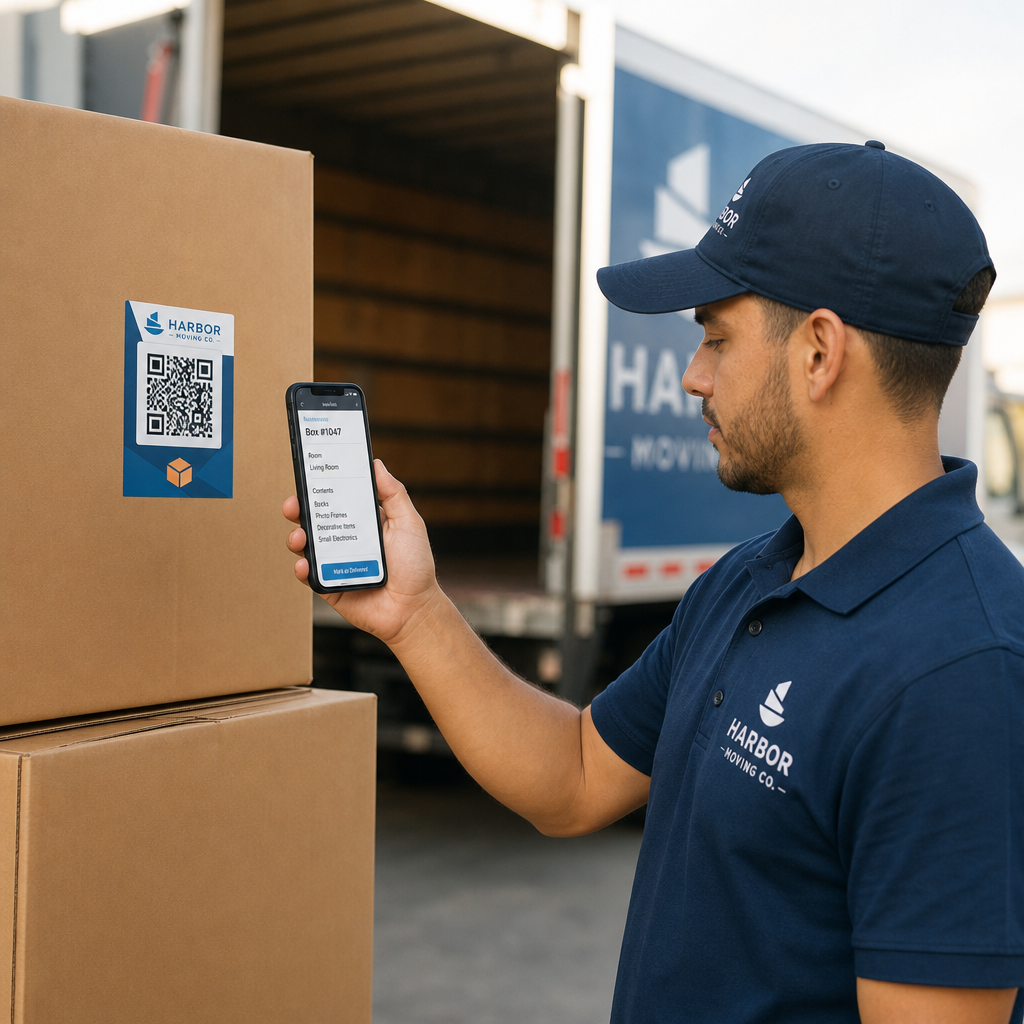
QR-code labels transformeren gewone kartonnen dozen in digitale trackingpunten. In plaats van itemlijsten rechtstreeks op karton of papieren formulieren te schrijven, bevestigt de bemanning een vooraf gedrukt QR-code label aan elke doos.
Wanneer het label wordt gescand met een smartphone of tablet, opent het een beveiligd digitaal manifest met de doos-ID, de bestemmingskamer, afhandelingsnotities en een fotorecord van de verpakte inhoud.
Upgrade uw verhuisinventarisbeheer Wilt u uw doos-tracking digitaliseren en manifesten onderweg bijwerken? Gebruik de Dynamische QR code generator om traceerbare, bewerkbare labels te maken voor uw gehele vloot.
Met behulp van dynamische QR-codes biedt verhuisteams volledige flexibiliteit op de werkplek. Als een klant zijn afleverkamer verandert of items toevoegt aan een verpakte doos, kan de bemanning het digitale bestand dat aan de code is gekoppeld bijwerken zonder het fysieke label opnieuw af te drukken of te vervangen.
Best practices voor het afdrukken van scanbare QR-labels
Verhuiswagens en magazijnen bieden veeleisende omgevingen voor afgedrukte afbeeldingen. Stof, wrijving, vocht en zwakke verlichting kunnen de leesbaarheid van barcodes beïnvloeden. Het volgen van strikte scanbaarheidsnormen zorgt ervoor dat uw team labels moeiteloos kan scannen op de werkplek:
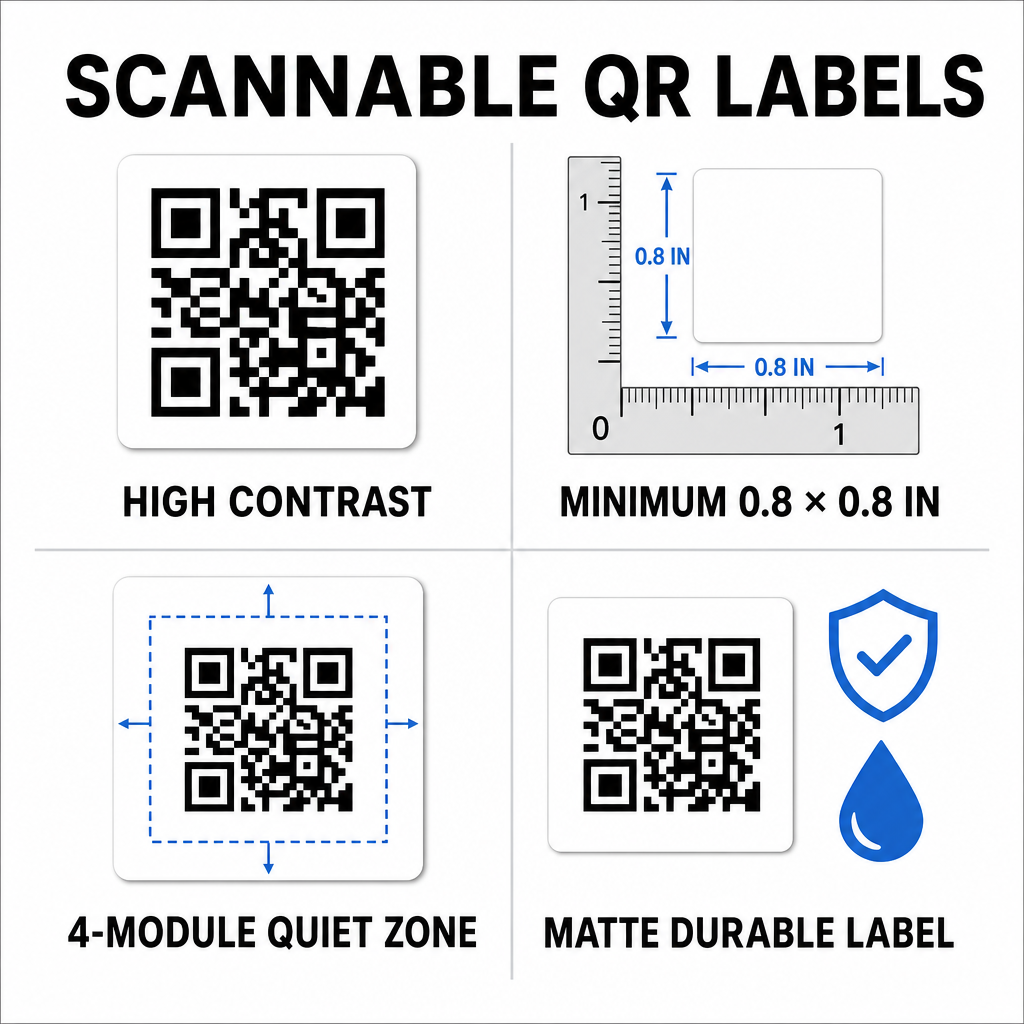
- Behoud hoog contrast: Druk donkere codes af op lichte achtergronden, met een contrastverhouding van minimaal 50% (4:1 contrast).
- Formaat labels correct: Houd standaard dooslabels minimaal 0.8 x 0.8 inch (2 x 2 cm) en pas de regel van een tiende toe voor grotere opslagcontainers.
- Bescherm de stille zone: Laat een lege marge van minimaal 4 modules breed rond de buitenrand van de code.
- Kies niet-reflecterende materialen: Gebruik matte, duurzame synthetische substraten om verblinding en scheuren tijdens ruwe behandeling te voorkomen.
- Gebruik vector afdrukbestanden: Exporteer afbeeldingen als SVG-, EPS- of PDF-bestanden met hoge resolutie om wazige randen te voorkomen. U kunt meer leren over formatteren in onze gids over QR-codes afdrukken op labels.
Stap-voor-stap implementatie voor verhuisploegen
De overgang van traditionele carbon-copy formulieren naar een digitaal inventarissysteem vereist minimale apparatuur en training. De overgang verbetert de efficiëntie aanzienlijk voor elke operationele taak.
| Operationele taak | Papieren inventarissysteem | Digitaal QR-code systeem |
|---|---|---|
| Doos catalogisering | Handmatig itemlijsten schrijven op carbon formulieren | Items digitaal toewijzen aan een gescande QR-code |
| Laden en lossen | Itemnummers afvinken op papieren clipboards | Direct scannen met camera bij de laadklep van de vrachtwagen |
| Manifest updates | Tekst doorstrepen en papieren updates krabbelen | Dynamische bestemmingen online bijwerken zonder opnieuw af te drukken |
| Claim verificatie | Fysieke dossiers doorzoeken maanden na levering | Direct toegang tot digitale foto's en logboeken |
Het opzetten van een efficiënte workflow voor het labelen van dozen omvat vier kernacties:
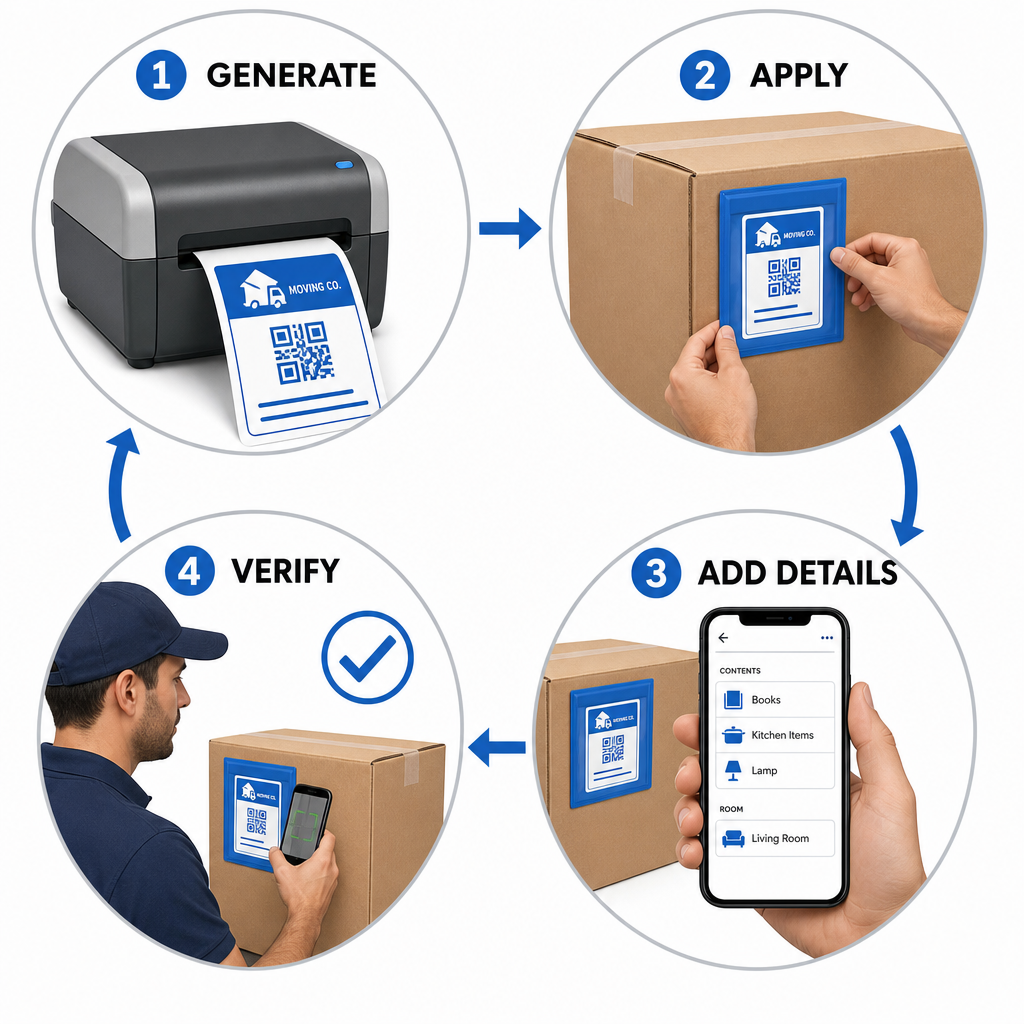
- Genereer dooslabels: Gebruik een QR-codegenerator om batch QR-labels te maken die zijn geformatteerd voor standaard zelfklevende vellen.
- Pas labels strategisch toe: Plaats labels op de bovenste zijpanelen van dozen, houd ze vrij van naden, tape en vouwen.
- Scan en bouw het manifest: Gebruik een camera-app of een gratis QR-codescanner om de inhoud van de doos, kamerlocaties en foto's vast te leggen.
- Verifieer het lossen bij levering: Scan elk label terwijl dozen de bestemmingsruimte binnenkomen om een nauwkeurig digitaal leveringslogboek te genereren.
Bedrijven die moderne inventarisworkflows opzetten, kunnen deze methoden ook aanpassen voor magazijnoperaties door onze gids te volgen voor het maken van productinventaris QR-codes of het afdrukken van aangepaste productlabel QR-codes.
Schaalbare Labeloplossingen in Verschillende Sectoren
Digitale inventarisregistratie is niet beperkt tot verhuizingen van huishoudens. Commerciële verhuizingen, magazijnverschuivingen en logistieke dienstverleners vertrouwen op geserialiseerde QR-tracking om grote activavolumes te beheren. Verhuismanagers kunnen op maat gemaakte toepassingen en workflowstrategieën in verschillende sectoren verkennen door de uitsplitsing van Pageloot te bezoeken QR-code oplossingen per branche.
Het vervangen van handmatige papieren registratie door dynamische QR-codelabels elimineert geschillen over verloren dozen, versnelt laadworkflows en biedt duidelijke digitale verificatie voor klanten. Neem vandaag nog de controle over uw inventarisbeheer door aangepaste QR-labels te genereren met de complete suite van QR-codetools van Pageloot.
Veelgestelde vragen
Ja. Ploegen kunnen labels scannen met standaard camera-apps op smartphones of een webgebaseerde tool zoals de Pageloot camscanner rechtstreeks in hun mobiele browser openen zonder aparte applicaties te installeren.
QR-codes beschikken over ingebouwde foutcorrectiemogelijkheden. Afhankelijk van het gekozen niveau van foutcorrectie tijdens het aanmaken, kan een scanner het etiket nauwkeurig decoderen, zelfs als 15% tot 30% van het oppervlak beschadigd of onleesbaar is.
Dynamische QR-codes linken naar bewerkbare webbestemmingen. Hierdoor kunnen managers kamerindelingen wijzigen, itemmanifesten bewerken of contactgegevens van klanten in realtime bijwerken zonder fysieke labels op de dozen opnieuw te hoeven afdrukken of vervangen.