> QR 코드 마케팅 > QR Code Marketing Ideas for Businesses
QR 코드 마케팅

QR Code Marketing Ideas for Businesses

Discover practical QR code marketing ideas for businesses. Learn to use codes for coupons, reviews, lead capture, and tracking scans for better results.
Updated on 6월 10, 2026
목차

Not sure how to use QR codes beyond linking to your homepage? Most businesses barely scratch the surface of what these codes can do, and the missed opportunities often mean fewer conversions, weaker campaigns, and no way to measure what’s working. This guide walks you through practical QR code marketing ideas you can apply across your channels right now.

Link Customers to Any Page on Your Website

The most common use – and still one of the most effective – is linking a QR code to a specific web page. That doesn’t have to mean your homepage. A dedicated landing page for a promotion, a seasonal offer, or a product launch converts far better than sending visitors to a generic URL.

The key is making sure the destination is mobile-optimized. Most people will scan from their phone, so a slow or poorly formatted page will kill your results before they start. You can use the 링크 QR 코드 생성기 to create codes for any URL and update the destination without reprinting if you choose a dynamic code.

Drive Offline Traffic to Your Digital Campaigns Place QR codes on flyers, packaging, or in-store signage and link them directly to your campaign landing pages. Use the QR 코드 생성기 to get started in seconds – no design skills required.

Offer Coupons and Discount Codes

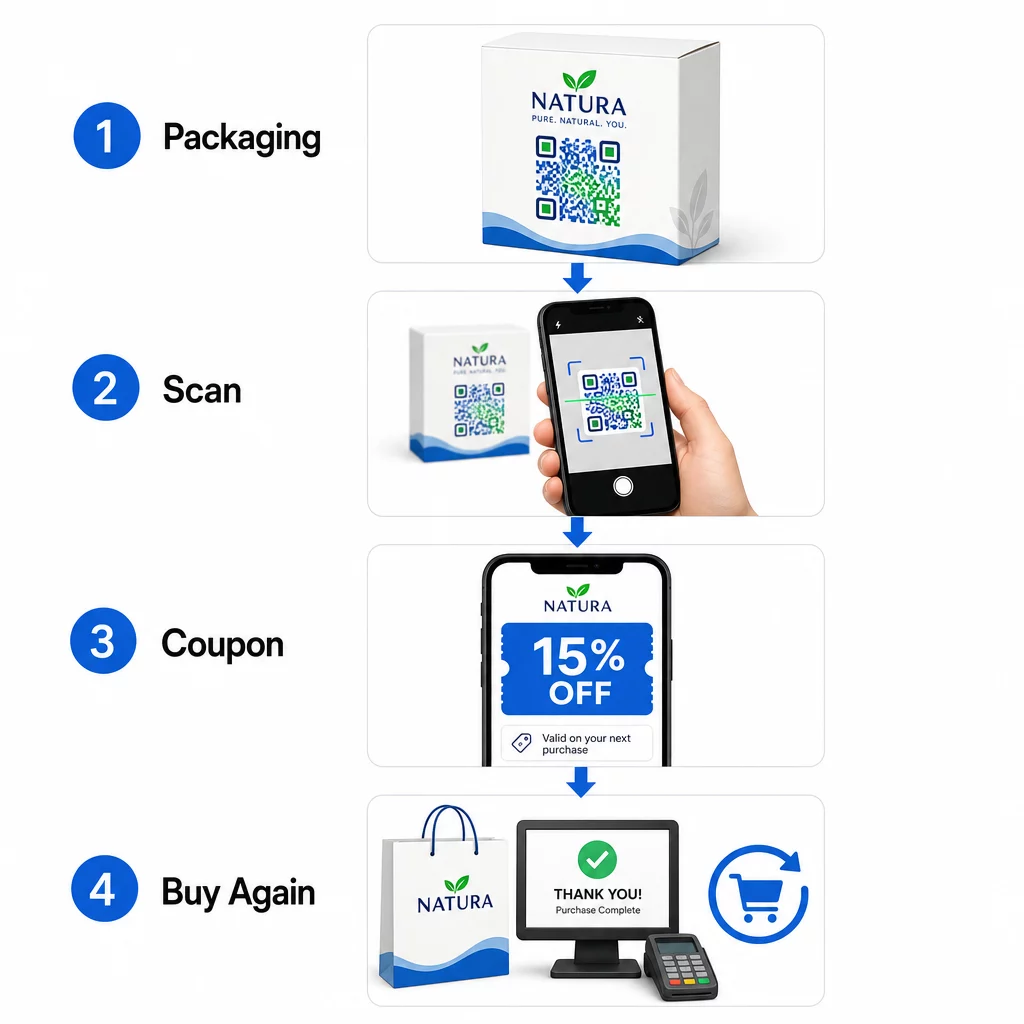
One of the highest-performing QR code marketing ideas is using a code to deliver a coupon or exclusive discount. Packaging, receipts, direct mail, and in-store signage are all natural placements. When a customer scans and immediately receives value – say, 15% off their next purchase – you reduce friction in the buying process and give people a concrete reason to scan.

QR coupon flow

Packaged food and beverage brands in the U.S. already use this approach extensively, printing QR codes on labels that unlock digital coupons and encourage repeat buying. A 쿠폰 QR코드 생성기 lets you set up a landing page with multiple offers, add terms and conditions, and share the code across print and digital channels.

Share Contact Details Instantly with a QR Business Card

Most paper business cards end up in a drawer – or the trash – before the contact is ever saved. A QR code on your business card changes that. When someone scans it, your name, phone number, email, website, and other details are automatically added to their phone’s address book with no manual entry required.

This is especially valuable at trade shows, conferences, and networking events where people exchange cards quickly. A 명함 QR 코드 생성기 lets you include all your contact fields and customize the design to match your brand.

Collect Customer Reviews

Getting customers to leave a Google review is one of the hardest asks in local marketing. A QR code removes nearly all of the friction. Place codes on receipts, table tents, packaging, or near your checkout counter with a prompt like “Enjoyed your experience? Scan to leave us a review.”

When customers scan, they land directly on your Google review page – no searching, no navigation. The Google 리뷰 QR 코드 생성기 makes it straightforward to set this up, and more reviews directly support your local search rankings.

Run Surveys and Capture Lead Data

QR codes that link to forms are a practical way to collect first-party customer data – information you own and can use directly in your marketing. Link a code to a short survey, a sweepstakes entry, or an email sign-up form and place it anywhere your audience naturally pauses: product packaging, waiting areas, event booths, or printed menus.

A beverage brand running a sweepstakes via front-of-pack QR codes generated more than 579,000 landing page views and over 28,000 email subscription entries in a single campaign. The Google 양식 QR 코드 생성기 is a simple way to create a scannable link to any Google Form you’ve already built.

Provide Wi-Fi Access Without Sharing the Password

If your business has a waiting room, lobby, café, or retail floor, a Wi-Fi QR code is a small touch that customers genuinely appreciate. The code contains your network credentials, and when someone scans it, their phone connects automatically – no password entry needed, and your actual password stays private.

This works well in restaurants, hotels, gyms, medical offices, and any space where guests spend time. It’s low effort to set up and creates an immediately positive experience.

Help Customers Find You

If your location is off the beaten path or your address is tricky to navigate to, a geolocation QR code saves customers the frustration of a wrong turn. The code contains your latitude and longitude coordinates, and when scanned, it opens your exact location in the user’s default maps app.

This is a practical addition to business cards, event invitations, direct mail, and local advertising – anywhere someone might need to drive to you for the first time.

Add Events to Calendars Automatically

Promoting a product launch, open house, or seasonal sale? A QR code can prompt customers to save the event directly to their phone calendar with a single tap. Include the event name, date, time, and location in the code, and when someone scans it, they’re asked to confirm the save.

This is far more effective than simply printing the date on a flyer and hoping people remember it.

Trigger a Phone Call or Text Message

If a direct response is the goal – getting someone to call your sales line or text for a callback – a QR code can pre-fill the phone number and dial it automatically, or open a pre-written text message waiting for confirmation. Both options remove the effort of manually typing digits, which meaningfully increases the likelihood someone actually follows through.

These are useful on printed ads, in-store signage, and direct mail where the call to action is time-sensitive.

Put QR Codes on Product Packaging

Retail packaging is one of the most underused QR placements in physical marketing. A code on the side or back of a product can link to how-to videos, detailed ingredient or sourcing information, warranty registration, or complementary product recommendations. Consumer-packaged-goods brands use this to share content that would never fit on a label – detailed nutrition data, recipe ideas, or product backstory.

Some brands go further: a wine label QR code that unlocks an augmented reality experience, or an energy drink can that rewards gamers with in-game items when scanned. The point is that packaging is already in customers’ hands – make it interactive.

For a broader view of how QR codes fit into physical marketing materials, the guide to QR code placement in marketing covers size, positioning, and design best practices in detail.

Brand Your QR Codes for Better Scan Rates

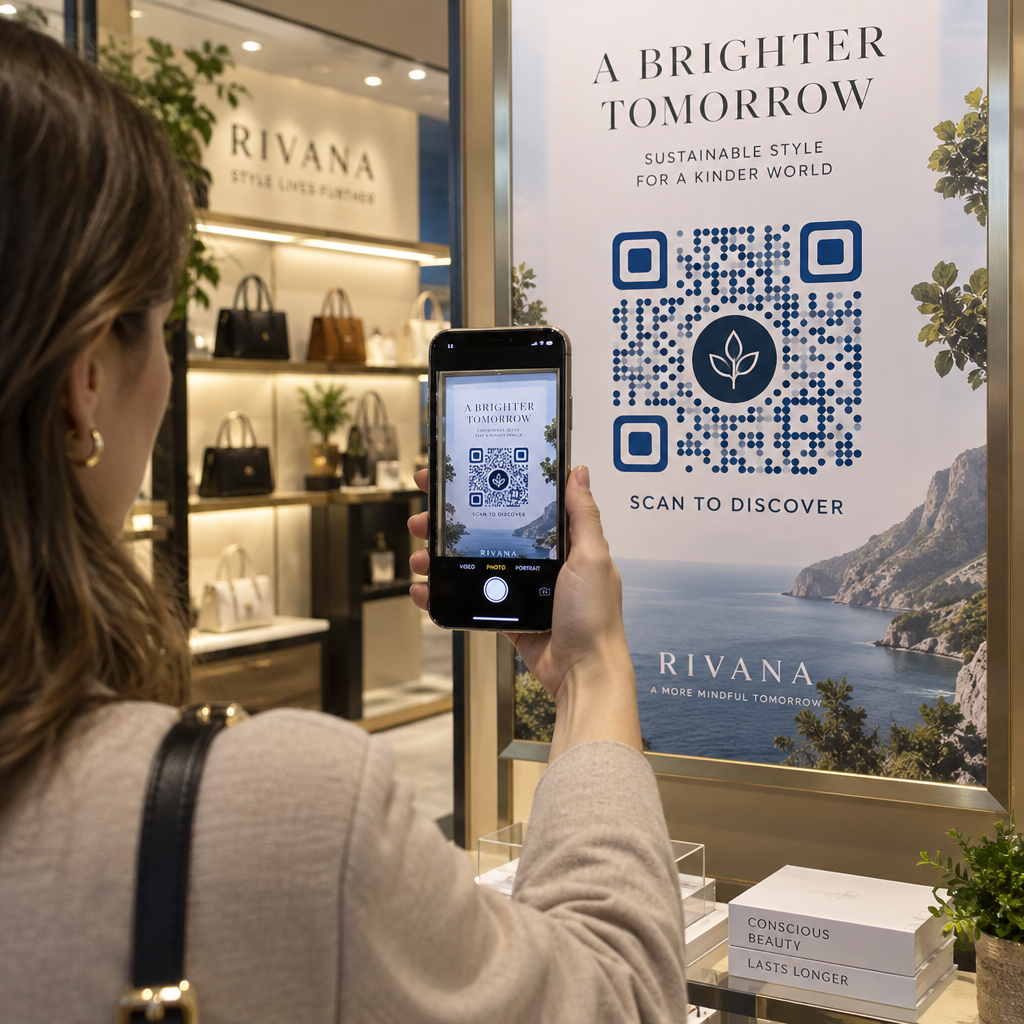
A plain black-and-white QR code signals nothing about the brand behind it, which can reduce trust and scanning rates. Adding your logo, brand colors, and a short call-to-action frame – like “Scan for 10% off” or “See the menu” – makes the code more recognizable and gives people a reason to act.

Customized QR codes stand out among competing visual elements on packaging, signage, and printed materials. The 로고가 있는 QR 코드 생성기 makes it simple to apply consistent branding across all your codes.

Make Every Code Recognizable Add your logo, brand colors, and a call-to-action frame to your QR codes with the 로고가 있는 QR 코드 생성기 to increase trust and scan rates across all your print and digital materials.

Track Performance and Update Codes Without Reprinting

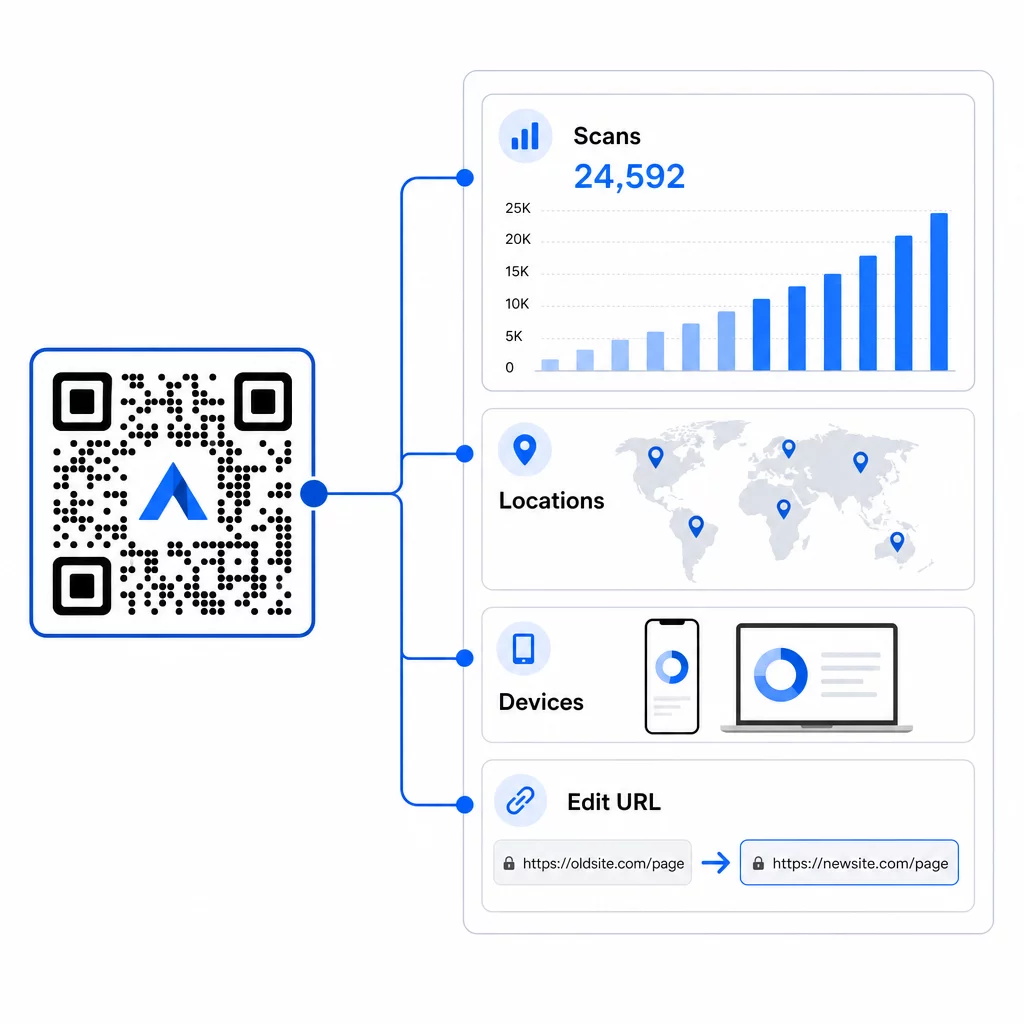
Static QR codes are fixed – once printed, you can’t change where they point or see how they’re performing. Dynamic QR codes solve both problems. You can update the destination URL at any time without touching the printed code, and you get access to scan analytics: total scans, unique users, device types, geographic data, and time-based patterns.

동적 QR 분석

This matters most in ongoing campaigns. If a seasonal promotion ends, you can redirect the same printed code to a new offer. If one placement is outperforming another, your analytics will show you exactly where and when people are scanning. For a full breakdown of what tracking captures, see the guide to QR 코드 추적.

Real campaigns demonstrate the impact: a major hotel group deployed QR codes to replace printed menus and in-room materials, saving approximately $150,000 in printing costs while improving the guest experience. Flexibility like that comes from using dynamic codes from the start.

모든 스캔을 실시간으로 추적 사용 동적 QR 코드 생성기 to create trackable, editable codes and monitor performance across all your placements from a single dashboard.

Placement and Design Tips That Actually Matter

The best marketing idea won’t perform if the code is too small, poorly placed, or hard to scan. A few practical rules to follow:

  • Size for the scanning distance – a rough guideline is 1 cm of code width for every 10 cm of expected viewing distance; aim for at least 2 × 2 cm as a minimum
  • Place at eye level – roughly 3.5 to 5.5 feet from the ground for most standing placements
  • Use high contrast – a dark code on a light background; reversed colors frequently cause scan failures
  • Keep a quiet zone – leave clear space around the code with no text, patterns, or logos bleeding into that border
  • Add a clear call to action – a QR code on its own tells people nothing; always include a short prompt explaining what they’ll get
  • Test before printing – scan the code on multiple devices, in different lighting conditions, and at the intended physical size

For a complete breakdown of placement strategies by format and industry, the QR 코드 배치 가이드 covers everything from business cards to billboards.

자주 묻는 질문

What types of QR codes work best for marketing campaigns?

Dynamic QR codes work best for marketing because they can be updated after printing and include scan analytics. Use URL codes for landing pages and promotions, coupon codes for discounts, vCard codes for networking, and form codes for lead capture. The right type depends on your campaign goal – the guide to choosing the right QR code for your campaign can help you decide.

How do I measure whether my QR code campaign is working?

With dynamic QR codes, you get access to real-time analytics that show total scans, unique users, device types, geographic location, and time-based patterns. You can also add UTM parameters to your destination URLs to track QR-driven traffic in Google Analytics alongside your other channels. Learn more about tracking QR codes.

Do I need a separate QR code for each marketing channel?

Not necessarily, but using separate codes per placement – one for packaging, one for a flyer, one for a poster – lets you compare performance across channels and identify which touchpoints drive the most engagement. Dynamic codes make this easy to manage since you can update destinations centrally without reprinting each material.

작성자 정보

시임 코스타비는 페이지루트의 콘텐츠 책임자입니다. 그는 페이지루트의 혁신적인 QR 코드 생성 서비스에 대한 글을 쓰고 있습니다. 5년 이상 QR 코드 분야에서 쌓아온 깊이 있는 전문 지식을 바탕으로, 시임은 이 분야의 전문가로 인정받고 있습니다. 그는 QR 기술을 활용하여 디지털 상호작용을 간소화하고 향상시키는 데 크게 기여하고 있습니다.

범주
에 대해 자세히 알아보기
Wedding QR code
QR 코드 결혼식
Bank customer scanning QR
QR 코드 은행 및 금융

온라인으로 QR 코드를 생성해야하는 경우 QR 코드 만들기 무료로 여기!
Pageloot는 #1 Go-To 솔루션 QR 코드를 만들고 스캔합니다.

QM-07

블로그 세대

20,000개 이상의 브랜드로부터 신뢰를 받아 더 많은 매출, 리뷰, 팔로워를 확보했습니다.

클라이언트 로고
최고 브랜드의 신뢰
5 중 4.8 평가

4.86 / 5 별점

휴고 로랑
휴고 로랑
레스토랑 주인
가장 쉽고 안정적인 QR 코드 생성기. PDF 파일을 즉시 업로드할 수 있습니다. 이제 레스토랑 메뉴가 디지털화되었습니다.
루카스 얀센
루카스 얀센
부동산 개발사
이것은 훌륭한 도구이며 QR 코드를 사용하면 원하는 곳으로 이동할 수 있습니다. 우리는 위치 QR 코드만 사용하지만 유용한 기능이 너무 많습니다.

엠마 모레티
엠마 모레티
소매 제품
사용하기 쉽고 빠릅니다. 그것은 훌륭하게 작동하고 완벽한 이미지를 생성하므로 직원들이 내 vCard를 다운로드할 수 있습니다.

휴고 로랑
휴고 로랑
레스토랑 주인
가장 쉽고 안정적인 QR 코드 생성기. PDF 파일을 즉시 업로드할 수 있습니다. 이제 레스토랑 메뉴가 디지털화되었습니다.
루카스 얀센
루카스 얀센
부동산 개발사
이것은 훌륭한 도구이며 QR 코드를 사용하면 원하는 곳으로 이동할 수 있습니다. 우리는 위치 QR 코드만 사용하지만 유용한 기능이 너무 많습니다.
엠마 모레티
엠마 모레티
소매 제품
사용하기 쉽고 빠릅니다. 그것은 훌륭하게 작동하고 완벽한 이미지를 생성하므로 직원들이 내 vCard를 다운로드할 수 있습니다.
더 많은 QR 코드보기
Students scanning QR codes
QR 코드 학교 교육
고객이 추첨 QR 스캔
QR 코드 공짜 콘테스트
무엇이든 디지털 경험으로 전환하세요 3분 이내에.

14일 무료 체험.

신용카드는 필요 없습니다.

첫 구매 시 30% 할인

코드를 사용하세요:

MP3 파일 공유

PDF QR 코드를 생성하려면 가입하세요

필요한 모든 것을 업로드하고 표시합니다.

  • 오디오 파일
  • 팟캐스트
  • 음악

가입 시 14일 무료 체험.
체험 기간 후 QR 코드 만료.

오디오 mp3 QR 코드를 생성하려면 가입하세요

프레임으로 더 많은 스캔 확보

QR 코드에 더 많은 프레임을 추가하려면 가입하세요

클릭 유도 문안 프레임은 고객이 QR 코드와 쉽게 상호 작용할 수 있도록 도와줍니다. 사용해 보세요!

가입 시 14일 무료 체험.
체험 기간 후 QR 코드 만료.

QR 코드에 더 많은 프레임을 추가하려면 가입하세요

도형으로 더 많은 스타일 추가

더 많은 도형을 만들려면 가입하세요

QR 코드는 정사각형일 필요가 없습니다. 브랜드 이미지에 맞게 전환해 보세요.

가입 시 14일 무료 체험.
체험 기간 후 QR 코드 만료.

더 많은 도형을 만들려면 가입하세요

QR 코드에 로고 추가

QR 코드에 로고를 추가하려면 가입하세요

로고와 브랜드를 추가하여 QR 코드를 돋보이게 만드세요.

가입 시 14일 무료 체험.
체험 기간 후 QR 코드 만료.

QR 코드에 로고를 추가하려면 가입하세요

스마트 앱 스토어 리디렉션

앱 스토어 QR 코드를 생성하려면 가입하세요

스마트 앱 스토어 QR 코드에 앱 링크를 추가하세요. 사용자는 장치에 따라 리디렉션됩니다.

가입 시 14일 무료 체험.
체험 기간 후 QR 코드 만료.

앱 스토어 QR 코드를 생성하려면 가입하세요

QR 코드에 이미지 업로드

이미지 QR 코드를 생성하려면 가입하세요

이미지를 쉽게 공유하세요. 몇 초 안에 동적으로 이미지를 변경하십시오.

가입 시 14일 무료 체험.
체험 기간 후 QR 코드 만료.

이미지 QR 코드를 생성하려면 가입하세요

PDF 파일 공유

PDF QR 코드를 생성하려면 가입하세요

필요한 모든 것을 업로드하고 표시합니다.

  • 메뉴 및 가격표
  • 명령
  • 모든 문서

가입 시 14일 무료 체험.
체험 기간 후 QR 코드 만료.

PDF QR 코드를 생성하려면 가입하세요

인쇄 없이 나중에 편집

다시 인쇄하지 않고 QR 코드를 편집하려면 가입하세요

동적 QR 코드를 사용하면 새 QR 코드를 인쇄하지 않고도 QR 코드의 내용을 변경할 수 있습니다.

가입 시 14일 무료 체험.
체험 기간 후 QR 코드 만료.

다시 인쇄하지 않고 QR 코드를 편집하려면 가입하세요

언제? 어디서? QR 코드 스캔 추적

QR 코드를 추적하려면 가입하세요

어떤 QR 코드가 가장 많이 스캔되고 무엇이 고객을 가장 흥분시키는지 알아보십시오.

가입 시 14일 무료 체험.
체험 기간 후 QR 코드 만료.

QR 코드를 추적하려면 가입하세요

인쇄 준비 파일 제공

PDF 및 SVG와 같은 벡터 QR 코드를 생성하려면 가입하세요.

.EPS, .PDF, .SVG

HD 해상도로 QR 코드를 다운로드하고 싶으신가요? 인쇄할 준비가 된 벡터 또는 픽셀 형식을 가져옵니다.

가입 시 14일 무료 체험.
체험 기간 후 QR 코드 만료.

PDF 및 SVG와 같은 벡터 QR 코드를 생성하려면 가입하세요.

기다리세요. 귀하의 QR 코드는 로드 중... 로드 중...

나만의 것으로 만들기

나중을 위해 QR 코드를 저장하려면 가입하세요.

다양한 색상, 로고 및 클릭 유도문안 프레임으로 멋진 QR 코드를 만들어 더 많은 스캔을 받으세요.

가입 시 14일 무료 체험.
체험 기간 후 QR 코드 만료.

나중을 위해 QR 코드를 저장하려면 가입하세요.