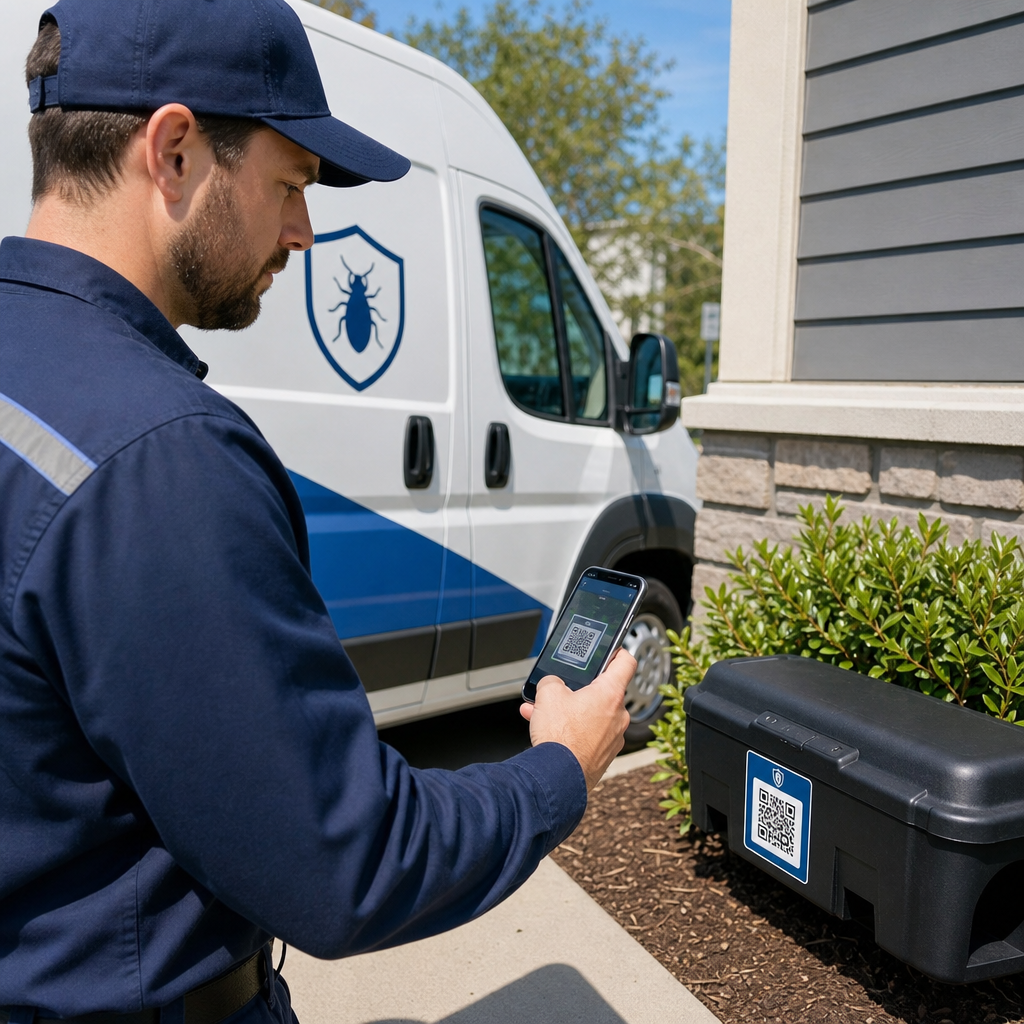

Túl sok időt töltenek a technikusai papíralapú mappák keresésével, manuális felszerelésnaplózással, vagy vegyi anyagok biztonsági adatainak felkutatásával a terepen? A rossz helyre tett dokumentáció lassítja a szervizhívásokat és komoly megfelelőségi kockázatokat jelent vállalkozása számára. A QR-kódok bevezetése a fizikai felszereléseken és járműveken azonnali digitális hozzáférést biztosít a biztonsági adatlapokhoz, címkékhez és ellenőrzési naplókhoz.
A felszerelések és csalétékállomások nyomon követésének egyszerűsítése
Több kereskedelmi helyszínen százával lévő rágcsálócsalétek-állomások, rovarcsapdák és gépi permetezők kezelése gyakran hiányzó készlethez és hiányos ellenőrzési naplókhoz vezet. Egyedi QR-kód csatolása minden egyes fizikai eszközhöz közvetlenül összekapcsolja azt az elemet a terepi irányítási rendszerével. Amikor egy technikus a helyszínre érkezik, egy gyors szkennelés azonosítja az adott állomást, megjeleníti a szervizelési előzményeit, és felkéri a technikust az aktuális tevékenység naplózására.
A dinamikus eszközcímkék használatával központi nyilvántartást vezethet minden egyes felszerelésről. Ha frissítenie kell egy eszköz szervizelési protokollját, vagy egy permetezőt más teherautóhoz kell hozzárendelnie, a digitális célhivatkozás frissítése a fizikai címkét újranyomtatás nélkül is működőképesen tartja. Többet megtudhat a fizikai eszközök kezeléséről ezen keresztül eszköznyomkövetési legjobb gyakorlatok és hasonló elveket alkalmazva kártevőirtó felszerelésére.
A QR-alapú eszközkezelési munkafolyamat bevezetése egyértelmű működési előnyökkel jár:
- Szüntesse meg a manuális adatbeviteli hibákat az írott sorozatszámok automatizált mobil szkennelésekkel való felváltásával.
- Hozzon létre időbélyegzővel ellátott digitális ellenőrzési nyomvonalakat a kereskedelmi ügyfelek jelentési követelményeinek és a szerződéses megfelelőségnek való megfelelés érdekében.
- Kövesse nyomon a karbantartási ütemezéseket és a vegyszer töltöttségi szintjét nehéz berendezéseken, mint például hőködgenerátorok és fúróberendezés-permetezők.
- Azonnal frissítse a központi raktár adatbázisokat bevált termékkészlet-kezelési stratégiák elfogadásával.
Optimalizálja felszereléseit és terepi készletét Kapcsolja össze a fizikai felszereléseket a flotta dinamikus digitális nyilvántartásaival a Dinamikus QR-kód generátor segítségével szerkeszthető eszközcímkék létrehozásához, amelyek azonnal frissülnek.
A biztonsági adatlapok és növényvédő szerek címkéinek azonnali hozzáférhetőségének biztosítása
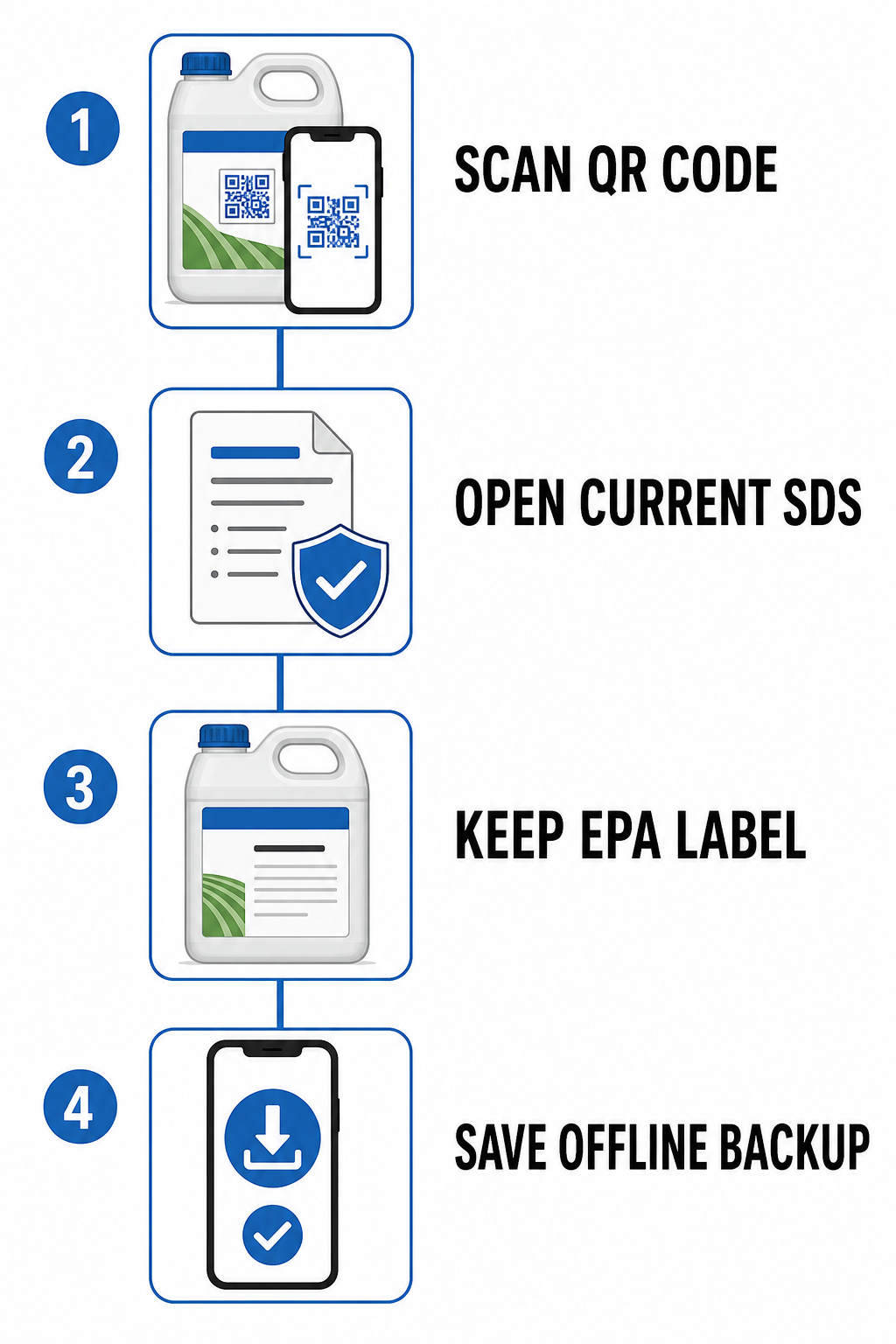
A szövetségi szabályozások szigorúan meghatározzák, hogyan kell dokumentálni és kezelni a vegyi kezeléseket a munkaterületeken. A technikusoknak minden munkanap során azonnali hozzáféréssel kell rendelkezniük a biztonsági adatlapokhoz (SDS) és a termékcímkékhez. A fizikai papírkötetek szervizautókban való tárolása helyet foglal, és megnehezíti az elavult vegyi anyag lapok frissítését.
A megfelelőség egyszerűsítése érdekében a kártevőirtó cégek QR-kódokat helyezhetnek el a járművekben vagy az alkalmazó berendezéseken, amelyek közvetlenül egy, a következőn keresztül generált digitális fájlokhoz kapcsolódnak PDF QR kód generátor. Digitális biztonsági rendszerének tervezésekor tartsa szem előtt a szabályozási keretrendszert:
| Szabályozási Szabvány | Megfelelőségi Követelmény | QR-kódok Szerepe |
|---|---|---|
| OSHA Veszélykommunikáció | Megköveteli a munkavállalók azonnali, akadálytalan hozzáférését a biztonsági adatlapokhoz minden műszakban. | Közvetlenül összekapcsolja a technikusokat a központi SDS fájlokkal, helyi offline biztonsági másolatokat igényelve a térerő nélküli területekre. |
| EPA Növényvédő Szer Címkézés (FIFRA) | Előírja, hogy a tartálycímkék fizikailag rögzítve és jogilag kötelező érvényűek maradjanak („a címke a törvény”). | Kiegészítő digitális hozzáférést biztosít a kiterjesztett mintacímkékhez, hígítási táblázatokhoz és fordított utasításokhoz. |
Az EPA 40 CFR 156. rész által szabályozott irányelvei szerint a növényvédő szer tartályán lévő QR-kód nem helyettesítheti a törvény által előírt fizikai tartálycímkét. Ehelyett kiegészítő hozzáférést biztosít részletes mintacímkékhez, hígítási táblázatokhoz vagy fordított útmutatásokhoz. Az OSHA megfelelőség érdekében az elektronikus SDS rendszereknek közvetlen hozzáférést kell biztosítaniuk a munkavállalók számára, anélkül, hogy önkényes internetes kereséseket igényelnének, és a vállalatoknak offline biztonsági másolatokat kell tartaniuk mobileszközökön arra az esetre, ha a távoli területeken megszűnne a mobilhálózat lefedettsége.
Helyszíni munkafolyamatok és ellenőrzési naplók egyszerűsítése
A helyszíni termelékenység növekszik, ha a technikusok kevesebb időt töltenek papírmunkával, és többet a szerkezetek ellenőrzésével. A beolvasható kódok elhelyezése kulcsfontosságú ellenőrzési pontokon – például kúszótér bejáratoknál, kereskedelmi konyhák kerületénél vagy fő megszakító paneleknél – intuitív, irányított munkafolyamatot hoz létre a csapat számára.
A technikusok használhatnak szabványos telefonkamerát vagy web alapú QR-kód olvasó a feladatlapok azonnali megnyitásához. A zökkenőmentes helyszíni jelentési folyamatok kiépítéséhez vegye figyelembe ezeket az alkalmazási munkafolyamatokat:
- Gyorsítsa fel az ügyfél-bejelentkezéseket a fő szolgáltatási bejáratok közelében elhelyezett kódokkal, hogy a technikusok beolvashassák az érkezéskor az indulási idők rögzítéséhez és a helyszín-specifikus biztonsági figyelmeztetések megtekintéséhez.
- Telepítsen digitális ellenőrzési űrlapokat csapdacímkék egyéni digitális felmérésekhez való kapcsolásával, amelyek egy Google Forms kérdőív QR kód generátor segítségével készültek a kártevő számok és a csalifogyasztás adatainak gyűjtéséhez.
- Terjessze az operatív dokumentumokat egy fájlfeltöltő eszköz használatával a felszerelések használati útmutatóinak, kártevő-azonosító útmutatóknak és ügyfél-előkészítő lapoknak a tárolásához az azonnali helyszíni letöltés érdekében.
- Javítsa az alvállalkozói koordinációt a helyszíni hozzáférési kódok, kapukombinációk és ingatlankártyák megosztásával, a mi útmutatónkban részletezett taktikák felhasználásával a alvállalkozói kommunikációs stratégiák.
Adja át a megfelelőségi dokumentumokat egyetlen beolvasással Biztosítsa, hogy technikusai mindig hozzáférjenek a naprakész SDS fájlokhoz és mintacímkékhez. Töltse fel az alapvető biztonsági fájlokat a mi fájlmegosztó eszközeink használatával, és hozzon létre tartós QR-kódokat minden szervizjárműhöz.
Bevált gyakorlatok a QR-kódok bevezetéséhez a helyszíni szolgáltatásban
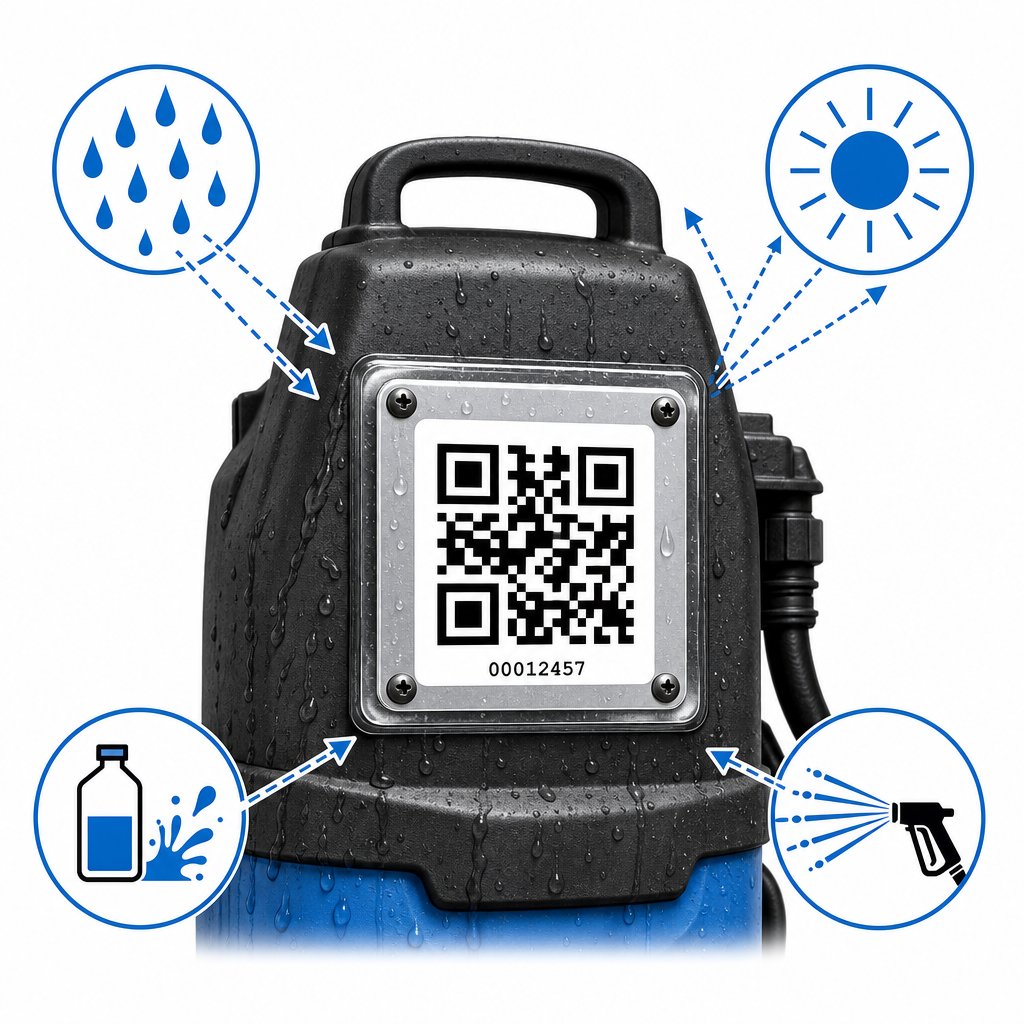
A kártevőirtó környezetek a fizikai címkéket zord körülményeknek teszik ki, beleértve a kültéri időjárást, a vegyszeres expozíciót, a szennyeződést és a nagynyomású mosásokat. Egy olyan kód, amely lebomlik vagy nem olvasható be, késéseket okoz a helyszíni csapatok számára. A világos tervezési és nyomtatási irányelvek betartása biztosítja a hosszú távú működési megbízhatóságot a különböző szolgáltatások során iparágban.
Válasszon tartós címkeanyagokat
A szokásos papírcímkék gyorsan lebomlanak a kártevőirtási környezetben. A csalétketetőkhöz, vegyszertartályokhoz és kültéri elhelyezésekhez nyomtasson címkéket ipari minőségű poliészter vagy vinil anyagokra, tartós akril ragasztóval. Gondoskodjon arról, hogy a címkék ellenálljanak az UV-fénynek, a nedvességnek és a vegyi anyagoknak.
Megfelelő méret és látótávolság fenntartása
Métezze a kódokat aszerint, hogy milyen közel állnak a technikusok szkenneléskor. Kövesse a 10:1 távolság-méret arányt: egy 10 hüvelyk (25 cm) távolságból beolvasott címke legalább 1 négyzet hüvelyk (2,5 cm) méretű legyen. Kis csalétketető fedelekhez vagy szerszámnyelekhez soha ne nyomtasson 0,8 x 0,8 hüvelyk (2 x 2 cm) méretnél kisebbet.
Kontraszt és tiszta margók megőrzése
A szkennerek az erős vizuális kontrasztra támaszkodnak a kódolt adatok gyors rögzítéséhez. Nyomtasson sötét mintákat magas kontrasztú világos hátterekre, legalább 4:1 kontrasztarányt fenntartva. Hagyjon tiszta „csendes zóna” margót a kód mind a négy oldalán – legalább négy modulszélességben – logók, szöveg vagy szegélyvonalak nélkül.
Dinamikus QR-kódok használata központi kezeléshez
A statikus kódok egy fix webcímet rögzítenek közvetlenül a grafikus mátrixba. Ha a dokumentum linkje megváltozik, a fizikai címke működésképtelenné válik. Dinamikus QR-kódok rövid átirányító URL-eket használjon, amelyek lehetővé teszik a vezetők számára, hogy központilag, egy irányítópultról frissítsék a célfájlokat, vegyi címkéket vagy háttérbeli űrlaplinkeket anélkül, hogy újra kellene nyomtatniuk a címkéket a terepen. Többet megtudhat arról, hogyan egyszerűsítik a dinamikus frissítések az eszközkezelést a következő útmutatónkban: valós idejű készletkövetési.
Kártevőirtási műveletek modernizálása
A berendezéscímkék, ellenőrzési űrlapok és biztonsági dokumentációk digitalizálása a kézi terepi rutinokat automatizált digitális munkafolyamatokká alakítja. A terepi dokumentációk ellenőrzése csökkenti az üzemeltetési költségeket, javítja a szabályozási megfelelést, és támogatja a terepi szolgáltató technikusokat minden híváskor. Kezdje még ma a következő beállításával: dokumentum QR-kód megoldások a megfelelőségi dokumentáció rendszerezéséhez és a napi terepi műveletek egyszerűsítéséhez.
Gyakori kérdések
Nem. Az EPA előírásai szerint (40 CFR 156. rész), a jogilag kötelező érvényű növényvédő szer tartálycímkéjének fizikailag rögzítve kell maradnia a közvetlen csomagoláson. A QR-kódok kiegészítő címkézésként szolgálnak, hogy könnyű hozzáférést biztosítsanak a részletes mintacímkékhez, digitális kézikönyvekhez vagy lefordított utasításokhoz, de nem helyettesíthetik a fizikai tartálycímkét.
Az OSHA engedélyezi a biztonsági adatlapok elektronikus hozzáférését, feltéve, hogy az alkalmazottak minden munkaműszakban azonnal, akadályok nélkül hozzáférhetnek a dokumentumokhoz. A megfelelőség fenntartásához a technikusokat ki kell képezni a rendszer használatára, és vállalkozásának fenn kell tartania egy offline biztonsági mentési módszert (például letöltött helyi fájlokat mobileszközökön) a gyenge mobilhálózati lefedettségű területekre.
A dinamikus QR-kódok lehetővé teszik, hogy bármikor szerkessze a hozzárendelt cél-URL-t vagy dokumentumot anélkül, hogy lecserélné az eszközön lévő fizikai címkét. Ha egy SDS frissül, egy űrlap URL-je megváltozik, vagy egy berendezést újraosztanak, azonnal frissítheti a célhivatkozást az irányítópultján, miközben a kinyomtatott címke a helyén marad.