¿Los errores de inventario manuales y los métodos de seguimiento obsoletos están ralentizando las operaciones de su negocio? Los datos de stock inexactos a menudo conducen a pedidos perdidos o capital desperdiciado, lo que hace que un sistema de seguimiento eficiente sea esencial para un crecimiento sostenible. La adopción de códigos QR para la gestión de inventario de productos ofrece una solución escalable y en tiempo real para optimizar los flujos de trabajo de su almacén y cadena de suministro.
Por Qué los Códigos QR Superan a los Códigos de Barras Tradicionales
Si bien los códigos de barras 1D tradicionales han sido el estándar durante décadas, están limitados por su estructura lineal y baja capacidad de datos. Los códigos QR son códigos de barras de matriz bidimensionales que ofrecen una flexibilidad superior porque se pueden escanear desde cualquier ángulo y almacenar mucha más información en un espacio físico más pequeño. Esta transición de códigos 1D a 2D permite a las empresas codificar no solo una identificación de producto, sino también números de lote, fechas de caducidad y detalles de fabricación.
| FUNCIÓN | Código de barras tradicional (1D) | Código QR (2D) |
|---|---|---|
| Capacidad de datos | Limitada (aprox. 20-25 caracteres) | Alta (hasta 4.296 caracteres alfanuméricos) |
| Tolerancia a daños | Baja; cualquier interrupción a menudo detiene el escaneo | Alta; permanece legible con hasta un 30% de daño |
| Ángulo de escaneo | Solo horizontal | Omnidireccional (360 grados) |
| Flexibilidad | Solo información estática | Los códigos dinámicos se pueden actualizar después de la impresión |
El diferencias entre códigos de barras y códigos QR se hacen aún más evidentes al considerar la durabilidad. Debido a que los códigos QR incluyen corrección de errores Reed-Solomon incorporada, una etiqueta puede soportar arañazos o suciedad en un almacén concurrido y seguir funcionando correctamente. Esta fiabilidad garantiza que su equipo dedique menos tiempo a solucionar problemas de etiquetas ilegibles y más tiempo a mover productos.
Beneficios de un sistema de inventario basado en QR
Implementar un sistema de inventario de productos con código QR proporciona mejoras inmediatas en la precisión de los datos y la velocidad operativa. Al alejarse de las entradas manuales en el libro mayor, reduce el error humano asociado con la escritura de SKU o el recuento manual de existencias.
- Acceso a Datos en Tiempo Real: Cada escaneo puede activar una actualización instantánea en una base de datos centralizada, proporcionando una vista en vivo de los niveles de existencias en múltiples ubicaciones.
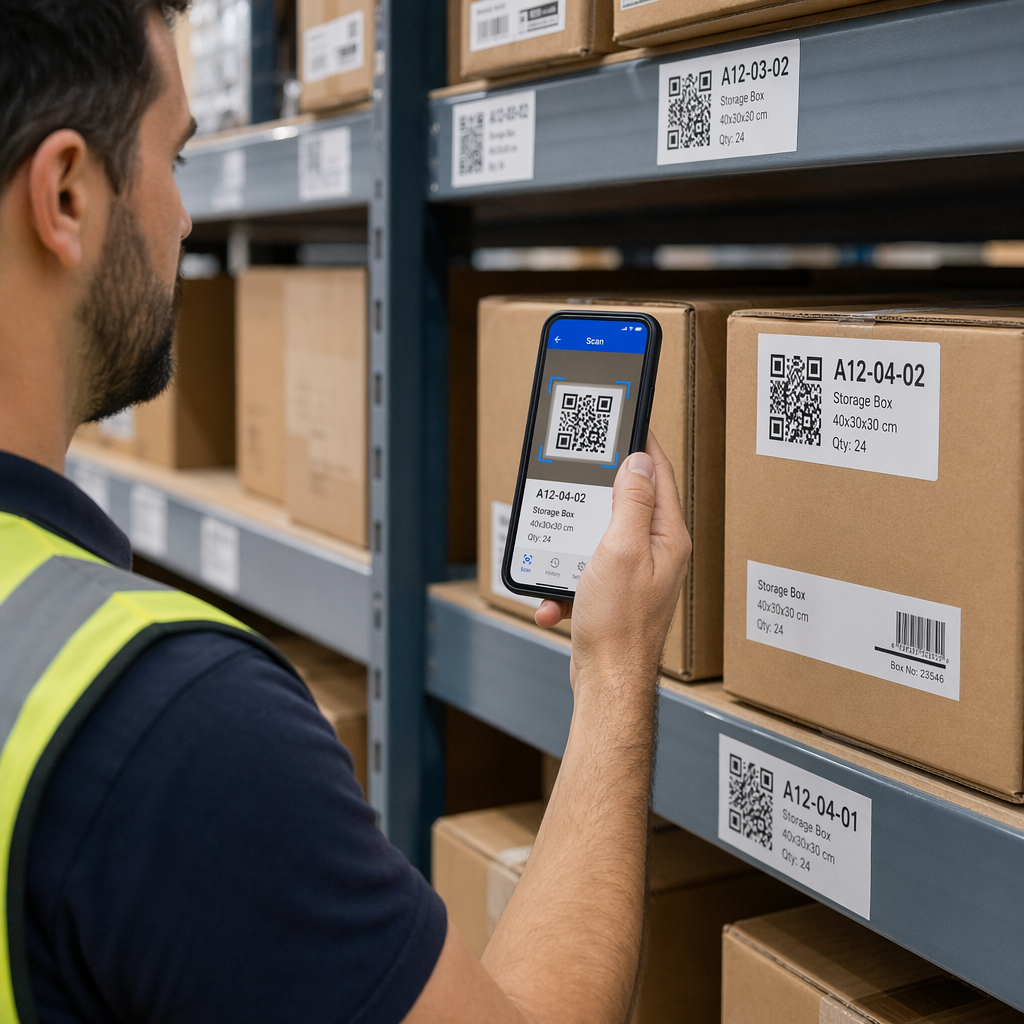
- Ahorro de costes: No necesita hardware costoso y especializado para comenzar el seguimiento. La mayoría de los teléfonos inteligentes modernos pueden funcionar como lectores de alta velocidad utilizando un escáner de código QR gratuito.
- Almacenamiento de Información Mejorado: Más allá de un simple número de serie, estos códigos pueden vincularse a manuales digitales, hojas de datos de seguridad o instrucciones de montaje para el personal del almacén.
- Visibilidad Mejorada de la Cadena de Suministro: El seguimiento de los artículos desde la planta de fabricación hasta el cliente final se vuelve fluido cuando usted utiliza códigos QR para la fabricación y la logística.
Modernice su Seguimiento de Inventario ¿Necesita una forma de actualizar los detalles del producto sin reimprimir miles de etiquetas? Utilice el Generador de códigos QR dinámicos para crear códigos flexibles y rastreables que crezcan con su negocio.
Cómo Configurar su Sistema de Inventario con Códigos QR
La transición a un sistema de inventario digital es un proceso sencillo que implica preparar sus datos, generar etiquetas y capacitar a su personal sobre los protocolos de escaneo.
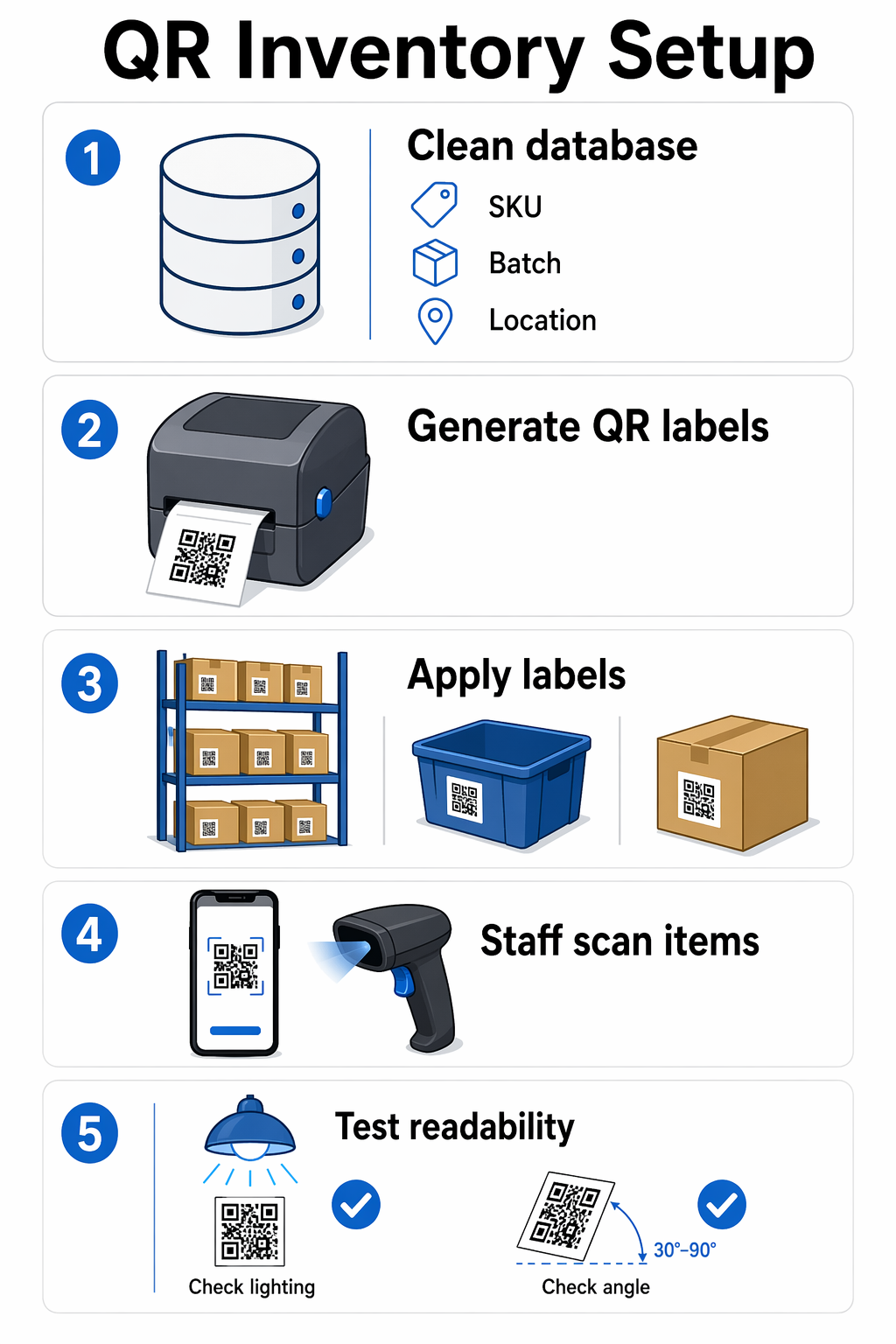
- Organice su base de datos de inventario: Antes de crear códigos, asegúrese de que los datos de su producto estén limpios. Debe asignar identificadores únicos a cada SKU, incluyendo detalles como nombres de productos, números de lote y ubicaciones de almacenamiento.
- Genera tus códigos QR: Utilice un generador de códigos QR para crear sus etiquetas. Para el inventario, debe decidir entre códigos estáticos y dinámicos. Los códigos estáticos son útiles para información permanente, pero los códigos QR dinámicos ofrecen más flexibilidad porque puede cambiar los datos vinculados incluso después de que la etiqueta esté pegada a un palé o contenedor.
- Aplique las etiquetas estratégicamente: Imprima sus etiquetas en materiales duraderos que puedan soportar las condiciones ambientales de sus instalaciones. Colóquelas en ubicaciones consistentes y visibles en estantes, contenedores o empaques de productos individuales para asegurar un fácil acceso para los escáneres.
- Implemente un flujo de trabajo de escaneo: Proporcione a su personal dispositivos móviles o escáneres dedicados. Asegúrese de que comprendan cómo usar una escáner de código de barras basado en web o aplicación de inventario para registrar la entrada y salida de artículos del sistema.
- Pruebe y valide: Antes de una implementación a gran escala, escanee sus etiquetas desde diferentes ángulos y en diversas condiciones de iluminación. Esta fase de prueba ayuda a identificar problemas con la legibilidad del código QR antes de que causen retrasos en sus operaciones.
Mejores prácticas para el escaneo y la legibilidad
El éxito de su sistema de inventario depende de la “escaneabilidad” de sus etiquetas. Factores como el tamaño, el contraste y la ubicación juegan un papel fundamental en la rapidez con la que un trabajador puede procesar un artículo. Piense en el escáner como un lector de alta velocidad; si el texto está borroso o el contraste es demasiado bajo, el lector tiene que reducir la velocidad o detenerse por completo.
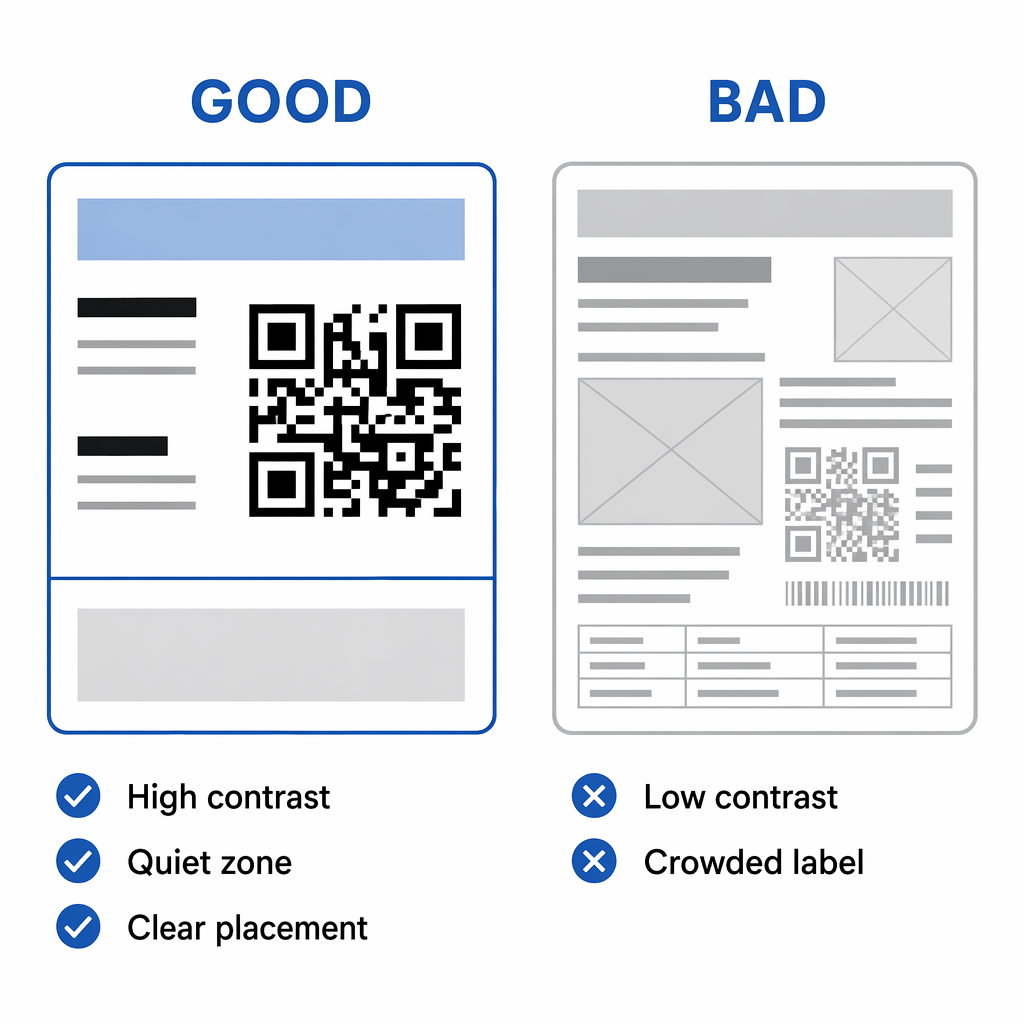
Para mantener una alta eficiencia, utilice siempre patrones oscuros sobre fondos claros y mantenga una “zona tranquila” o borde alrededor del código. Este borde ayuda al escáner a distinguir el código QR del texto o los gráficos circundantes en el empaque. Además, considere usar seguimiento de inventario en tiempo real herramientas que proporcionan análisis sobre ubicaciones y tiempos de escaneo, lo que le permite identificar cuellos de botella en el movimiento de su almacén.
La gestión eficaz del inventario requiere un equilibrio entre un diseño inteligente y una tecnología robusta. Al integrar códigos QR en su flujo de trabajo, crea un entorno transparente y resistente a errores que respalda una mejor toma de decisiones y un cumplimiento de pedidos más rápido. Comience auditando su stock actual y generando su primer conjunto de etiquetas dinámicas para ver cómo la automatización puede transformar sus operaciones diarias.
Preguntas frecuentes
Sí. La mayoría de los teléfonos inteligentes modernos tienen capacidades de escaneo integradas o pueden usar escáneres basados en la web para actualizar bases de datos de inventario al instante, eliminando la necesidad de hardware propietario costoso.
Los códigos QR cuentan con niveles de corrección de errores incorporados. Dependiendo de la configuración utilizada durante su creación, un código puede seguir siendo completamente funcional incluso si hasta el 30% del símbolo está oscurecido o dañado.
Los códigos QR dinámicos son generalmente mejores para el inventario porque permiten actualizar la información del producto vinculado o la URL de destino sin reimprimir las etiquetas físicas, ahorrando tiempo significativo y costos de material.