บ้าน > บล็อก > วิธีที่ QR โค้ดติดตามสินค้าคงคลังแบบเรียลไทม์
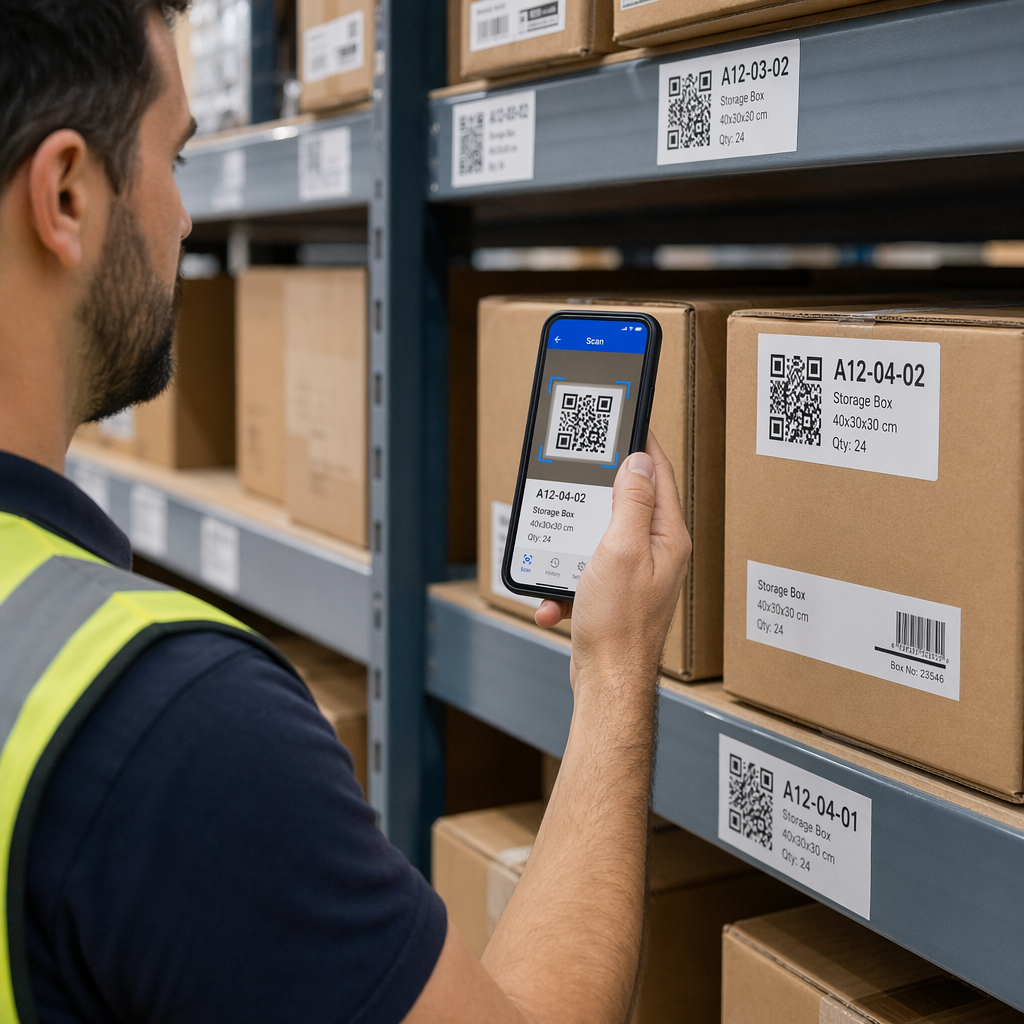
Worker scanning inventory

วิธีที่ QR โค้ดติดตามสินค้าคงคลังแบบเรียลไทม์

Learn how QR codes enable real-time inventory tracking to eliminate manual errors. This guide covers setup, dynamic labels, and automated warehouse tasks.
Updated on มิถุนายน 10, 2026
สารบัญ

Is your team still counting stock by hand or updating spreadsheets after every shipment? Manual inventory tracking is one of the leading causes of inaccurate stock data, and the ripple effects – missed orders, overstocking, and wasted time – add up fast. This guide explains how QR codes enable real-time inventory tracking, and how to set up a system that keeps your warehouse data accurate without expensive hardware.

Why Manual Inventory Tracking Falls Short

Nearly half of small businesses either skip inventory tracking entirely or rely on outdated manual methods. The core problem is straightforward: manual data entry is error-prone by nature. Missed details, incorrect counts, and inconsistent naming conventions create stock discrepancies that only get worse over time.

QR codes solve this by replacing manual entries with a scan-based system. Each scan instantly updates a central database, so your stock levels, storage locations, and movement history reflect what’s actually happening on the floor – not what someone recorded hours ago.

Compared to traditional 1D barcodes, QR codes hold significantly more data. While a standard barcode typically stores 20–85 characters, a QR code can hold over 7,000. That means a single label can encode a product name, SKU, batch number, supplier, storage location, and expiration date all at once – and the code remains readable even if up to 30% of it is physically damaged.

For a side-by-side look at how the two formats compare for warehouse use, see the barcode vs QR code comparison guide.

How Real-Time QR Inventory Tracking Works

When a worker scans a QR code label on a product or shelf location, that scan triggers an instant update in your inventory management system. Stock levels adjust automatically, movement history is logged with a timestamp, and managers see the change reflected in their dashboard in real time.

This flow depends on three components working together:

  • A QR code generator that creates unique, data-rich codes for each item or location
  • Durable labels affixed consistently to products, bins, shelves, or pallets
  • Inventory software connected to your QR platform via API or direct integration

Once this infrastructure is in place, everyday warehouse tasks – receiving shipments, fulfilling orders, running cycle counts – all become scan-based operations that update your database automatically.

Start Tracking Inventory in Real Time ใช้ Pageloot เครื่องสร้างรหัส QR to create unique, data-rich inventory labels and connect them to your management system today.

Setting Up Your QR Inventory System

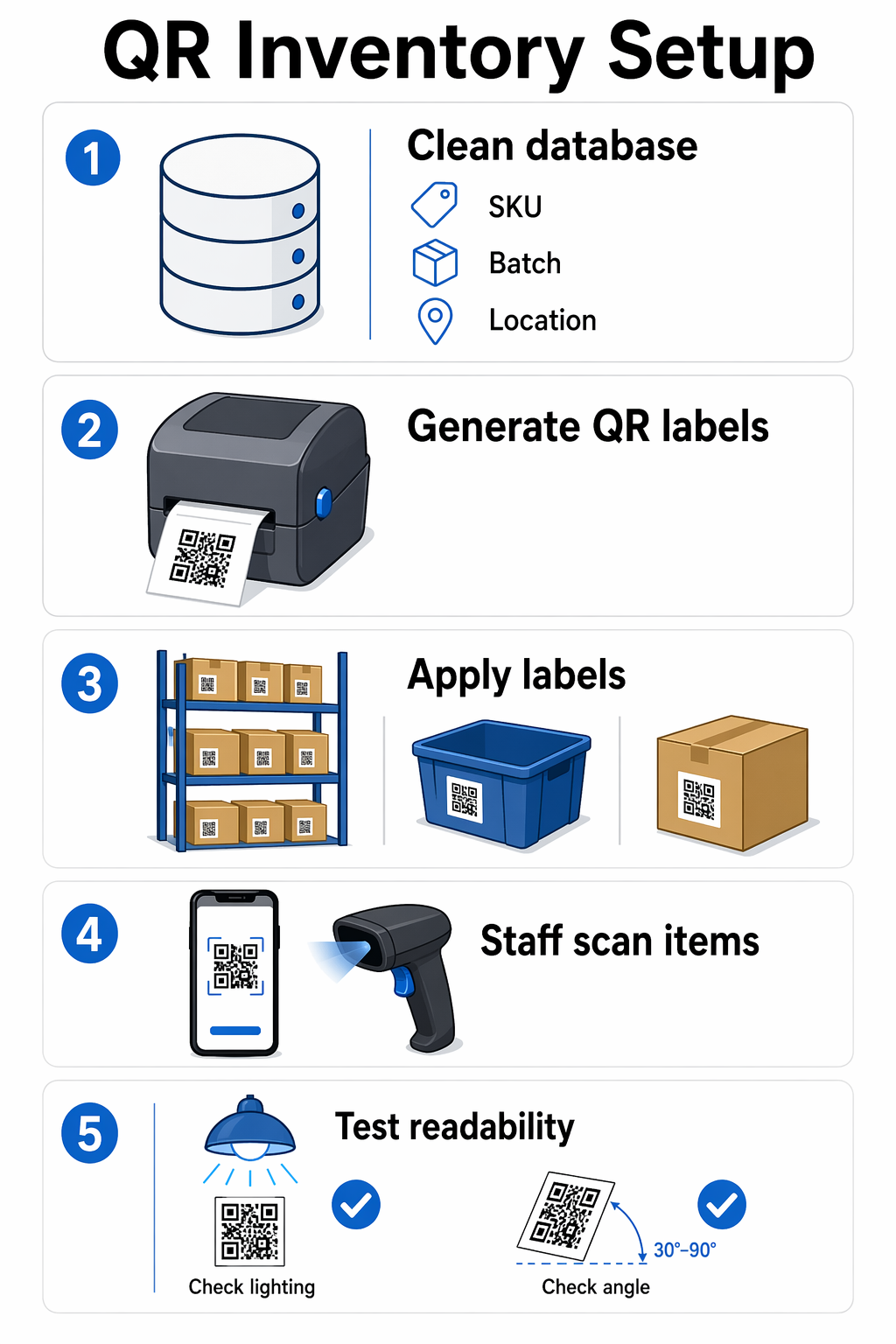
Step 1: Audit and Prepare Your Inventory Data

Before generating a single label, clean up your existing records. Fix duplicate SKUs, standardize product naming, and decide which data points each QR code will represent – such as product name, SKU, lot number, quantity, and storage location. Building a system on messy data produces messy results.

QR inventory setup

Also define your warehouse “address system” at this stage. Assign logical identifiers to aisles, shelves, and bins (for example, A1-S3-B2 for Aisle 1, Shelf 3, Bin 2) so that location QR codes link unambiguously to a specific physical spot.

Step 2: Generate Unique QR Codes

Use a reliable QR code generator to create a distinct code for each item, batch, or storage location. Each code should encode a unique identifier – such as a SKU or location address – that links back to the corresponding record in your inventory database.

For detailed guidance on this step, the QR codes for product inventory guide walks through the full process, from inputting product details to downloading print-ready labels.

Before printing in bulk, test a sample batch. Scan each code with a smartphone or dedicated scanner to confirm it reads correctly and pulls the expected data.

If you also need traditional barcodes for supplier compatibility or retail point-of-sale, the barcode generator guide covers format selection and print specifications.

Step 3: Print and Place Labels Consistently

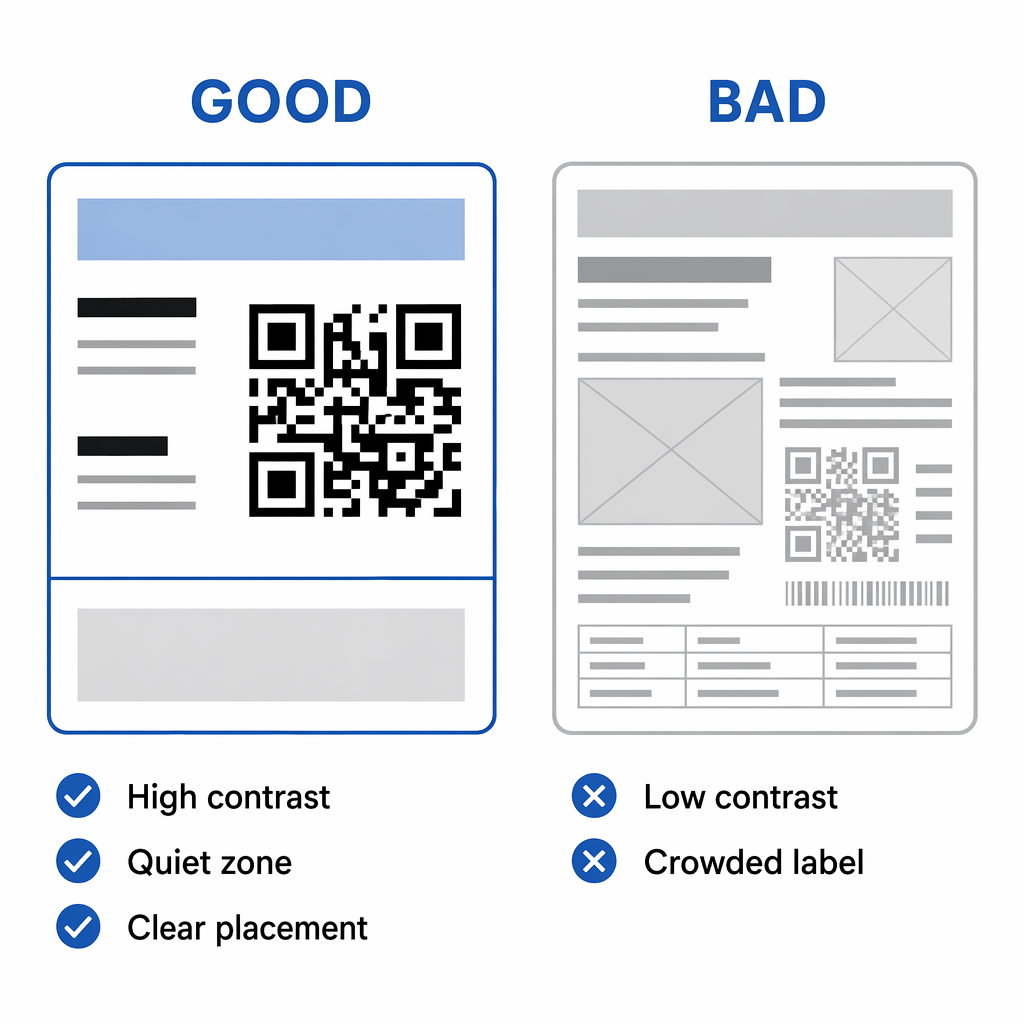
Print QR codes at sufficient size and resolution – labels intended for standard warehouse scanners should be at least 1 × 1 inch, printed at a minimum of 300 DPI with high contrast (black on white is most reliable). Always maintain a clear quiet zone around the code.

Placement consistency matters as much as print quality. Affix labels to the same position on every item – for example, the upper-left corner of each box. For shelves and bins, place labels at eye level where they won’t be obscured by product. In harsh environments (cold storage, outdoor areas, high-traffic zones), use laminated or industrial-grade adhesive vinyl to prevent wear.

A color-coding system can layer on additional utility: blue for finished goods, green for raw materials, yellow for storage areas. Staff can identify what they’re scanning at a glance without reading every label.

Step 4: Integrate with Your Inventory Software

Connect your QR code platform to your inventory management system using API connections or standard data formats like CSV. Once integrated, each scan automatically pushes updates – quantity changes, location moves, receipt confirmations – directly into your database.

Most modern inventory platforms support 2D barcode input natively, so the technical barrier is low. Workers only need a smartphone; no proprietary scanning hardware required. The เครื่องสแกนรหัส QR ของ Pageloot works directly from a browser, and the เครื่องสแกนบาร์โค้ด handles traditional formats when needed alongside QR.

Configure reorder alerts at this stage as well. When a scanned item’s quantity falls below a defined threshold, the system notifies the relevant team member automatically – removing the need for manual stock checks to trigger purchasing.

Step 5: Start with a Pilot Zone

Rather than labeling your entire facility at once, start with a single zone or your fastest-moving product category. Test scanning accuracy, confirm the software integration is updating records correctly, and gather feedback from the staff doing the scanning. Then expand across the rest of the warehouse once the workflow is validated.

Using Dynamic QR Codes for Ongoing Accuracy

Static QR codes store fixed data – once printed, that data cannot change. รหัส QR แบบไดนามิก work differently: they store a short redirect URL that points to editable content in your inventory platform. This means you can update stock levels, pricing, storage locations, or product details without reprinting the physical label.

For inventory tracking, this has practical implications:

  • Correct a data error by editing the linked record – no reprint needed
  • Update a product’s storage location after a warehouse reorganization
  • Refresh pricing or batch information across hundreds of items simultaneously
  • Marketing or product teams can update product descriptions without touching warehouse operations

Dynamic codes also unlock analytics. Every scan is logged with a timestamp, device type, and location, giving you a data trail of product movement. You can identify peak activity periods, flag workflow bottlenecks, and see which areas of your warehouse are generating the most scan traffic.

Inventory analytics dashboard

For a detailed comparison of when to use each format, see โค้ด QR แบบคงที่เทียบกับแบบไดนามิก.

To understand how scan data is captured and what metrics to monitor, the QR code tracking guide covers the fundamentals in detail.

Update Inventory Data Without Reprinting Pageloot’s dynamic QR codes let you edit linked content anytime from a central dashboard. Try the Dynamic QR Code Generator free for 14 days.

QR Code Workflows for Common Inventory Tasks

Once your system is running, QR codes streamline the most repetitive warehouse tasks:

  • Receiving shipments: Staff scan QR codes on incoming goods to log arrival time, quantity, batch number, and supplier details instantly. Stock levels update before the item reaches the shelf.
  • Stock picking and order fulfillment: Workers scan product QR codes during picking to confirm item selection and automatically decrement inventory counts. For a closer look at how this integrates with fulfillment, see how QR codes streamline order fulfillment.
  • Cycle counting: During inventory audits, scanning a QR code displays the current system count on-screen. Staff compare it against the physical count and flag discrepancies immediately, rather than reconciling at month-end.
  • Shipment tracking: QR codes on outbound packages update in real time as items move through the shipping process, giving internal teams visibility from dispatch through delivery.
  • Supply chain traceability: QR codes integrated with a WMS or ERP system create a complete audit trail for every product – useful for quality control, recalls, and compliance. The QR codes for supply chain tracking guide covers this in depth.

Advanced Features Worth Knowing

Branding and Visual Organization

QR codes don’t need to be generic black squares. Adding your company logo, brand colors, or category-specific design elements makes codes easier to trust and faster to identify. Pageloot’s generator supports logo placement, color customization, and design templates – useful for customer-facing products or multi-location operations where visual differentiation helps staff work faster.

Analytics and Trend Identification

Scan analytics go beyond basic counts. Time-stamped data shows peak warehouse activity, geographic scan distribution reveals whether storage placement is efficient, and per-item scan frequency highlights which products move fastest. If a product shows a significant scan spike during specific months, you can adjust procurement schedules before a stockout occurs.

Real-time dashboards present this data in charts and graphs, making it accessible for daily operational decisions rather than just end-of-month reporting.

Security and Access Control

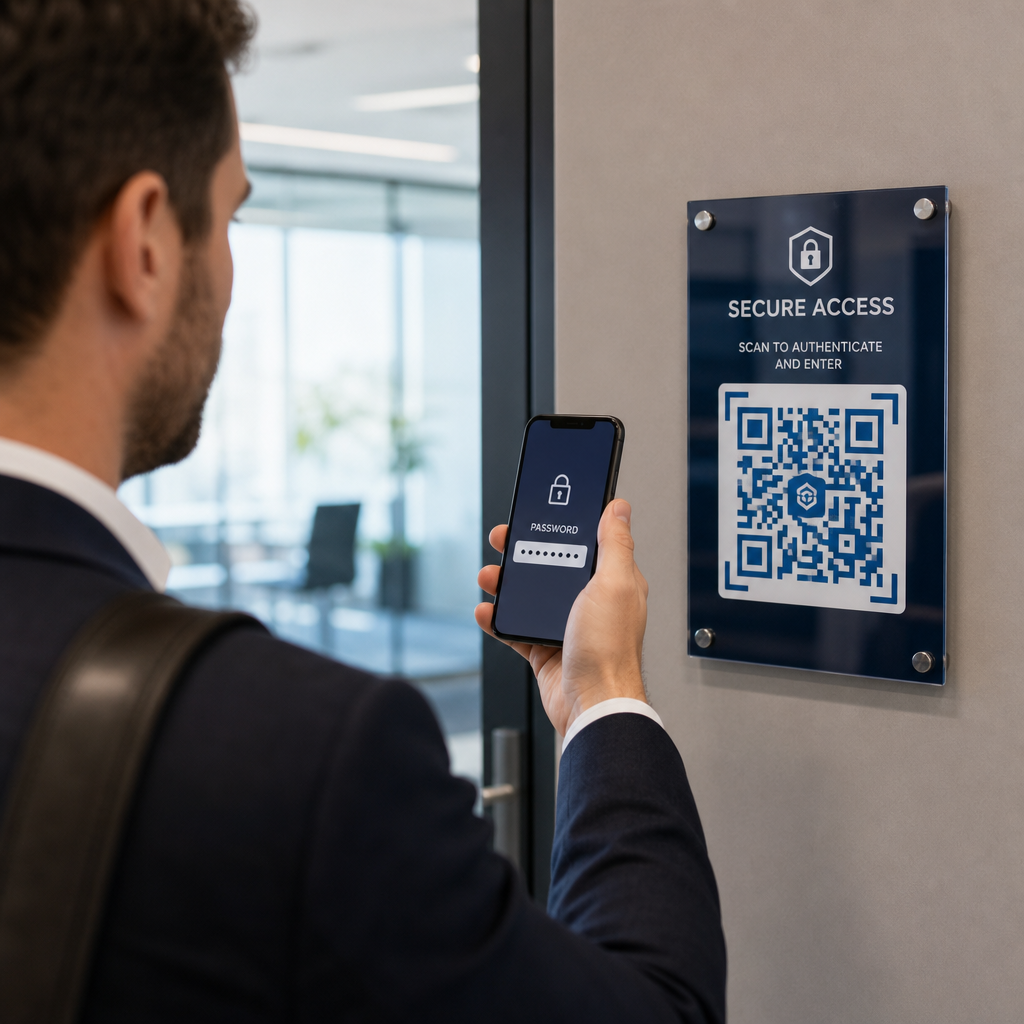
Role-based permissions let you define what each team member can do when they scan a QR code. Warehouse staff may only update stock levels, while managers can access analytics and edit QR content. Administrators control code creation and user permissions.

Additional controls – password protection, time-based access restrictions, and location-based rules (limiting scans to approved IP addresses or physical zones) – are especially valuable for high-value inventory or regulated industries. Every interaction is logged in an audit trail, creating a transparent record of who accessed what and when.

Industry Applications

การผลิต

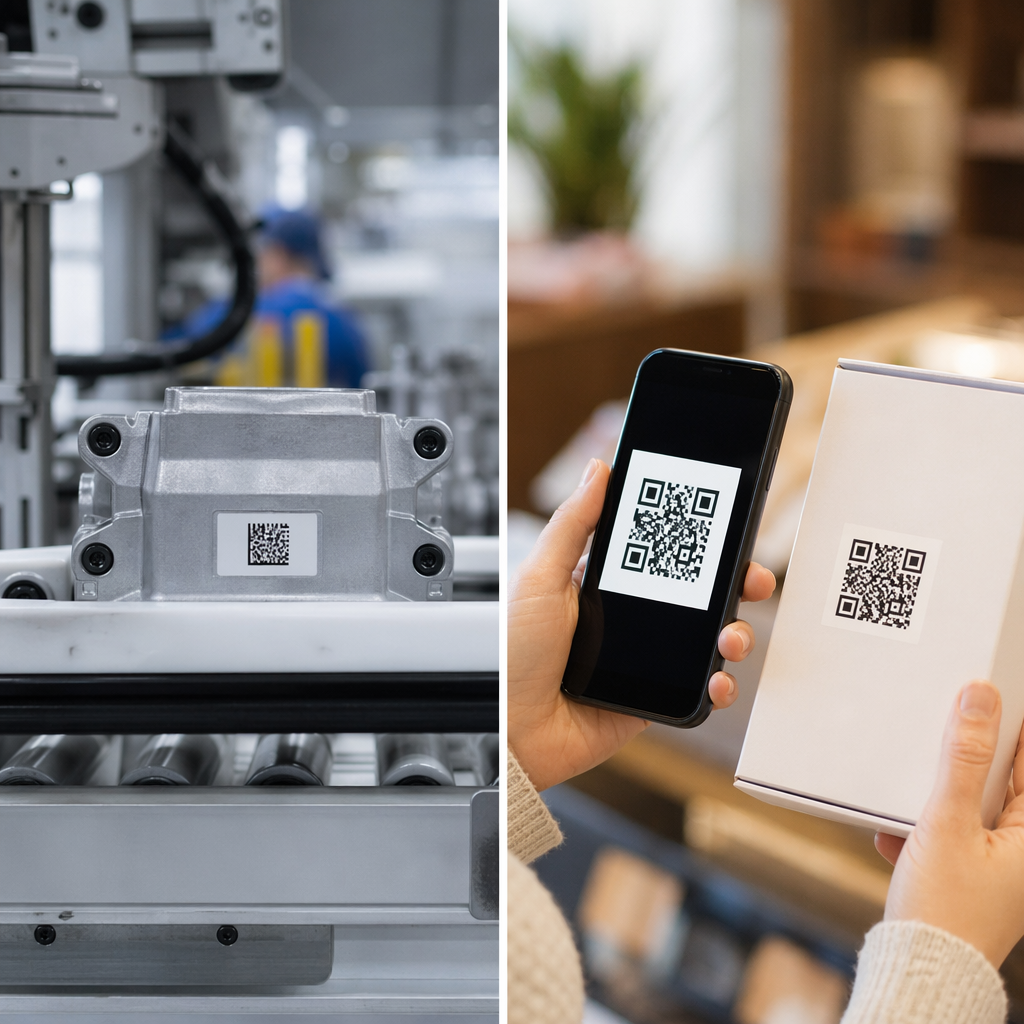
In manufacturing environments, QR codes follow components from raw material intake through finished product. Each scan logs production date, batch number, quality control status, and storage location. If a defect is identified, the QR data trail allows manufacturers to isolate affected units precisely – reducing the scope and cost of recalls.

QR codes also support just-in-time production by giving suppliers real-time visibility into consumption rates, enabling dynamic adjustments to delivery schedules.

For a broader view of how QR codes support tracking across the full product lifecycle, see QR codes for product lifecycle tracking.

Retail and Multi-Location Operations

Retailers use QR codes to sync inventory across warehouses, distribution centers, and storefronts. When stock levels update in real time across all locations, overselling becomes far less likely and customer satisfaction improves.

Warehouse navigation also benefits: location QR codes on shelves help workers find items faster in large facilities, while product codes provide instant access to handling instructions, expiration dates, and shipping destinations.

Putting It Into Practice

QR codes are one of the most cost-effective tools available for real-time inventory accuracy. They require no proprietary hardware, integrate with most modern inventory platforms, and scale from a single stockroom to a multi-site distribution network.

The practical starting point is straightforward: clean your existing inventory data, generate unique QR codes for your products and storage locations, print durable labels, connect your QR platform to your inventory software, and run a pilot in one zone before expanding.

For ongoing accuracy, dynamic QR codes eliminate the need to reprint labels when data changes, and scan analytics give you the visibility to make proactive decisions about stocking, layout, and fulfillment.

Build Your QR Inventory System Today Create and manage inventory QR codes from one dashboard with the Pageloot เครื่องสร้างรหัส QR – free to start, no credit card required.

คำถามที่พบบ่อย

What is the difference between static and dynamic QR codes for inventory tracking?

Static QR codes contain fixed data that cannot be changed after printing. Dynamic QR codes store a redirect URL, which means the linked information – stock levels, storage locations, product details – can be updated at any time without reprinting the label. For inventory systems where data changes regularly, dynamic QR codes are the practical choice because they eliminate reprinting costs and reduce the risk of labels becoming outdated.

Do I need specialized scanning hardware to run a QR inventory system?

No. Most modern smartphones can scan QR codes using their built-in camera or a browser-based tool like the Pageloot QR code scanner. This eliminates the need for expensive dedicated scanners, which is one reason QR-based inventory tracking is accessible for small businesses. Dedicated barcode scanners can still be used when higher throughput is needed in busy warehouse environments.

How do I connect QR codes to my inventory management software?

Most modern inventory platforms support 2D barcode input and API connections. You configure your QR code generator to encode item identifiers or URLs that map to records in your database. When a QR code is scanned, the linked identifier triggers an update in your inventory system – adjusting stock levels, logging movement, or pulling up item details. The Pageloot platform supports API connections and standard data formats like CSV to make this integration straightforward.

เกี่ยวกับผู้เขียน

Siim Kostabi เป็นหัวหน้าฝ่ายเนื้อหาของ Pageloot เขาเขียนบทความเกี่ยวกับบริการสร้างรหัส QR ที่ล้ำสมัยของเรา ด้วยความเชี่ยวชาญอย่างลึกซึ้งในด้านรหัส QR มากว่าห้าปี Siim จึงเป็นผู้เชี่ยวชาญในสาขานี้ เขาได้สร้างความก้าวหน้าอย่างมากในการใช้เทคโนโลยี QR เพื่อทำให้การโต้ตอบทางดิจิทัลง่ายขึ้นและมีประสิทธิภาพมากขึ้น.

หมวดหมู่
ดูข้อมูลเพิ่มเติมเกี่ยวกับ

หากคุณต้องการสร้างรหัส QR ออนไลน์คุณสามารถทำได้ สร้างรหัส QR ที่นี่ฟรี!
Pageloot คือไฟล์ โซลูชัน Go-To #1 เพื่อสร้างและสแกนรหัส QR

BL-0215

ได้รับความไว้วางใจจากแบรนด์ต่างๆ มากกว่า 20,000 แบรนด์เพื่อเพิ่มยอดขาย รีวิว และจำนวนผู้ติดตาม

โลโก้ของลูกค้า
ได้รับความไว้วางใจจากแบรนด์ชั้นนำ
ให้คะแนน 4.8 จาก 5

คะแนน 4.86 / 5 ดาว

Hugo Laurent
Hugo Laurent
เจ้าของร้านอาหาร
เครื่องสร้างรหัส QR ที่ง่ายและน่าเชื่อถือที่สุดเท่าที่เคยมีมา ไฟล์ PDF สามารถอัพโหลดได้ทันที เมนูร้านอาหารของเราเป็นแบบดิจิทัล
ลูคัส แจนเซ่น
ลูคัส แจนเซ่น
ผู้พัฒนาอสังหาฯ
นี่เป็นเครื่องมือที่ยอดเยี่ยมและรหัส QR จะพาคุณไปยังที่ที่คุณต้องการ เราใช้รหัส QR ของตำแหน่งเท่านั้น แต่มีคุณสมบัติที่มีประโยชน์มากมาย
Emma Moretti
Emma Moretti
สินค้าขายปลีก
ใช้งานง่ายและรวดเร็ว มันใช้งานได้ดีและสร้างภาพที่สมบูรณ์แบบ ดังนั้นพนักงานสามารถดาวน์โหลด vCard ของฉันได้
Hugo Laurent
Hugo Laurent
เจ้าของร้านอาหาร
เครื่องสร้างรหัส QR ที่ง่ายและน่าเชื่อถือที่สุดเท่าที่เคยมีมา ไฟล์ PDF สามารถอัพโหลดได้ทันที เมนูร้านอาหารของเราเป็นแบบดิจิทัล
ลูคัส แจนเซ่น
ลูคัส แจนเซ่น
ผู้พัฒนาอสังหาฯ
นี่เป็นเครื่องมือที่ยอดเยี่ยมและรหัส QR จะพาคุณไปยังที่ที่คุณต้องการ เราใช้รหัส QR ของตำแหน่งเท่านั้น แต่มีคุณสมบัติที่มีประโยชน์มากมาย
Emma Moretti
Emma Moretti
สินค้าขายปลีก
ใช้งานง่ายและรวดเร็ว มันใช้งานได้ดีและสร้างภาพที่สมบูรณ์แบบ ดังนั้นพนักงานสามารถดาวน์โหลด vCard ของฉันได้
ดูรหัส QR เพิ่มเติม
Worker scanning QR code
รหัส QR สำหรับ การก่อสร้าง
โปสเตอร์สแกนคิวอาร์โค้ด
คิวอาร์โค้ด วิธีการสร้าง
เปลี่ยนทุกสิ่งให้กลายเป็นประสบการณ์ดิจิทัล ในเวลาไม่ถึง 3 นาที

ทดลองใช้งานฟรี 14 วัน

ไม่ต้องใช้บัตรเครดิต

รับส่วนลด 30% จากการซื้อครั้งแรกของคุณ

ใช้โค้ด:

แชร์ไฟล์ MP3 ของคุณ

ลงทะเบียนเพื่อสร้างรหัส PDF QR

อัปโหลดและแสดงทุกสิ่งที่คุณต้องการ:

  • ไฟล์เสียง
  • พอดคาสต์
  • ดนตรี

ทดลองใช้ฟรี 14 วันเมื่อลงทะเบียน.
รหัส QR จะหมดอายุหลังจากการทดลองใช้.

ลงทะเบียนเพื่อสร้างรหัส QR เสียง mp3

รับการสแกนเพิ่มขึ้นด้วยกรอบ

ลงทะเบียนเพื่อเพิ่มเฟรมให้กับโค้ด QR ของคุณ

กรอบคำกระตุ้นการตัดสินใจช่วยให้ลูกค้าโต้ตอบกับ QR Code ได้อย่างง่ายดาย ลองพวกเขา!

ทดลองใช้ฟรี 14 วันเมื่อลงทะเบียน.
รหัส QR จะหมดอายุหลังจากการทดลองใช้.

ลงทะเบียนเพื่อเพิ่มเฟรมให้กับโค้ด QR ของคุณ

เพิ่มสไตล์ด้วยรูปทรง

ลงทะเบียนเพื่อสร้างรูปร่างเพิ่มเติม

รหัส QR ไม่จำเป็นต้องเป็นรูปสี่เหลี่ยมจัตุรัส ลองเปลี่ยนให้เหมาะกับภาพลักษณ์ของแบรนด์คุณ

ทดลองใช้ฟรี 14 วันเมื่อลงทะเบียน.
รหัส QR จะหมดอายุหลังจากการทดลองใช้.

ลงทะเบียนเพื่อสร้างรูปร่างเพิ่มเติม

เพิ่มโลโก้ลงในรหัส QR ของคุณ

ลงทะเบียนเพื่อเพิ่มโลโก้ของคุณลงในรหัส QR

ทำให้รหัส QR ของคุณโดดเด่นด้วยการเพิ่มโลโก้และแบรนด์ของคุณลงไป

ทดลองใช้ฟรี 14 วันเมื่อลงทะเบียน.
รหัส QR จะหมดอายุหลังจากการทดลองใช้.

ลงทะเบียนเพื่อเพิ่มโลโก้ของคุณลงในรหัส QR

การเปลี่ยนเส้นทางไปยัง App Store อัจฉริยะ

ลงทะเบียนเพื่อสร้างรหัส QR ของ App Store

เพิ่มลิงค์แอพของคุณไปยัง QR Code ของ App Store อันชาญฉลาดของเรา ผู้ใช้จะถูกเปลี่ยนเส้นทางตามอุปกรณ์ของพวกเขา

ทดลองใช้ฟรี 14 วันเมื่อลงทะเบียน.
รหัส QR จะหมดอายุหลังจากการทดลองใช้.

ลงทะเบียนเพื่อสร้างรหัส QR ของ App Store

อัปโหลดรูปภาพไปยังรหัส QR

ลงทะเบียนเพื่อสร้างรหัส QR รูปภาพ

แบ่งปันภาพของคุณได้อย่างง่ายดาย เปลี่ยนภาพแบบไดนามิกภายในไม่กี่วินาที

ทดลองใช้ฟรี 14 วันเมื่อลงทะเบียน.
รหัส QR จะหมดอายุหลังจากการทดลองใช้.

ลงทะเบียนเพื่อสร้างรหัส QR รูปภาพ

แชร์ไฟล์ PDF ของคุณ

ลงทะเบียนเพื่อสร้างรหัส PDF QR

อัปโหลดและแสดงทุกสิ่งที่คุณต้องการ:

  • รายการเมนูและราคา
  • คำแนะนำ
  • เอกสารใด ๆ

ทดลองใช้ฟรี 14 วันเมื่อลงทะเบียน.
รหัส QR จะหมดอายุหลังจากการทดลองใช้.

ลงทะเบียนเพื่อสร้างรหัส PDF QR

แก้ไขภายหลังโดยไม่ต้องพิมพ์

ลงทะเบียนเพื่อแก้ไขรหัส QR ของคุณโดยไม่ต้องพิมพ์อีกครั้ง

รหัส QR แบบไดนามิกช่วยให้คุณเปลี่ยนเนื้อหาของรหัส QR ของคุณโดยไม่ต้องพิมพ์ใหม่

ทดลองใช้ฟรี 14 วันเมื่อลงทะเบียน.
รหัส QR จะหมดอายุหลังจากการทดลองใช้.

ลงทะเบียนเพื่อแก้ไขรหัส QR ของคุณโดยไม่ต้องพิมพ์อีกครั้ง

เมื่อไหร่? ที่ไหน? ติดตามการสแกนรหัส QR ของคุณ

ลงทะเบียนเพื่อติดตามรหัส QR ของคุณ

ค้นพบว่ารหัส QR ใดของคุณได้รับการสแกนมากที่สุดและอะไรที่ทำให้ลูกค้าของคุณตื่นเต้นมากที่สุด

ทดลองใช้ฟรี 14 วันเมื่อลงทะเบียน.
รหัส QR จะหมดอายุหลังจากการทดลองใช้.

ลงทะเบียนเพื่อติดตามรหัส QR ของคุณ

มีไฟล์พร้อมพิมพ์

ลงทะเบียนเพื่อสร้างโค้ด QR เวกเตอร์ เช่น PDF และ SVG

.EPS, .PDF, .SVG

ต้องการดาวน์โหลดรหัส QR ของคุณในความละเอียดระดับ HD หรือไม่? รับรูปแบบเวกเตอร์หรือพิกเซลที่พร้อมพิมพ์

ทดลองใช้ฟรี 14 วันเมื่อลงทะเบียน.
รหัส QR จะหมดอายุหลังจากการทดลองใช้.

ลงทะเบียนเพื่อสร้างโค้ด QR เวกเตอร์ เช่น PDF และ SVG

โปรดรอ. รหัส QR ของคุณคือ กำลังโหลด... กำลังโหลด...

สร้างสรรค์ในแบบของคุณเอง

ลงทะเบียนเพื่อบันทึกรหัส QR ของคุณไว้ใช้ในภายหลัง

รับการสแกนมากขึ้นด้วยการสร้างรหัส QR ที่ยอดเยี่ยมด้วยสี โลโก้ และกรอบคำกระตุ้นการตัดสินใจที่แตกต่างกัน

ทดลองใช้ฟรี 14 วันเมื่อลงทะเบียน.
รหัส QR จะหมดอายุหลังจากการทดลองใช้.

ลงทะเบียนเพื่อบันทึกรหัส QR ของคุณไว้ใช้ในภายหลัง