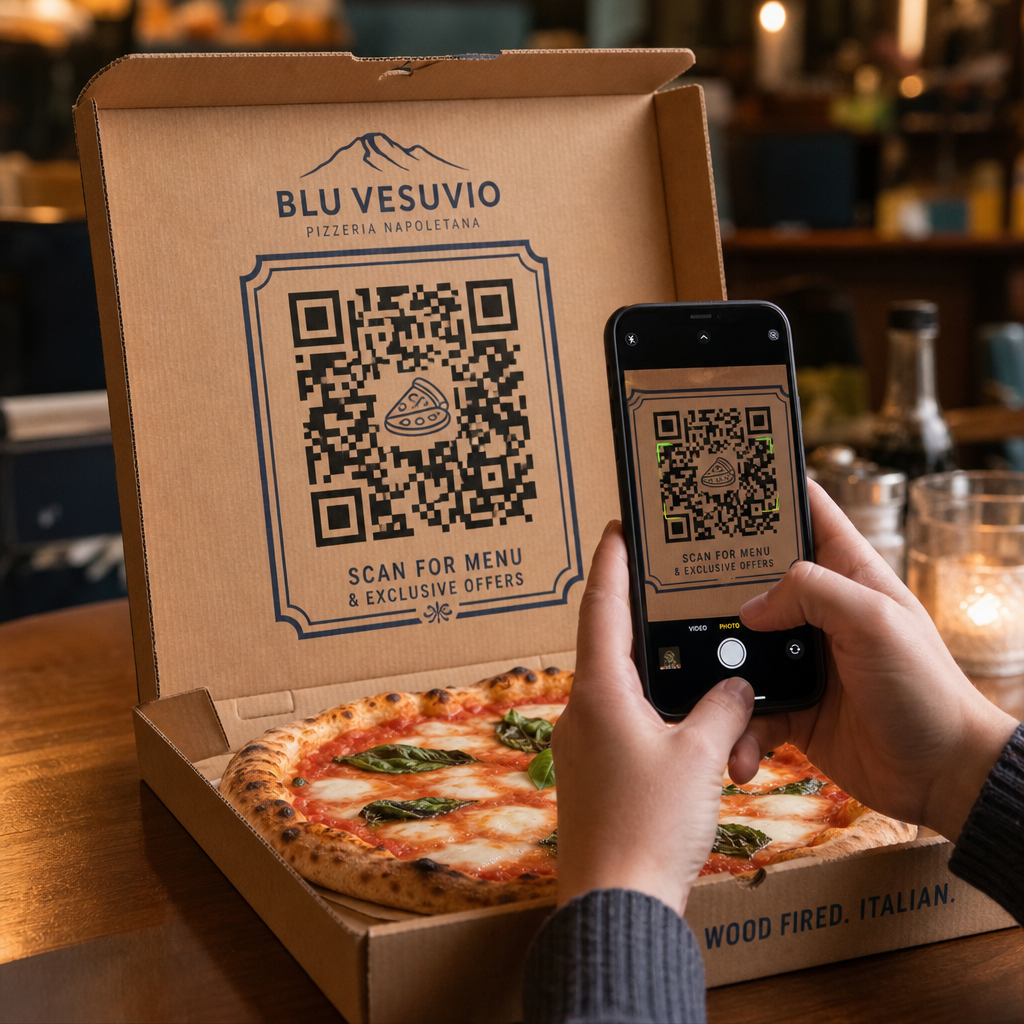

Wie verwandelt man einen Standard-Pizzakarton in eine zuverlässige Quelle für wiederkehrende Bestellungen? Die meisten Lieferverpackungen werden weggeworfen, ohne zukünftige Verkäufe zu fördern oder Kunden über die Mahlzeit hinaus zu binden. Das Drucken strategischer QR-Codes direkt auf Ihre Pizzakartons schafft einen interaktiven Berührungspunkt, der direkte Bestellungen, Feedback und Kundenbindung fördert.
Warum Pizzakartons erstklassige Werbeflächen für QR-Codes sind
Wenn Kunden eine frische Pizza erhalten, steht Ihr Karton 15 bis 30 Minuten lang direkt vor ihnen. Dies bietet ein spezielles Zeitfenster für die Kundenaufmerksamkeit während eines angenehmen Erlebnisses. Herkömmliche Kartondrucke basieren auf statischen Telefonnummern oder einfachen Logos, aber das Hinzufügen eines scanbaren Barcodes verwandelt passive Pappe in einen aktiven digitalen Vertriebskanal.
Die Nutzung von Verpackungen, um Kunden auf digitale Kanäle zu lenken, begegnet einer kritischen Herausforderung der Branche: hohen Provisionsgebühren von Drittanbieter-Lieferdiensten. Kunden dazu zu ermutigen, einen Kartoncode für ihre nächste Bestellung zu scannen, ermöglicht es Pizzerien, Drittanbieter-Käufer in direkte, profitable Kunden umzuwandeln. Die Implementierung intelligenter Tools, zugeschnitten auf QR-Code-Marketing für Restaurants gibt lokalen Pizzerien die volle Kontrolle über Kundenbeziehungen und Bestellmargen.
Strategische Wege zur Nutzung von QR-Codes auf Pizzakartons
Ein QR-Code auf einem Pizzakarton muss einen klaren Mehrwert bieten, um einen hungrigen Kunden zum Scannen zu überzeugen. Der Einsatz gezielter Werbekampagnen auf Ihrer Verpackung hilft, spezifische Geschäftsziele zu erreichen:
- Direkte Online-Nachbestellungen fördern: Leiten Sie Kunden von Liefer-Apps Drittanbieter weg, indem Sie exklusive Essensangebote machen, wenn sie über Ihre primäre Website bestellen. Die Verwendung eines dedizierten Menü QR-Code erstellen ermöglicht Ihnen, direkt auf eine mobilfreundliche Online-Speisekarte zu verlinken.
- Gezielte Rabatte und Wiederkaufsangebote liefern: Fügen Sie einen Aufruf zum Handeln wie „Scannen Sie für 5 $ Rabatt auf Ihre nächste Bestellung“ hinzu, um Wiederholungsbesuche zu fördern. Das Verknüpfen des Codes mit einem flexiblen Gutschein QR-Code Generator präsentiert übersichtliche Rabattgutscheine, die zu zukünftigen Käufen anregen.
- Authentische Google-Bewertungen sammeln: Zufriedene Gäste hinterlassen am ehesten positives Feedback direkt nach einem großartigen Essen. Wenn Sie Ihren Code über einen QR-Code für Google Bewertung erstellen leiten Sie Kunden mit einem einzigen Scan direkt auf Ihre Bewertungsseite.
- Bewerben Sie Social-Media-Wettbewerbe und Giveaways: Ermutigen Sie Gäste, Fotos ihrer Mahlzeit mit einem benutzerdefinierten Hashtag zu posten, um die Chance zu haben, eine kostenlose Pizza zu gewinnen. Eine mit einem [Multi-Link Landing Page Generator] erstellte Multi-Link-Landingpage Link-QR-Code-Generator führt Nutzer zu Ihren sozialen Profilen, Bewertungsformularen oder zur Registrierung für Ihr Treueprogramm.
Steigern Sie noch heute Ihre direkten Pizzabestellungen Möchten Sie Take-out-Verpackungen in wiederholbare Online-Verkäufe umwandeln? Nutzen Sie den Menü QR-Code erstellen , um ein schnelles, mobilfreundliches Bestellerlebnis für Ihre Pizzeria zu schaffen.
Technische Standards für den Druck auf Wellpappverpackungen
Wellpappe stellt besondere Druckherausforderungen dar, darunter hohe Farbabsorption, raue Textur und Oberflächenvariationen. Die Einhaltung standardmäßiger technischer Druckrichtlinien stellt sicher, dass Ihre Box-Codes leicht scanbar bleiben:
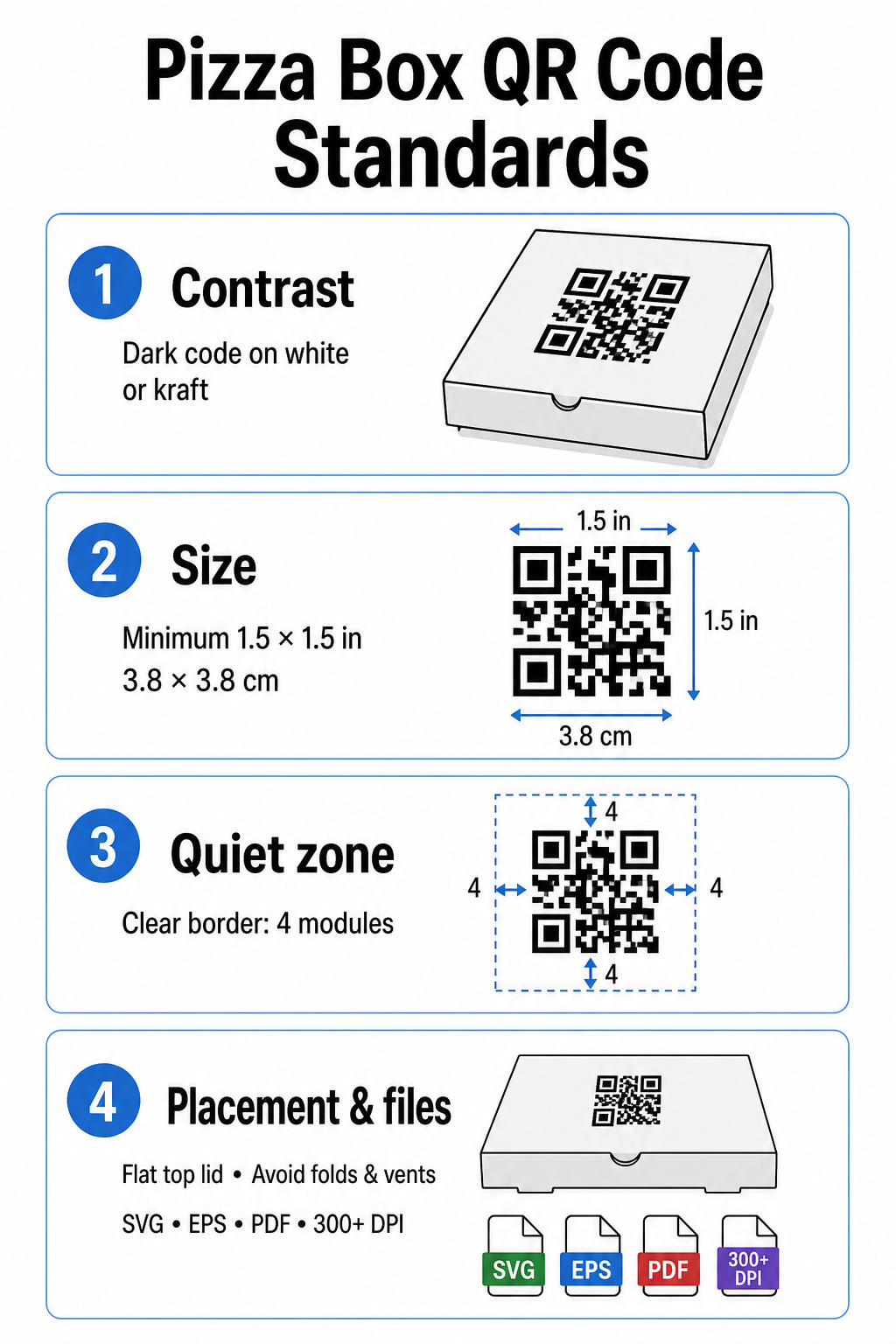
Kontrast- und Farbauswahl
Scanner benötigen einen hohen Kontrast, um dunkle Module von hellen Flächen zu unterscheiden. Drucken Sie dunkle Module immer auf einem hellen Hintergrund, wie z. B. fester schwarzer Tinte auf Standard-Weiß- oder Kraftkarton. Vermeiden Sie hell-auf-dunkel-Inversionen, reflektierende Metallic-Tinten oder kontrastarme Kombinationen wie Rot auf braunem Kraftpapier. Detaillierte Anforderungen an Tinte und Substrate können in unserer Analyse von [QR code color contrast] eingesehen werden. wie Drucktechniken die Scanbarkeit beeinflussen.
Codegröße und Ruhezone
Kartontexturen erfordern größere Codes als glatte Papieroberflächen. Drucken Sie Ihren Pizzakarton-QR-Code in einer Mindestgröße von 1,5 x 1,5 Zoll (3,8 x 3,8 cm). Halten Sie einen klaren Rand um den Code – bekannt als Ruhezone – ein, der auf allen Seiten mindestens vier Module breit ist. Halten Sie alle Texte, Grafiken und Schnittlinien der Box vollständig außerhalb dieser Begrenzung.
Platzierung und Kartongeometrie
Platzieren Sie den Code auf einer ebenen Fläche, idealerweise nahe der Mitte des oberen Deckels, wo die Augen vor dem Öffnen der Schachtel natürlich hinschauen. Vermeiden Sie es, Codes über Falten, Rillen, Dampföffnungen oder von Klebeband oder Sicherheitsetiketten bedeckten Bereichen zu platzieren. Weitere Positionierungsideen sind in unserer Übersicht zu QR-Code-Platzierung im Marketing.
Auflösung und Artwork-Dateitypen
Exportieren Sie Artworks als skalierbare Vektordateien (.SVG, .EPS oder druckfertiges .PDF) anstatt als Rasterbilder (.JPG oder .PNG). Das Drucken von Artworks mit einer Auflösung von 300 DPI oder höher verhindert unscharfe Kanten, wenn Tinte in unbeschichtete Wellpappe-Fasern eindringt. Für umfassendere Best Practices im Bereich Verpackung, erkunden Sie unsere Anleitungen zu QR-Codes auf Produktverpackungen und QR-Codes auf Lebensmittelverpackungen.
Ergebnisse maximieren mit dynamischen QR-Codes
Der Druck von Tausenden von individuellen Pizzaschachteln erfordert eine erhebliche finanzielle Investition. Die Verwendung statischer QR-Codes birgt ein Betriebsrisiko, falls sich ein Ziellink ändert, ein Angebot abläuft oder ein Menü aktualisiert wird.
Dynamische QR-Codes lösen dieses Problem, indem sie das gedruckte Muster vom Ziellink entkoppeln. Sie können die zugrunde liegende Ziel-URL jederzeit in Ihrem Plattform-Dashboard aktualisieren, ohne das Verpackungsinventar neu drucken zu müssen. Dies ermöglicht es Ihnen, saisonale Angebote zu schalten, Kampagnen-Landingpages auszutauschen oder Links zur Online-Bestellung zu aktualisieren, während Sie dasselbe Schachtelinventar verwenden.
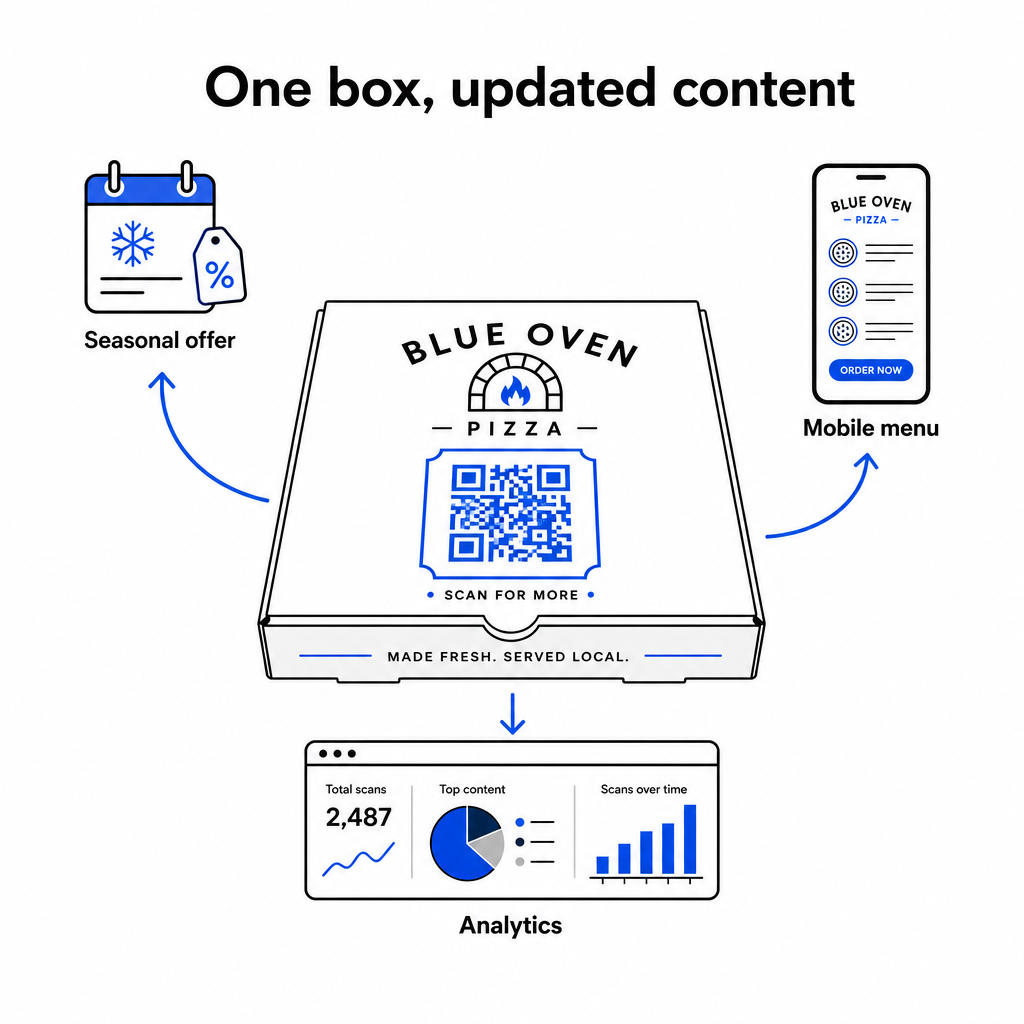
Dynamische Codes bieten auch eine umfassende Leistungsmessung. Durch die Nutzung von Software für Verfolgung von QR-Codes, können Sie das gesamte Scanvolumen, den Scanzeitpunkt, die Gerätetypen der Kunden und die geografischen Scanorte überwachen, um die Kampagnenleistung im Laufe der Zeit zu bewerten.
Wenn Sie QR-Codes verwenden, um Kontaktdaten zu sammeln, E-Mail-Listen aufzubauen oder Kunden in SMS-Marketingprogramme einzuschreiben, stellen Sie sicher, dass Ihre Landingpages explizite Einwilligungserklärungen enthalten, die den relevanten Datenschutzbestimmungen und Telekommunikationsrichtlinien entsprechen.
Praktische Schritte zum Start Ihrer Pizzaschachtel-Kampagne
Die Verwendung von Pizzaschachteln als aktiver Marketingkanal verbindet Offline-Gastronomie mit digitaler Kundenbindung. Befolgen Sie diese praktischen Schritte, um Ihre Kampagne effektiv umzusetzen:
- Definieren Sie ein klares Kampagnenziel, wie die Steigerung direkter Nachbestellungen oder die Förderung von Online-Bewertungen.
- Generieren Sie einen dynamischen QR-Code, gepaart mit einem expliziten Call-to-Action (z.B. “Scannen, um 5 $ Rabatt auf Ihre nächste direkte Bestellung zu erhalten”).
- Formatieren Sie die Grafik auf mindestens 1,5 Zoll im Quadrat mit hohem Kontrast und einer vier Module umfassenden Ruhezone.
- Testen Sie gedruckte Muster mit mehreren Smartphone-Modellen unter verschiedenen Lichtverhältnissen, bevor Sie mit der Massenproduktion der Boxen beginnen.
Beginnen Sie noch heute mit den Pageloot-Tools, gebrandete, verfolgbare Codes zu erstellen, um Ihre Pizzakartonverpackung in einen Wachstumstreiber für Ihr Restaurant zu verwandeln.
Häufig gestellte Fragen
Das obere Deckelpanel ist ideal, da es für Kunden vor und während des Öffnens der Box vollständig sichtbar bleibt.
Drucken Sie den Code mit einer Mindestgröße von 1,5 x 1,5 Zoll (3,8 x 3,8 cm), um die raue Textur und die Tintenabsorption von Wellpappe auszugleichen.
Ja, die Verwendung dynamischer QR-Codes ermöglicht es Ihnen, den Ziellink in Ihrem Verwaltungs-Dashboard zu bearbeiten, ohne Ihre physische Verpackung neu drucken zu müssen.