
> 사용 사례 > How to Use QR Codes on Pizza Boxes for Marketing
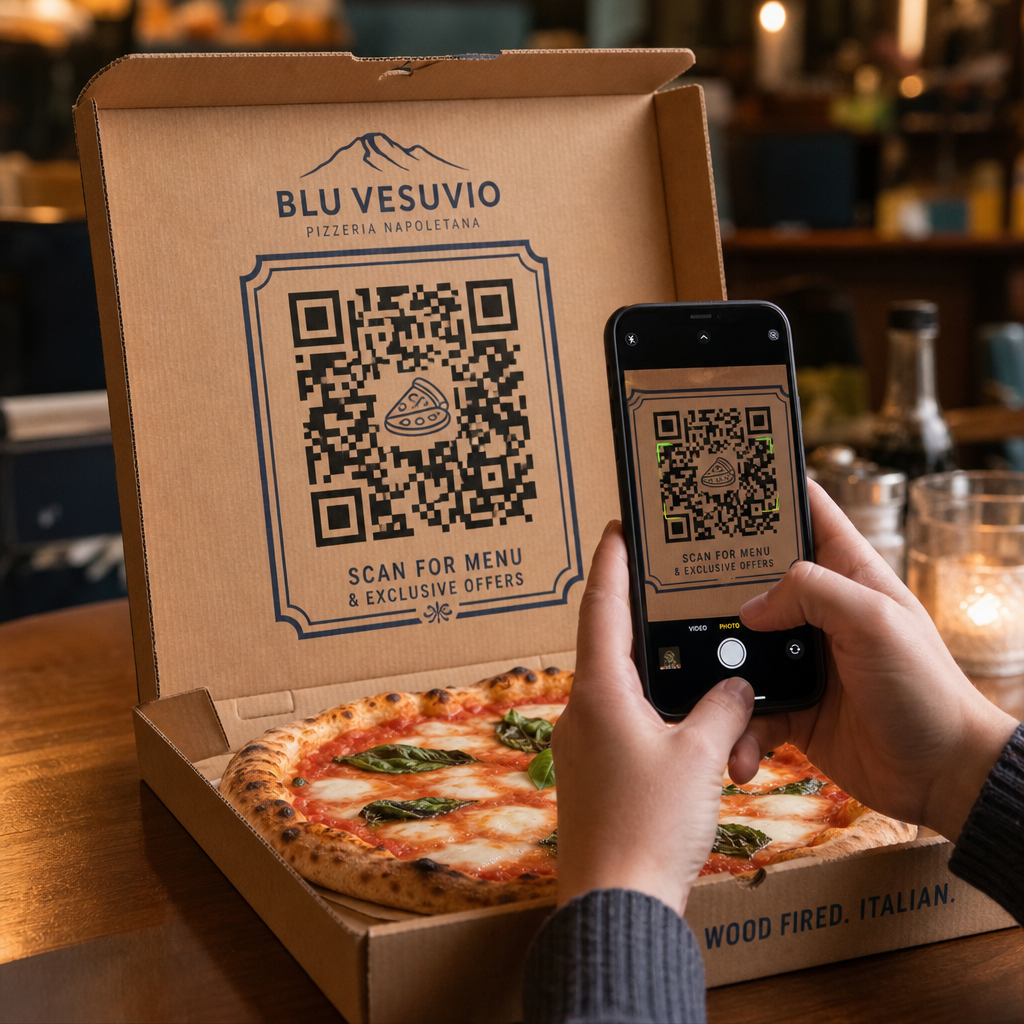
Scanning a pizza box

How to Use QR Codes on Pizza Boxes for Marketing

Learn how to use QR codes on pizza boxes to drive direct reorders, collect reviews, and cut delivery fees with essential printing and marketing tips.
Updated on 7월 27, 2026
목차

How do you turn a standard pizza box into a reliable source of repeat orders? Most takeout packaging gets thrown away without driving future sales or engaging customers beyond the meal. Printing strategic QR codes directly on your pizza packaging creates an interactive touchpoint that drives direct orders, feedback, and customer retention.

Why Pizza Packaging Is Prime Real Estate for QR Codes

When customers receive a fresh pizza, your box sits directly in front of them for 15 to 30 minutes. This provides a dedicated window of customer attention during an enjoyable experience. Traditional box printing relies on static phone numbers or plain logos, but adding a scannable barcode transforms passive cardboard into an active digital sales channel.

Using packaging to direct customers to digital channels addresses a critical industry challenge: high commission fees from third-party delivery services. Encouraging customers to scan a box code for their next order allows pizzerias to convert third-party buyers into direct, profitable customers. Implementing smart tools tailored to restaurant QR code marketing gives local pizzerias full control over customer relationships and order margins.

Strategic Ways to Use QR Codes on Pizza Boxes

A QR code on a pizza box must offer clear value to convince a hungry customer to scan it. Deploying targeted promotional campaigns on your packaging helps achieve specific business goals:

  • Drive direct online reorders: Direct customers away from third-party delivery apps by offering exclusive meal deals when they order through your primary website. Using a dedicated 메뉴 QR 코드 생성기 allows you to link directly to a mobile-friendly online menu.
  • Deliver targeted discounts and bounce-back offers: Include a call to action such as “Scan for $5 off your next order” to encourage repeat visits. Linking the code to a flexible `쿠폰 QR 코드 생성기` presents clean discount vouchers that incentivize future purchases.
  • Gather authentic Google reviews: Satisfied diners are most likely to leave positive feedback right after a great meal. Linking your code via a Google 리뷰 QR 코드 생성기 routes customers straight to your review page with a single scan.
  • Promote social media contests and giveaways: Encourage guests to post photos of their meal with a custom hashtag for a chance to win a free pizza. A multi-link landing page built with a 링크 QR 코드 생성기 guides users to your social profiles, review forms, or loyalty program registration.

Boost Direct Pizza Orders Today Want to turn takeout packaging into repeatable online sales? Use the 메뉴 QR 코드 생성기 to build a fast, mobile-ready ordering experience for your pizzeria.

Technical Standards for Printing on Corrugated Packaging

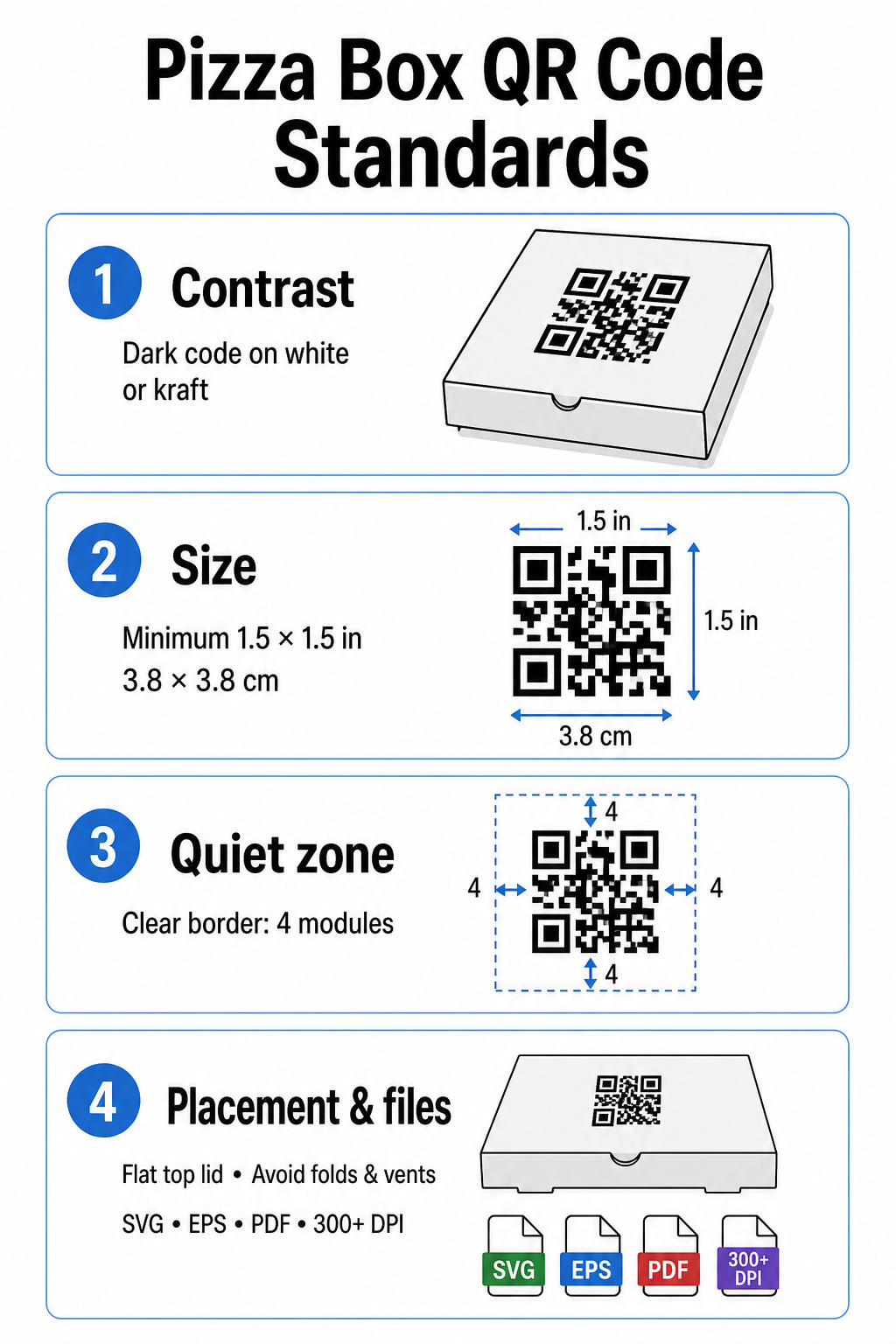
Corrugated cardboard presents distinct print challenges, including high ink absorption, coarse texture, and surface variations. Following standard technical printing guidelines ensures your box codes remain easy to scan:

Pizza box printing standards

Contrast and Color Choices

Scanners require high contrast to distinguish dark modules from light spaces. Always print dark modules on a light background, such as solid black ink on standard white or kraft cardboard. Avoid light-on-dark inversions, reflective metallic inks, or low-contrast combinations like red on brown kraft paper. Detailed requirements for ink and substrates can be reviewed in our analysis of 인쇄 기술이 스캔 가능성에 미치는 영향.

Code Sizing and Quiet Zone

Cardboard textures require larger codes than smooth paper surfaces. Print your pizza box QR code at a minimum size of 1.5 x 1.5 inches (3.8 x 3.8 cm). Maintain a clear border surrounding the code – known as the quiet zone – that is at least four modules wide on all sides. Keep all text, graphics, and box trim lines entirely outside this boundary.

Placement and Box Geometry

Position the code on a flat surface, ideally near the center of the top lid where eyes naturally look before opening the box. Avoid placing codes over box folds, scores, steam vents, or areas covered by tape or security stickers. Additional positioning ideas are outlined in our overview of 마케팅에서의 QR 코드 배치.

Resolution and Artwork File Types

Export artwork as scalable vector files (.SVG, .EPS, or print-ready .PDF) rather than raster images (.JPG or .PNG). Printing artwork at a resolution of 300 DPI or higher prevents blurred edges when ink absorbs into un-coated corrugated fibers. For broader packaging best practices, explore our guides on 제품 포장의 QR 코드를 스캔하여식품 포장의 QR 코드.

Maximizing Results with Dynamic QR Codes

Printing thousands of custom pizza boxes requires a significant financial investment. Using static QR codes creates operational risk if a destination link changes, an offer expires, or a menu updates.

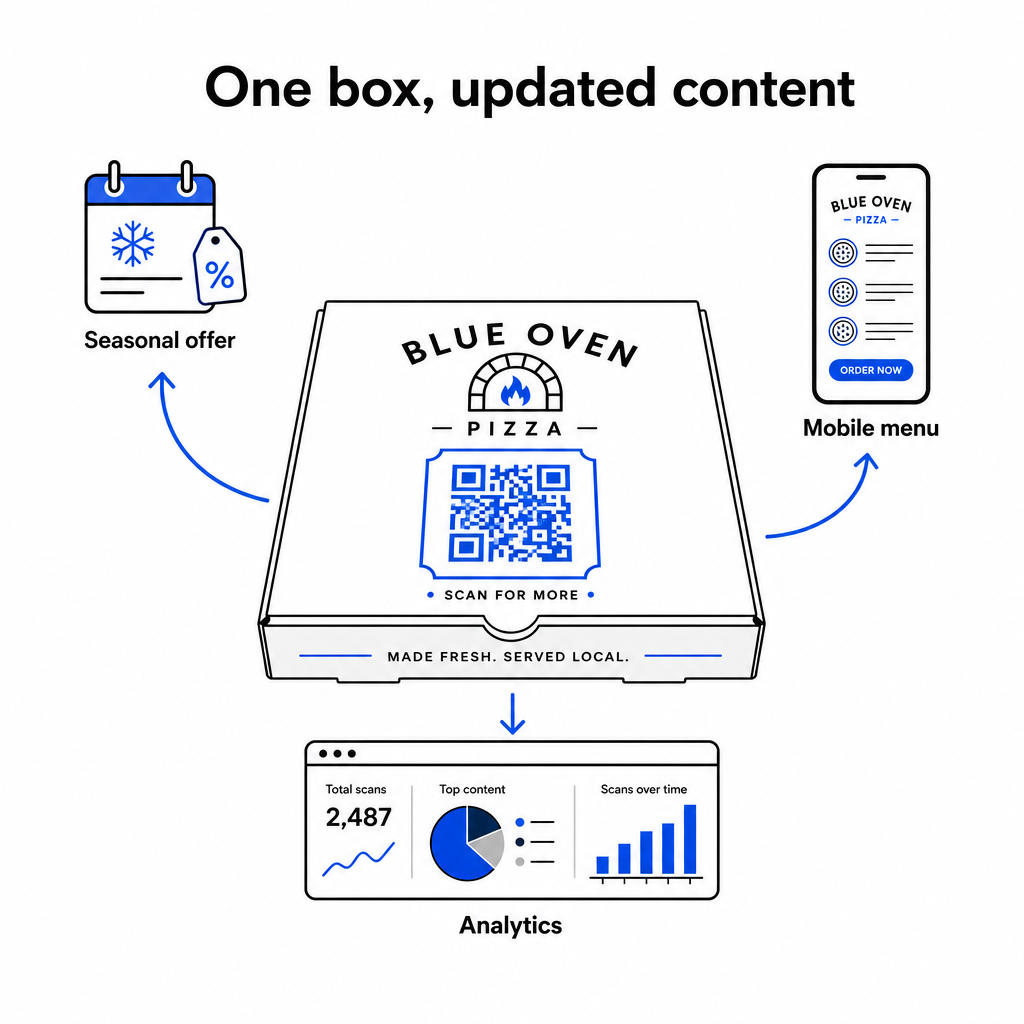
Dynamic QR codes solve this issue by decoupling the printed pattern from the destination link. You can update the underlying target URL in your platform dashboard at any time without reprinting packaging inventory. This allows you to run seasonal specials, swap out campaign landing pages, or update online ordering links while using the exact same box inventory.

Dynamic QR code updates

Dynamic codes also offer comprehensive performance measurement. By utilizing software for QR 코드 추적, you can monitor total scan volume, scan timing, customer device types, and geographic scan locations to evaluate campaign performance over time.

When using QR codes to collect contact details, build email lists, or enroll customers in text message marketing programs, ensure your landing pages provide explicit consent disclosures that comply with relevant privacy regulations and telecommunications guidelines.

Practical Steps to Launch Your Pizza Box Campaign

Using pizza boxes as an active marketing channel connects offline dining with digital customer retention. Follow these practical steps to implement your campaign effectively:

  • Define a clear campaign objective, such as increasing direct reorders or boosting online reviews.
  • Generate a dynamic QR code paired with an explicit call to action (e.g., “Scan to Get $5 Off Your Next Direct Order”).
  • Format the artwork to at least 1.5 inches square with high contrast and a four-module quiet zone.
  • Test printed samples using multiple smartphone models under varied lighting conditions before starting mass box production.

Start creating branded, trackable codes today with Pageloot tools to transform your pizza packaging into a growth driver for your restaurant.

자주 묻는 질문

Where is the best spot to print a QR code on a pizza box?

The top lid panel is ideal because it remains fully visible to customers before and while opening the box.

What size should a QR code be on cardboard pizza boxes?

Print the code at a minimum of 1.5 x 1.5 inches (3.8 x 3.8 cm) to compensate for the rough texture and ink absorption of corrugated cardboard.

Can I update the destination link after my pizza boxes are printed?

Yes, using dynamic QR codes allows you to edit the destination link inside your management dashboard without reprinting your physical packaging.

작성자 정보

시임 코스타비는 페이지루트의 콘텐츠 책임자입니다. 그는 페이지루트의 혁신적인 QR 코드 생성 서비스에 대한 글을 쓰고 있습니다. 5년 이상 QR 코드 분야에서 쌓아온 깊이 있는 전문 지식을 바탕으로, 시임은 이 분야의 전문가로 인정받고 있습니다. 그는 QR 기술을 활용하여 디지털 상호작용을 간소화하고 향상시키는 데 크게 기여하고 있습니다.

범주
에 대해 자세히 알아보기

온라인으로 QR 코드를 생성해야하는 경우 QR 코드 만들기 무료로 여기!
Pageloot는 #1 Go-To 솔루션 QR 코드를 만들고 스캔합니다.

BL-0326

블로그 세대

20,000개 이상의 브랜드로부터 신뢰를 받아 더 많은 매출, 리뷰, 팔로워를 확보했습니다.

클라이언트 로고
최고 브랜드의 신뢰
5 중 4.8 평가

4.86 / 5 별점

휴고 로랑
휴고 로랑
레스토랑 주인
가장 쉽고 안정적인 QR 코드 생성기. PDF 파일을 즉시 업로드할 수 있습니다. 이제 레스토랑 메뉴가 디지털화되었습니다.
루카스 얀센
루카스 얀센
부동산 개발사
이것은 훌륭한 도구이며 QR 코드를 사용하면 원하는 곳으로 이동할 수 있습니다. 우리는 위치 QR 코드만 사용하지만 유용한 기능이 너무 많습니다.

엠마 모레티
엠마 모레티
소매 제품
사용하기 쉽고 빠릅니다. 그것은 훌륭하게 작동하고 완벽한 이미지를 생성하므로 직원들이 내 vCard를 다운로드할 수 있습니다.

휴고 로랑
휴고 로랑
레스토랑 주인
가장 쉽고 안정적인 QR 코드 생성기. PDF 파일을 즉시 업로드할 수 있습니다. 이제 레스토랑 메뉴가 디지털화되었습니다.
루카스 얀센
루카스 얀센
부동산 개발사
이것은 훌륭한 도구이며 QR 코드를 사용하면 원하는 곳으로 이동할 수 있습니다. 우리는 위치 QR 코드만 사용하지만 유용한 기능이 너무 많습니다.
엠마 모레티
엠마 모레티
소매 제품
사용하기 쉽고 빠릅니다. 그것은 훌륭하게 작동하고 완벽한 이미지를 생성하므로 직원들이 내 vCard를 다운로드할 수 있습니다.
더 많은 QR 코드보기
QR 코드 스캔 태블릿
QR 코드 스캔 iPad 및 태블릿
무엇이든 디지털 경험으로 전환하세요 3분 이내에.

14일 무료 체험.

신용카드는 필요 없습니다.

첫 구매 시 30% 할인

코드를 사용하세요:

MP3 파일 공유

PDF QR 코드를 생성하려면 가입하세요

필요한 모든 것을 업로드하고 표시합니다.

  • 오디오 파일
  • 팟캐스트
  • 음악

가입 시 14일 무료 체험.
체험 기간 후 QR 코드 만료.

오디오 mp3 QR 코드를 생성하려면 가입하세요

프레임으로 더 많은 스캔 확보

QR 코드에 더 많은 프레임을 추가하려면 가입하세요

클릭 유도 문안 프레임은 고객이 QR 코드와 쉽게 상호 작용할 수 있도록 도와줍니다. 사용해 보세요!

가입 시 14일 무료 체험.
체험 기간 후 QR 코드 만료.

QR 코드에 더 많은 프레임을 추가하려면 가입하세요

도형으로 더 많은 스타일 추가

더 많은 도형을 만들려면 가입하세요

QR 코드는 정사각형일 필요가 없습니다. 브랜드 이미지에 맞게 전환해 보세요.

가입 시 14일 무료 체험.
체험 기간 후 QR 코드 만료.

더 많은 도형을 만들려면 가입하세요

QR 코드에 로고 추가

QR 코드에 로고를 추가하려면 가입하세요

로고와 브랜드를 추가하여 QR 코드를 돋보이게 만드세요.

가입 시 14일 무료 체험.
체험 기간 후 QR 코드 만료.

QR 코드에 로고를 추가하려면 가입하세요

스마트 앱 스토어 리디렉션

앱 스토어 QR 코드를 생성하려면 가입하세요

스마트 앱 스토어 QR 코드에 앱 링크를 추가하세요. 사용자는 장치에 따라 리디렉션됩니다.

가입 시 14일 무료 체험.
체험 기간 후 QR 코드 만료.

앱 스토어 QR 코드를 생성하려면 가입하세요

QR 코드에 이미지 업로드

이미지 QR 코드를 생성하려면 가입하세요

이미지를 쉽게 공유하세요. 몇 초 안에 동적으로 이미지를 변경하십시오.

가입 시 14일 무료 체험.
체험 기간 후 QR 코드 만료.

이미지 QR 코드를 생성하려면 가입하세요

PDF 파일 공유

PDF QR 코드를 생성하려면 가입하세요

필요한 모든 것을 업로드하고 표시합니다.

  • 메뉴 및 가격표
  • 명령
  • 모든 문서

가입 시 14일 무료 체험.
체험 기간 후 QR 코드 만료.

PDF QR 코드를 생성하려면 가입하세요

인쇄 없이 나중에 편집

다시 인쇄하지 않고 QR 코드를 편집하려면 가입하세요

동적 QR 코드를 사용하면 새 QR 코드를 인쇄하지 않고도 QR 코드의 내용을 변경할 수 있습니다.

가입 시 14일 무료 체험.
체험 기간 후 QR 코드 만료.

다시 인쇄하지 않고 QR 코드를 편집하려면 가입하세요

언제? 어디서? QR 코드 스캔 추적

QR 코드를 추적하려면 가입하세요

어떤 QR 코드가 가장 많이 스캔되고 무엇이 고객을 가장 흥분시키는지 알아보십시오.

가입 시 14일 무료 체험.
체험 기간 후 QR 코드 만료.

QR 코드를 추적하려면 가입하세요

인쇄 준비 파일 제공

PDF 및 SVG와 같은 벡터 QR 코드를 생성하려면 가입하세요.

.EPS, .PDF, .SVG

HD 해상도로 QR 코드를 다운로드하고 싶으신가요? 인쇄할 준비가 된 벡터 또는 픽셀 형식을 가져옵니다.

가입 시 14일 무료 체험.
체험 기간 후 QR 코드 만료.

PDF 및 SVG와 같은 벡터 QR 코드를 생성하려면 가입하세요.

기다리세요. 귀하의 QR 코드는 로드 중... 로드 중...

나만의 것으로 만들기

나중을 위해 QR 코드를 저장하려면 가입하세요.

다양한 색상, 로고 및 클릭 유도문안 프레임으로 멋진 QR 코드를 만들어 더 많은 스캔을 받으세요.

가입 시 14일 무료 체험.
체험 기간 후 QR 코드 만료.

나중을 위해 QR 코드를 저장하려면 가입하세요.