Er du usikker på, om QR-koden på den parkeringsautomat er legitim eller en fidus? Falske parkerings-QR-koder er en aktiv og voksende trussel, hvor svindlere placerer forfalskede klistermærker direkte over officiel skiltning for at stjæle betalingsoplysninger. Denne guide forklarer præcis, hvordan ægte QR-kode parkeringssystemer fungerer – og hvordan bilister og parkeringsoperatører kan se forskel.
Hvordan QR-kode parkeringsbetalingssystemer fungerer
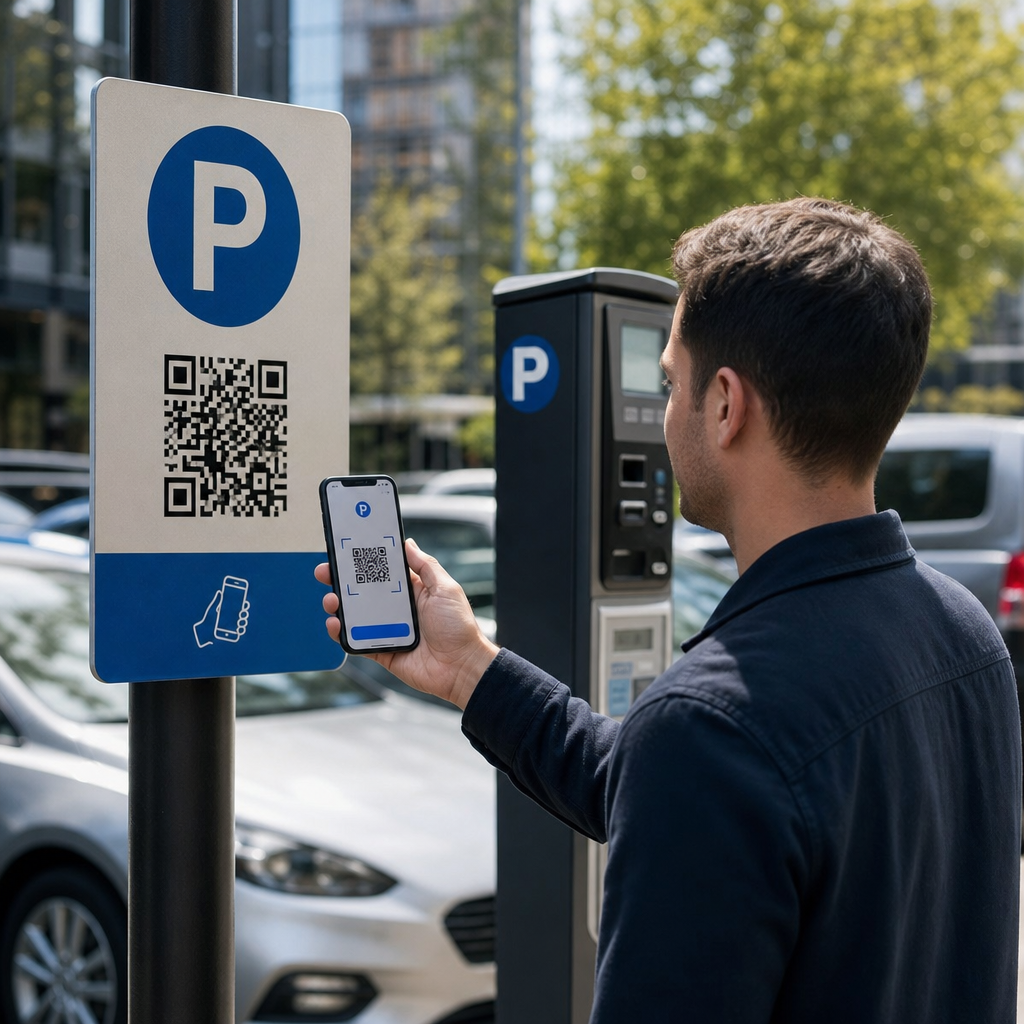
Legitime QR-kode parkeringssystemer følger en ligetil scan-og-betal-arbejdsgang. Når du ankommer til en parkeringsfacilitet, finder du en QR-kode vist på skiltning ved kiosken, prislisten, elevatorlobbyen, trappeopgangen eller bygningens udgang. At forstå hvert trin hjælper dig med at genkende, når noget er galt.
Du starter med at scanne koden ved hjælp af din smartphones indbyggede kamera eller en dedikeret QR-kode scanner. Ingen app-download er påkrævet – koden åbner en mobiloptimeret betalingsside direkte i din browser. Derfra indtaster du dit nummerpladenummer, så systemet kan knytte dit køretøj til parkeringssessionen og muliggøre håndhævelsesverifikation. Du vælger derefter din parkeringsvarighed – timevis, daglig, ugentlig eller månedlig – og gennemfører betalingen med et kredit- eller betalingskort, Apple Pay, Google Pay, Samsung Pay eller en anden accepteret metode. Hele transaktionen er kontantløs og kontaktløs. For ubommede parkeringspladser opdateres parkeringsstyringssystemet automatisk ved bekræftelse, så håndhævelse kan verificere din session via nummerplade i stedet for en fysisk billet.
En vigtig praktisk bemærkning: da betalingssiden er online, har du brug for pålidelig mobil- eller Wi-Fi-forbindelse på betalingstidspunktet. Hvis dit signal er svagt, skal du flytte til et område med bedre dækning, før du scanner.
Hvorfor operatører bruger QR-koder til parkering
QR-baseret parkering fjerner traditionelle friktionspunkter for både bilister og facilitetsledere. For bilister er der ingen billetter at holde styr på, ingen køer ved en betalingsstation, og ingen grund til at vende tilbage til din bil, før du forlader en facilitet – du kan betale fra din telefon hvor som helst i bygningen. For operatører reducerer QR-koder hardwareafhængighed og tillader en komplet parkeringstransaktion at ske på kundens telefon via en standardbrowser.
Parkeringsoperatører, der implementerer disse systemer, kan også spore betalingsbekræftelse i realtid og markere ubetalte sessioner uden at kræve fysiske billetkontroller ved udgangsporte. Resultatet er en slankere drift, der skalerer uden at tilføje dyrt hardware ved hvert betalingspunkt.
Den reelle trussel: Falske QR-kode klistermærker
Bekvemmeligheden ved QR-parkeringsbetalinger har tiltrukket en specifik type svindel. Svindlere placerer fysisk falske QR-kode klistermærker over legitim parkeringsskiltning. Når en intetanende bilist scanner den falske kode, omdirigeres de til en forfalsket betalingsside, der ligner den ægte vare – men kun eksisterer for at fange kortoplysninger.
FTC har udtrykkeligt advaret om denne taktik og bemærket, at svigagtige koder kan sende brugere til forfalskede websteder eller endda installere malware på deres enheder. En veldokumenteret sag i Austin, Texas, så 29 falske QR-koder placeret på byens parkeringsautomater, hvilket førte til stjålne kreditkortoplysninger og uautoriserede køb. I Storbritannien mistede bilister i York op til 400 £ hver efter at have scannet falske QR-klistermærker på kommunale parkeringsskilte, der efterlignede den legitime PayByPhone-tjeneste – en sag beskrevet i Advarsel om QR-kode parkeringssvindel for britiske bilister.
Disse hændelser er ikke fejl i selve QR-betalingsteknologien. De er resultatet af fysisk skiltmanipulation og brandimitation, og de kan fuldstændig forebygges med de rette forholdsregler på begge sider af transaktionen.
Sådan verificerer du en parkerings-QR-kode, før du scanner
Både bilister og parkeringsoperatører kan tage konkrete skridt for at undgå at blive offer for falske QR-koder.
For bilister:
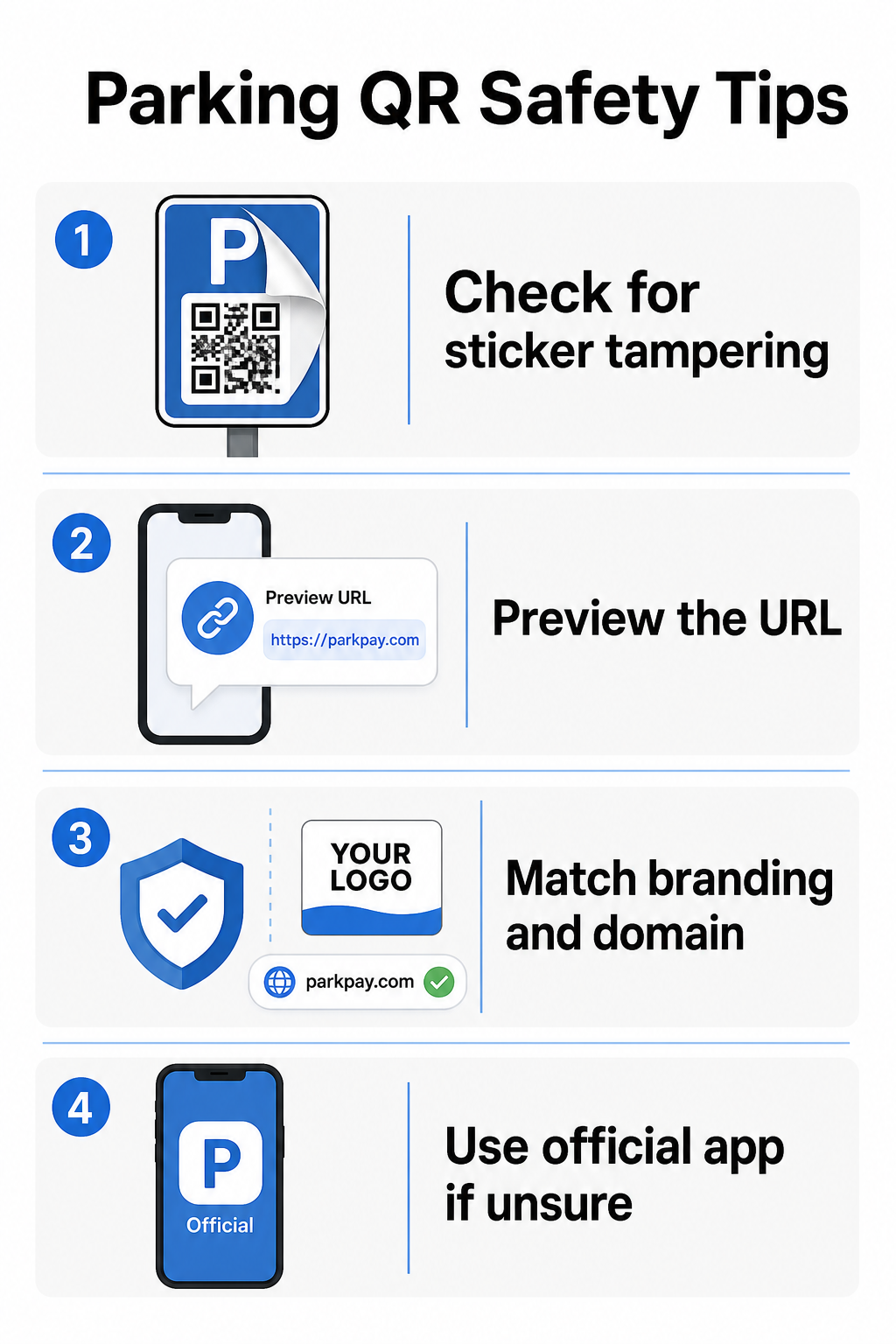
- Se efter klistermærker placeret over eksisterende skiltning. Legitime koder er typisk trykt direkte på officiel skiltning, ikke påført som eftermarkedsklistermærker. Et klistermærke, der sidder oven på en anden overflade, er et rødt flag.
- Forhåndsvis URL'en, før du trykker dig videre. De fleste smartphones giver dig mulighed for at trykke og holde en QR-kode nede for at forhåndsvise destinationslinket. Tjek for stavefejl, ombyttede bogstaver eller ukendte domæner – dette er tegn på et forfalsket websted.
- Verificer branding på betalingssiden. Siden, der åbnes, skal matche operatørens kendte brand. Hvis logoer, farver eller domænenavne ser forkerte ud, skal du ikke fortsætte.
- Brug den officielle app eller en alternativ betalingsmetode, hvis du er i tvivl. By- og kommunale parkeringsmyndigheder lister typisk officielle betalingsapps på deres skiltning. Hvis en QR-kode ser mistænkelig ud, betal via den officielle app eller kontakt parkeringsoperatøren direkte.
- Scan ikke QR-koder sendt i uventede e-mails eller tekstbeskeder der opfordrer dig til at handle øjeblikkeligt – legitime parkeringsoperatører sender ikke uopfordrede betalingsanmodninger.
- Hold din telefons operativsystem opdateret og brug stærke adgangskoder med multifaktorautentificering på dine konti for at begrænse potentiel skade, hvis du ender på en ondsindet side.
For parkeringsoperatører:
- Brug manipulationssikre skiltningsmaterialer der gør det visuelt tydeligt, hvis et klistermærke er blevet påført oven på officielle koder.
- Udfør regelmæssige fysiske inspektioner af al QR-kode skiltning i hele din facilitet.
- Brug brandede QR-koder med dit logo og farveskema trykt direkte ind i kodedesignet, hvilket gør forfalskning betydeligt sværere.
- Hvis en svigagtig kode opdages, fjern den øjeblikkeligt, dokumenter hændelsen med fotos, underret dine betalingspartnere, og råd berørte parkanter til at bestride gebyrer hos deres bank eller kortudsteder.
Opsætning af QR-kodebetalinger for en parkeringsvirksomhed
Hvis du driver en parkeringsfacilitet og ønsker at implementere et legitimt QR-baseret betalingssystem, starter processen med en betalings-URL – såsom et link til din betalingsportal, PayPal-kasseside eller Stripe-hostet betalingsformular – og en pålidelig QR-kodegenerator.
Opret en brandet betalings-QR-kode Indsæt din betalings-URL i PayPal QR-kode generator for at oprette en tilpasset, downloadbar kode med dit logo og brandfarver – hvilket gør det sværere at forfalske og lettere for bilister at stole på.
Brug af en Link QR-kodegenerator lader dig kode enhver betalingsside-URL ind i en scanbar kode. For løbende drift, dynamiske QR-koder tilbyder en betydelig fordel: du kan opdatere destinations-URL'en når som helst uden at genudskrive skiltning. Hvis din betalingsudbyder ændrer sig, din kasse-URL opdateres, eller en kode kompromitteres, omdirigerer du blot den eksisterende kode til den nye destination fra dit dashboard.
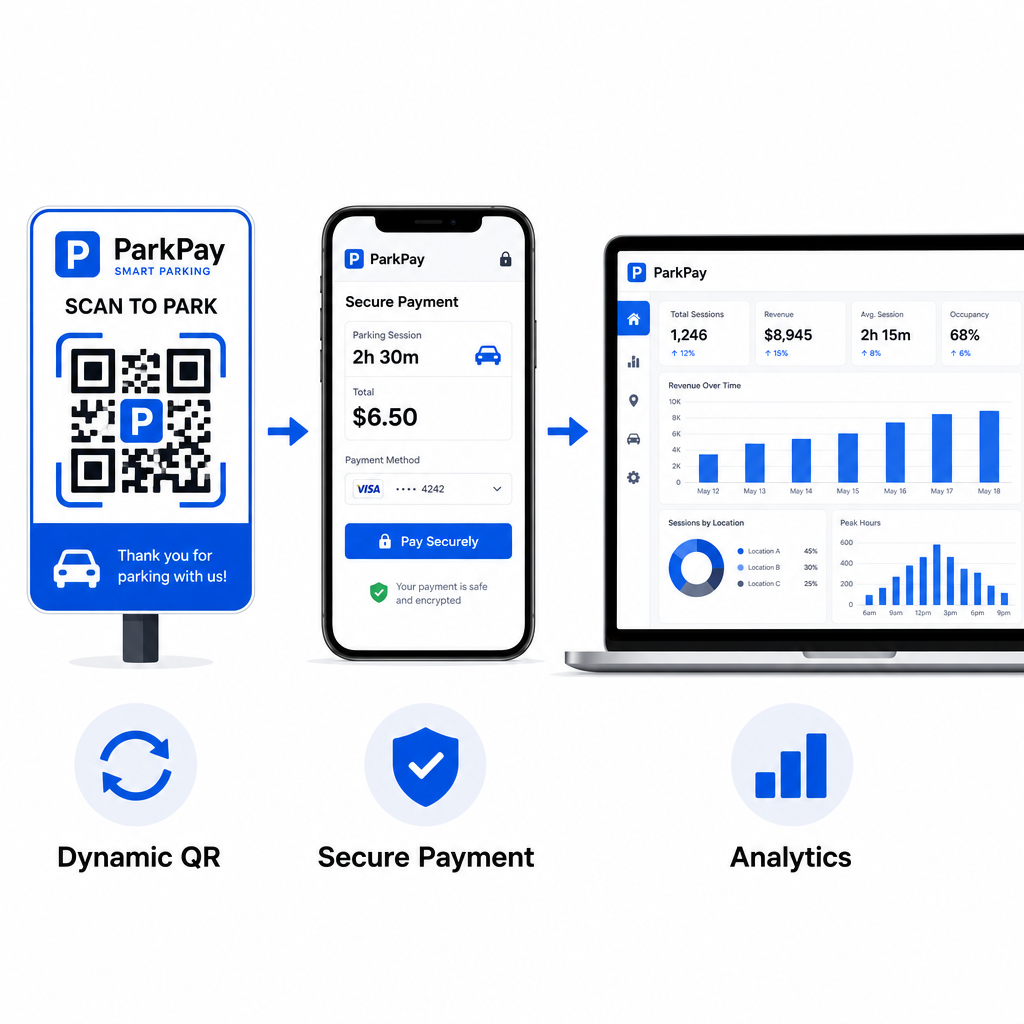
Dynamiske koder giver dig også adgang til realtids scanningsanalyse – scanningsantal, tidsstempler, placeringer og enhedstyper – så du kan overvåge for usædvanlig aktivitet. En pludselig stigning i scanninger fra uventede placeringer, for eksempel, kunne indikere, at en kode er blevet kopieret og distribueret svigagtigt. Du kan læse mere om, hvordan QR-kodebetalinger fungerer på tværs af forskellige forretningskontekster for at se, hvordan de samme principper gælder ud over parkering.
Spor hver scanning i realtid Brug Pageloots QR-kodegenerator for at oprette dynamiske parkeringsbetalingskoder med fuld scanningsanalyse. Overvåg ydeevne, opdag anomalier, og opdater destinationer øjeblikkeligt – alt sammen fra ét dashboard.
For virksomheder, der udforsker QR-koder på tværs af flere anvendelsestilfælde ud over parkering, er Pageloot-siden for industriløsninger dækker applikationer inden for detailhandel, hotel- og restaurationsbranchen, arrangementer og mere.
Hvad gør en parkerings-QR-kode sikker
Legitime parkerings-QR-kodebetalingssystemer lægger flere beskyttelseslag, som svindlere ikke let kan replikere:
| Sikkerhedsfunktion | Hvad det gør |
|---|---|
| Branded QR-design | Logo og farver indlejret i koden gør forfalskning visuelt tydelig |
| SSL-krypteret destination | Betalingsside bruger HTTPS og beskytter data under overførsel |
| Dynamiske omdirigeringer | Operatør kan deaktivere eller omdirigere en kompromitteret kode øjeblikkeligt |
| Scanningsmonitorering | Usædvanlige scanningsmønstre udløser advarsler, før udbredt svindel opstår |
| Manipulationssikker skiltning | Fysiske materialer viser tydelige tegn på manipulation |
For et dybere kig på, hvordan disse lag arbejder sammen, dækker guiderne om QR-kodebetalingssikkerhed og -hastighed og håndtering af QR-koderisici i betalinger de tekniske og operationelle detaljer fuldt ud.
Beskyttelse af din virksomhed mod QR-kodesvindel
Ud over parkering er QR-kodesvindel en voksende bekymring på tværs af brancher. De samme principper gælder overalt: brandede koder, dynamiske destinationer, regelmæssige revisioner og uddannelse af de mennesker, der interagerer med dine koder. For en fuld gennemgang af defensive strategier, se guiden om Sådan beskytter du din virksomhed mod QR-kodesvindel og oversigten over QR-kodens privatlivsrisici og hvordan man undgår dem.
QR-kode parkeringsbetalinger er ægte bekvemme og sikre, når de implementeres korrekt – risikoen ligger i manipulation, ikke i selve teknologien. Uanset om du er en bilist, der bekræfter en kode før scanning, eller en operatør, der opbygger et kontaktløst betalingssystem, giver trinene ovenfor dig en klar ramme for at forblive sikker. Hvis du er klar til at implementere en brandet, sporbar betalings-QR-kode til din facilitet, er PayPal QR-kode generator et praktisk udgangspunkt.
Ofte stillede spørgsmål
Se efter klistermærker placeret over eksisterende skiltning, hvilket er et almindeligt tegn på manipulation. Før du trykker dig videre, tryk og hold QR-koden nede med din smartphone for at forhåndsvise URL'en – tjek for stavefejl eller ukendte domænenavne. Betalingssiden, der åbnes, skal matche operatørens kendte branding. Hvis noget ser forkert ud, betal ved hjælp af den officielle parkeringsapp, der er angivet på skiltningen, eller kontakt anlægget direkte.
Nej. De fleste QR-baserede parkeringsbetalingssystemer åbner en mobiloptimeret betalingsside direkte i din telefons browser, når du scanner koden. Du har brug for en aktiv mobil- eller Wi-Fi-forbindelse for at gennemføre transaktionen, da betalingssiden er online.
Fjern den svigagtige skiltning øjeblikkeligt og dokumenter hændelsen med fotos. Underret dit interne team og betalingsbehandlingspartnere. Rådgive eventuelle potentielt berørte parkanter om at kontakte deres bank eller kortudsteder for at bestride uautoriserede gebyrer. Fremover, brug manipulationssikre skiltningsmaterialer, udfør regelmæssige inspektioner, og overvej at skifte til dynamiske QR-koder, så enhver kompromitteret kode kan deaktiveres og omdirigeres øjeblikkeligt fra dit administrationsdashboard.