Rumah > Blog > How to Add Expiration Dates to QR Codes
Scanning a timed promotion

How to Add Expiration Dates to QR Codes

Learn how to set expiration dates, scan limits, and fallback URLs for dynamic QR codes to manage time-sensitive campaigns and prevent broken links.
Updated on September 29, 2026
Daftar isi

Are you worried about customers scanning printed QR codes for expired promotions? Broken links and outdated offers frustrate potential buyers and hurt brand trust. Setting automated expiration dates gives you precise control over your campaign timeline while protecting the customer experience.

Static vs. Dynamic QR Code Limitations

To manage code expiration, you must first understand how different codes store information. A static QR code embeds data directly into the black-and-white pixel pattern. Because that information is fixed at generation, a static code has no built-in timer or automatic shutoff. As explained in our guide to kode QR statis vs dinamis, the only way to stop a printed static code from working is to physically remove or cover the material.

Dynamic QR codes solve this problem by routing scans through a short redirect link on a central server. The printed pattern never needs to change because the server dictates where the user lands. When a dynamic code reaches its expiration date, the platform simply closes the link or forwards incoming traffic to an alternate page. If you ever need to adjust your promotion window after distribution, you can learn how to edit QR codes directly inside your management dashboard without reprinting a single flyer.

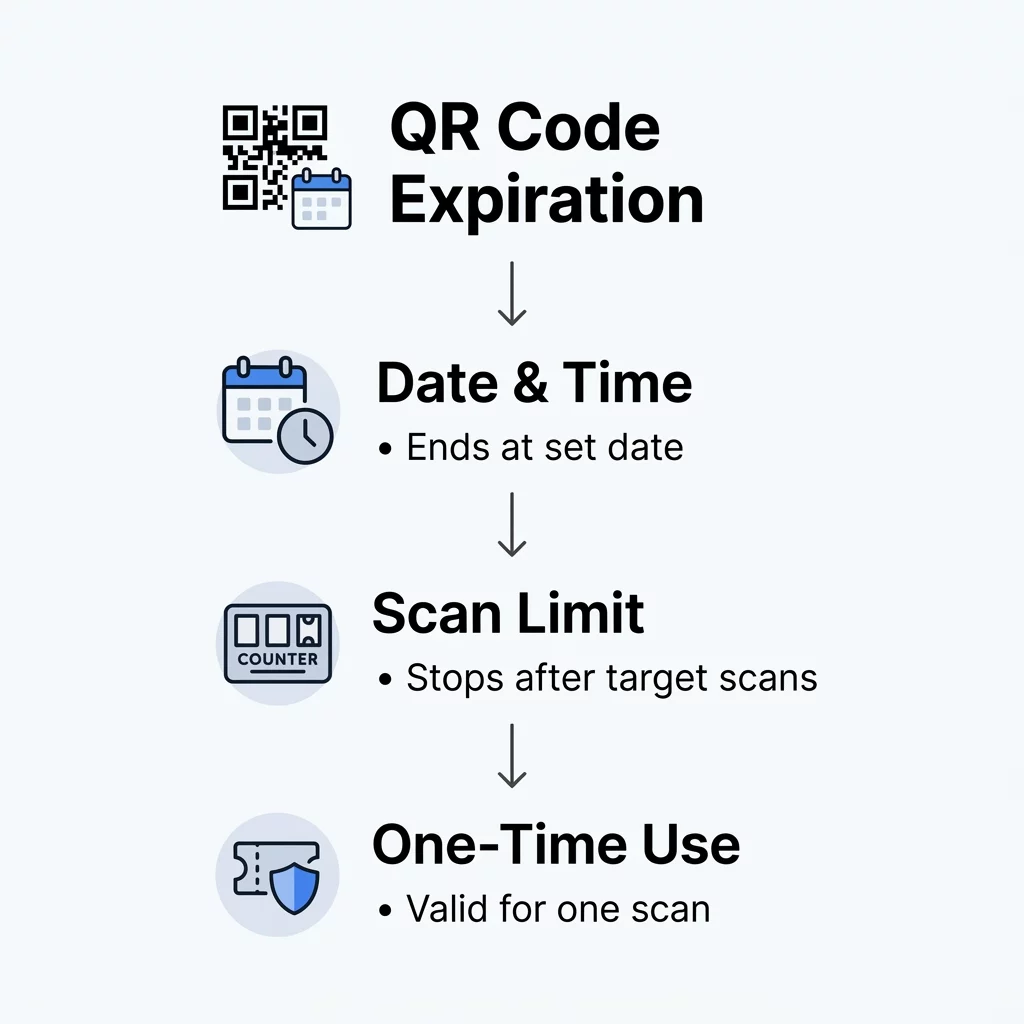
Primary Methods for Setting QR Code Expiration

Modern management platforms offer multiple automated mechanisms to deactivate codes or shift destinations based on campaign rules. Choosing the right method depends on whether your campaign is bound by time, user volume, or access security.

  • Date and time scheduling: You can define an exact calendar date and hour for a code to stop working. This approach fits seasonal retail sales, holiday promotions, and limited-time menu schedules. For example, the Marriott Aruba replaced physical menus with dynamic codes to swap between breakfast, lunch, and dinner, saving approximately $150,000 in printing costs.
  • Scan-count thresholds: A scan limit deactivates or redirects the code after a designated number of scans occurs. This rule supports scarcity marketing, such as offering an exclusive discount voucher to the first 100 customers who scan a store display.
  • Single-scan validation: High-security environments rely on codes that expire immediately after one successful verification. This mechanism is standard for kode QR dinamis untuk kontrol akses and digital event entry, blocking unauthorized sharing or duplication of credentials.
Metode kedaluwarsa QR

Manage Time-Sensitive Campaigns with Ease Want to automate promotional cutoffs and monitor real-time visitor engagement? Use the Generator Kode QR Dinamis to schedule active windows, set scan limits, and manage destinations from one central dashboard.

Cara Menetapkan Tanggal Kedaluwarsa

Configuring an expiration rule requires a dynamic link setup through a professional management dashboard. Follow these steps to automate your campaign lifecycle:

  • Create a new dynamic code using the Pembuat Kode QR Pageloot.
  • Enter your target destination URL or upload your digital asset.
  • Open the code settings inside your dashboard to explore advanced Fitur kode QR.
  • Select the expiration tab and establish your parameters, such as a cutoff date, time zone, or total scan limit.
  • Assign a designated fallback URL where scanners should go once the promotion ends.
  • Save your settings and test the code across multiple mobile devices to verify the redirect logic.

For operations that handle single-use passes or secure registration, review our guide on cara membuat tiket acara kode QR yang aman to implement tokenized expiration policies.

Mengelola Pengalaman Pengguna Pasca-Kedaluwarsa

One of the most damaging mistakes in physical-to-digital marketing is allowing a printed code to lead to an unhandled 404 error. A broken screen signals poor management and brings the customer journey to a sudden halt. Instead of deactivating a code completely, always pair time-sensitive codes with a planned fallback destination.
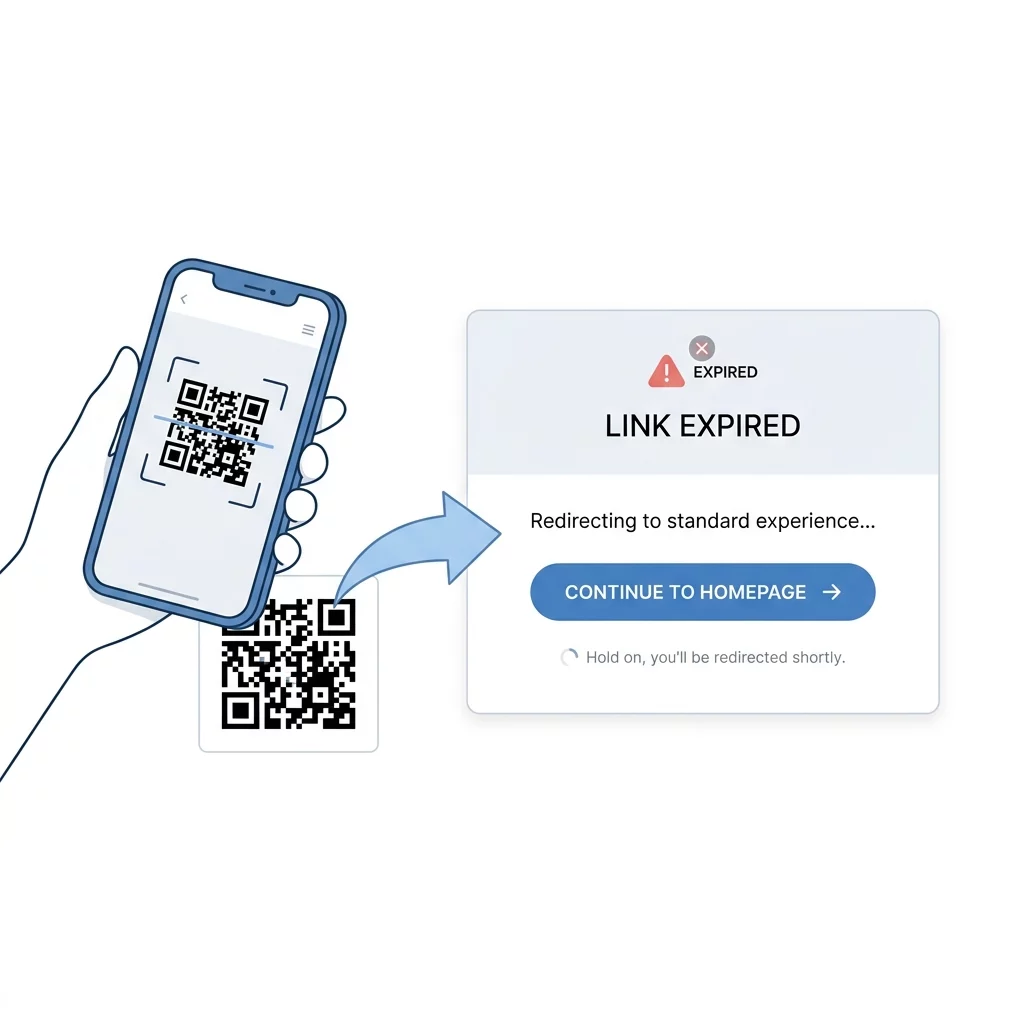
Pengalihan QR kedaluwarsa

When your seasonal promotion expires, redirect traffic to your primary website, a newsletter signup form, or a product catalog featuring ongoing sales. You can configure this transition seamlessly with a dedicated pembuat kode QR tautan, ensuring that anyone scanning your printed materials after the campaign window still finds relevant, high-value content.

Maintaining Campaign Integrity Over Time

Adding expiration controls ensures your offline marketing matches your live inventory, active pricing, and security protocols. Rather than leaving permanent access points in the wild, dynamic codes give you full control over when content starts, stops, and redirects. Create your first time-sensitive code using the Pembuat Kode QR Pageloot today to keep your offline promotions accurate and reliable.

Pertanyaan yang Sering Diajukan

Can I add an expiration date to an already printed static QR code?

No. Static QR codes encode destination data directly into the printed matrix, meaning the content cannot be modified or scheduled. To configure automated expiration, you must create a dynamic QR code before printing.

What does a customer see when scanning an expired QR code?

If you configured a fallback URL, the customer automatically lands on your chosen replacement page. If you do not provide a fallback link, the platform displays an inactive campaign notification.

Does setting an expiration date prevent users from sharing the link?

An expiration date only stops access once the deadline passes or scan threshold is reached. While the campaign is still active, anyone with access to the link can view it unless you implement single-use access controls.


Tentang penulis

Siim Kostabi adalah Content Lead di Pageloot. Ia menulis tentang layanan generator kode QR inovatif kami. Dengan keahlian mendalam selama lebih dari setengah dekade di bidang kode QR, Siim adalah pakar di bidang ini. Ia membuat kemajuan signifikan dalam memanfaatkan teknologi QR untuk menyederhanakan dan meningkatkan interaksi digital.

Kategori
Belajar lebih tentang
Memindai kode QR aplikasi
Bagaimana caranya Unduh aplikasi
Check-in kehadiran QR
Kode QR untuk Pelacakan Kehadiran
✅ Solusi #1 untuk Kode QR

Jika Anda perlu membuat Kode QR online, Anda bisa Buat kode QR di sini gratis!
Pageloot adalah #1 Solusi Masuk untuk membuat dan memindai Kode QR.

BL-0083

blog-gen

Dipercaya oleh lebih dari 20.000 merek untuk mendapatkan lebih banyak penjualan, ulasan & pengikut.

Logo klien
Dipercaya oleh merek ternama
Dinilai 4.8 dari 5

4.86 / peringkat 5 bintang

Hugo Laurent
Hugo Laurent
★★★★★
Pemilik restoran
Generator kode QR paling mudah dan andal yang pernah ada. File PDF dapat diunggah secara instan. Menu restoran kami sekarang sudah digital.
Lucas Jansen
Lucas Jansen
★★★★★
Pengembang real estat
Ini adalah alat yang sangat baik dan kode QR membawa Anda ke tempat yang Anda inginkan. Kami hanya menggunakan kode QR lokasi tetapi ada begitu banyak fitur yang berguna.
Emma Moretti
Emma Moretti
★★★★★
Produk Ritel
Mudah digunakan dan cepat. Ini berfungsi dengan baik dan menghasilkan gambar yang sempurna, sehingga karyawan dapat mengunduh vCard saya.
Hugo Laurent
Hugo Laurent
★★★★★
Pemilik restoran
Generator kode QR paling mudah dan andal yang pernah ada. File PDF dapat diunggah secara instan. Menu restoran kami sekarang sudah digital.
Lucas Jansen
Lucas Jansen
★★★★★
Pengembang real estat
Ini adalah alat yang sangat baik dan kode QR membawa Anda ke tempat yang Anda inginkan. Kami hanya menggunakan kode QR lokasi tetapi ada begitu banyak fitur yang berguna.
Emma Moretti
Emma Moretti
★★★★★
Produk Ritel
Mudah digunakan dan cepat. Ini berfungsi dengan baik dan menghasilkan gambar yang sempurna, sehingga karyawan dapat mengunduh vCard saya.
Lihat Lebih Banyak Kode QR
Ponsel memindai kode QR
12 Teratas Aplikasi QR Code Scanner
Ubah apa pun menjadi pengalaman digital dalam waktu kurang dari 3 menit.

Uji coba gratis 14 hari.

Tidak diperlukan kartu kredit.

Dapatkan diskon 30% untuk pembelian pertama Anda

Gunakan kode:

Bagikan file MP3 Anda

Daftar untuk membuat kode QR PDF

Unggah dan tampilkan semua yang Anda butuhkan:

  • File audio
  • Podcast
  • Musik

Uji coba gratis 14 hari dengan pendaftaran.
Kode QR kedaluwarsa setelah uji coba.

mendaftar untuk membuat kode QR audio mp3

Dapatkan lebih banyak pemindaian dengan bingkai

Daftar untuk menambahkan lebih banyak bingkai ke kode QR Anda

Bingkai ajakan bertindak membantu pelanggan Anda berinteraksi dengan Kode QR dengan mudah. Cobalah mereka!

Uji coba gratis 14 hari dengan pendaftaran.
Kode QR kedaluwarsa setelah uji coba.

Daftar untuk menambahkan lebih banyak bingkai ke kode QR Anda

Tambahkan lebih banyak gaya dengan bentuk

Daftar untuk membuat lebih banyak bentuk

Kode QR tidak harus persegi. Cobalah mengubahnya agar sesuai dengan citra merek Anda.

Uji coba gratis 14 hari dengan pendaftaran.
Kode QR kedaluwarsa setelah uji coba.

Daftar untuk membuat lebih banyak bentuk

Tambahkan logo ke Kode QR Anda

Daftar untuk menambahkan logo Anda ke kode QR

Jadikan kode QR Anda menonjol dengan menambahkan logo dan merek Anda ke dalamnya.

Uji coba gratis 14 hari dengan pendaftaran.
Kode QR kedaluwarsa setelah uji coba.

Daftar untuk menambahkan logo Anda ke kode QR

Pengalihan Toko Aplikasi Cerdas

Daftar untuk membuat kode QR toko aplikasi

Tambahkan tautan Aplikasi Anda ke Kode QR App Store pintar kami. Pengguna dialihkan berdasarkan perangkat mereka.

Uji coba gratis 14 hari dengan pendaftaran.
Kode QR kedaluwarsa setelah uji coba.

Daftar untuk membuat kode QR toko aplikasi

Unggah gambar ke Kode QR

Daftar untuk membuat kode QR gambar

Bagikan gambar Anda dengan mudah. Ubah gambar apapun secara dinamis dalam hitungan detik.

Uji coba gratis 14 hari dengan pendaftaran.
Kode QR kedaluwarsa setelah uji coba.

Daftar untuk membuat kode QR gambar

Bagikan file PDF Anda

Daftar untuk membuat kode QR PDF

Unggah dan tampilkan semua yang Anda butuhkan:

  • Menu & daftar harga
  • Instruksi
  • Dokumen apa saja

Uji coba gratis 14 hari dengan pendaftaran.
Kode QR kedaluwarsa setelah uji coba.

Daftar untuk membuat kode QR PDF

Edit nanti tanpa mencetak

Daftar untuk mengedit kode QR Anda tanpa mencetak lagi

Kode QR Dinamis memungkinkan Anda mengubah konten Kode QR Anda tanpa harus mencetak yang baru.

Uji coba gratis 14 hari dengan pendaftaran.
Kode QR kedaluwarsa setelah uji coba.

Daftar untuk mengedit kode QR Anda tanpa mencetak lagi

Kapan? Di mana? Lacak pemindaian Kode QR Anda

Daftar untuk melacak kode QR Anda

Temukan Kode QR mana yang paling banyak dipindai dan apa yang paling menggairahkan klien Anda.

Uji coba gratis 14 hari dengan pendaftaran.
Kode QR kedaluwarsa setelah uji coba.

Daftar untuk melacak kode QR Anda

File siap cetak tersedia

Daftar untuk membuat kode QR vektor seperti PDF dan SVG

.EPS, .PDF, .SVG

Ingin mengunduh Kode QR Anda dalam resolusi HD? Dapatkan format vektor atau piksel yang siap dicetak.

Uji coba gratis 14 hari dengan pendaftaran.
Kode QR kedaluwarsa setelah uji coba.

Daftar untuk membuat kode QR vektor seperti PDF dan SVG

Mohon tunggu. Kode QR Anda adalah Memuat... Memuat...

Jadikan milik Anda sendiri

Daftar untuk menyimpan kode QR Anda untuk nanti

Dapatkan lebih banyak pindaian dengan membuat Kode QR keren dengan berbagai warna, logo, dan bingkai ajakan bertindak.

Uji coba gratis 14 hari dengan pendaftaran.
Kode QR kedaluwarsa setelah uji coba.

Daftar untuk menyimpan kode QR Anda untuk nanti