
Kas otsite kaasaegset viisi kliendi vastuvõtmise ja maksete sujuvamaks muutmiseks, ilma et see kahjustaks teie advokaadibüroo professionaalset mainet? Paberipõhised administratiivsed tööprotsessid aeglustavad esialgseid konsultatsioone, viivitavad arvete kogumist ja tekitavad potentsiaalsetele klientidele hõõrdumist. Skaneeritavate QR-koodide rakendamine kogu teie juriidilises praktikas ühendab füüsilised trükitud puutepunktid otse turvaliste digitaalsete portaalidega, kiirendades büroo efektiivsust, säilitades samal ajal täieliku eetilise vastavuse.
Miks juriidilised praktikad võtavad kasutusele skaneeritavaid puutepunkte
Traditsioonilised juriidilise turunduse ja administratiivsed protsessid kannatavad sageli hõõrdumise all, kui potentsiaalsed kliendid püüavad trükitud materjalidelt – nagu visiitkaardid, ürituste sildid või otsepostitused – üle minna digitaalsetele kontaktvormidele ja konsultatsioonide ajastamisele.
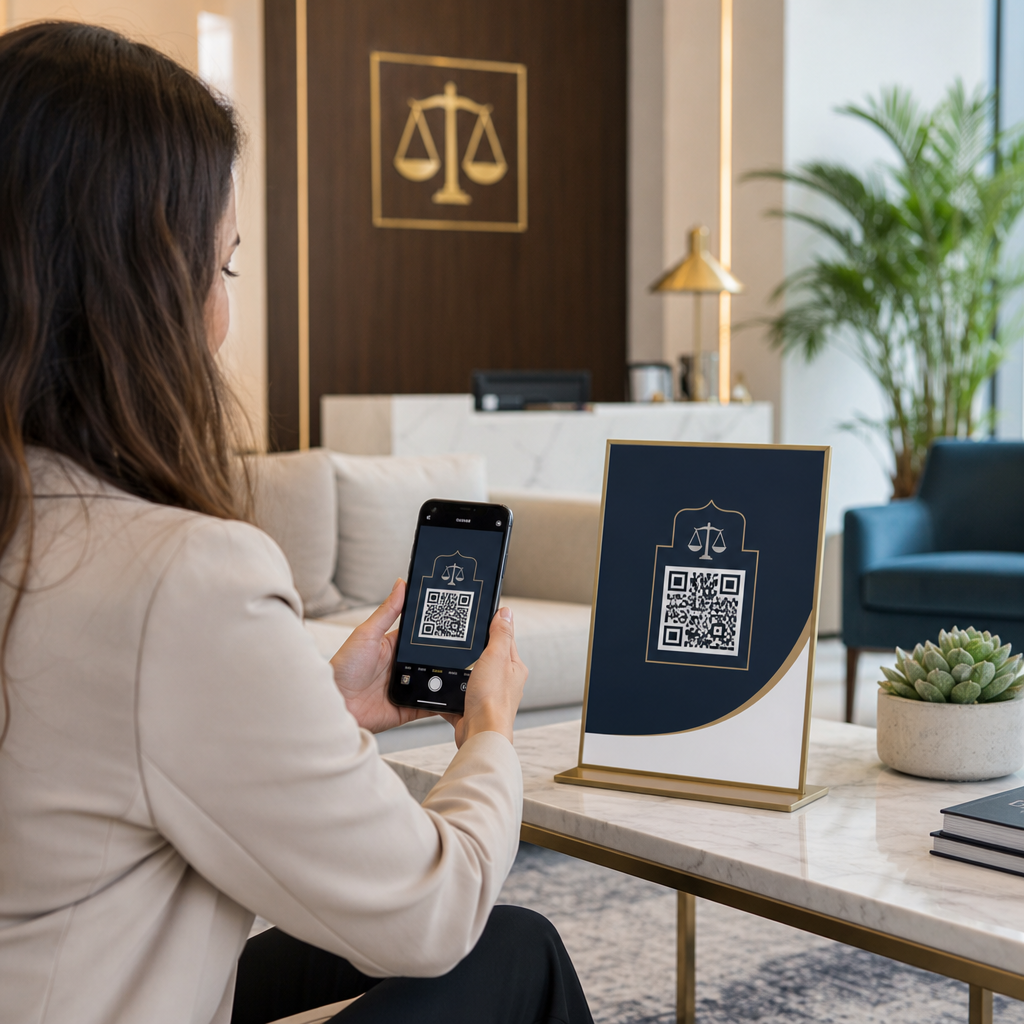
Ameerika Advokatuuride Liidu (ABA) mudelreegel 7.2(a) lubab advokaatide reklaamimist mis tahes meedia kaudu, tingimusel et kõik kommunikatsioonid jäävad täpseks ja eksitamatuks vastavalt ABA mudelreeglile 7.1. Kaasaegsed juriidilised praktikad kasutavad skaneeritavaid maatriksvöötkoode (üldtuntud kui QR-koodid), et ühendada füüsilist meediat krüpteeritud veebipõhiste sihtlehtedega.
Nende puutepunktide rakendamisel peavad advokaadibürood valima staatiliste ja dünaamiliste koodide vahel:
- Staatilised QR-koodid: Salvestage fikseeritud andmed otse maatriksi mustrisse, mis tähendab, et te ei saa pärast printimist sihtkohta muuta ega skaneerimisandmeid jälgida.
- Dünaamilised QR-koodid: Suunake skannerid lühikese ümbersuunamislingi kaudu, mis võimaldab teil siht-URL-e igal ajal värskendada ja skaneerimise kaasatust analüüsida.
Dünaamiline tehnoloogia salvestab ka isikut tuvastamata skaneerimisandmeid – nagu skaneerimise aeg, operatsioonisüsteem ja geograafiline piirkond –, mis võimaldab firmadel hinnata turunduskampaaniate tulemuslikkust. Lisateabe saamiseks sobiva tehnilise struktuuri valimise kohta vaadake meie ülevaadet staatiliste ja dünaamiliste QR-koodide vahel või uurige laiemalt juriidilise praktika tööriistu erinevates tööstuslahendusi.
Advokaatide visiitkaartide täiustamine dünaamiliste v-kaartidega
Standardsed juriidilised visiitkaardid kannatavad sageli piiratud füüsilise ruumi puuduse all, sundides advokaate jätma välja olulisi praktikadetaile või printima ebaseaduslikult väikest teksti. Kasutades a Firma visiitkaart QR-koodiga võimaldab teil manustada täieliku virtuaalse kontaktifaili (vCard) otse paberkaardile.
Kui potentsiaalne klient või kolleeg skannib koodi nutitelefoni kaameraga, palub nende seade neil koheselt salvestada teie täieliku juriidilise profiili – sealhulgas peamised telefoninumbrid, otsepikendused, kontoriaadressid, otsemeiliaadress ja advokaadibüroo veebiportaalid. Samm-sammult juhiseid virtuaalsete kontaktikaartide seadistamiseks leiate meie õpetusest, kuidas luua QR-kood kontaktandmete jaoks.
| KAARDI ESIKÜLG | KAARDI TAGAKÜLG |
|---|---|
| JANE DOE, ESQ. | QR-KOOD |
| Partner, Vaidlused | 0,8 x 0,8 tolli |
| Smith & Doe LLP | – |
| [email protected] | Skanni kontakti salvestamiseks |
Korras ja väga professionaalse esteetika säilitamiseks:
- Jätke kaardi esikülg olulise tüpograafia jaoks, nagu advokaadi nimi, ametinimetus, büroo nimi ja peamine telefoninumber.
- Asetage skannitav kood puhtalt tagapaneelile, lisades peene tegevusfraasi, nagu “Skanni kontaktandmete salvestamiseks.”
- Hoidke prinditud suurust vähemalt 0,8 x 0,8 tolli (2 x 2 cm), et tagada kiire ja usaldusväärne skannimine.
Sügavamate disainisoovituste saamiseks lugege meie juhendeid visiitkaardi kujundus QR-koodiga ja täpsete trükistandardite kohta parimate QR-koodi suuruste kohta visiitkaartide jaoks.
Uuendage oma büroo võrgustikutööriistu Muutke sujuvamaks, kuidas potentsiaalsed kliendid teie advokaadi kontaktandmed otse oma mobiilseadmetesse salvestavad. Kasutage Firma visiitkaart QR-koodiga et luua täna kohandatud, skannitavaid juriidilisi vKaarte.
Kliendi vastuvõtuvormide moderniseerimine konfidentsiaalsuse tagamisel
Paberist vastuvõtuvormid ooteruumides pikendavad kliendi sisseelamist ja põhjustavad andmete transkriptsioonivigu. Veebipõhiste vastuvõtuvormide kasutuselevõtt Google vorm: QR-koodi generaator või üldine lingi QR-koodi generaator võimaldab potentsiaalsetel klientidel täita esialgseid konsultatsiooni küsimustikke otse oma isiklikes mobiilseadmetes.
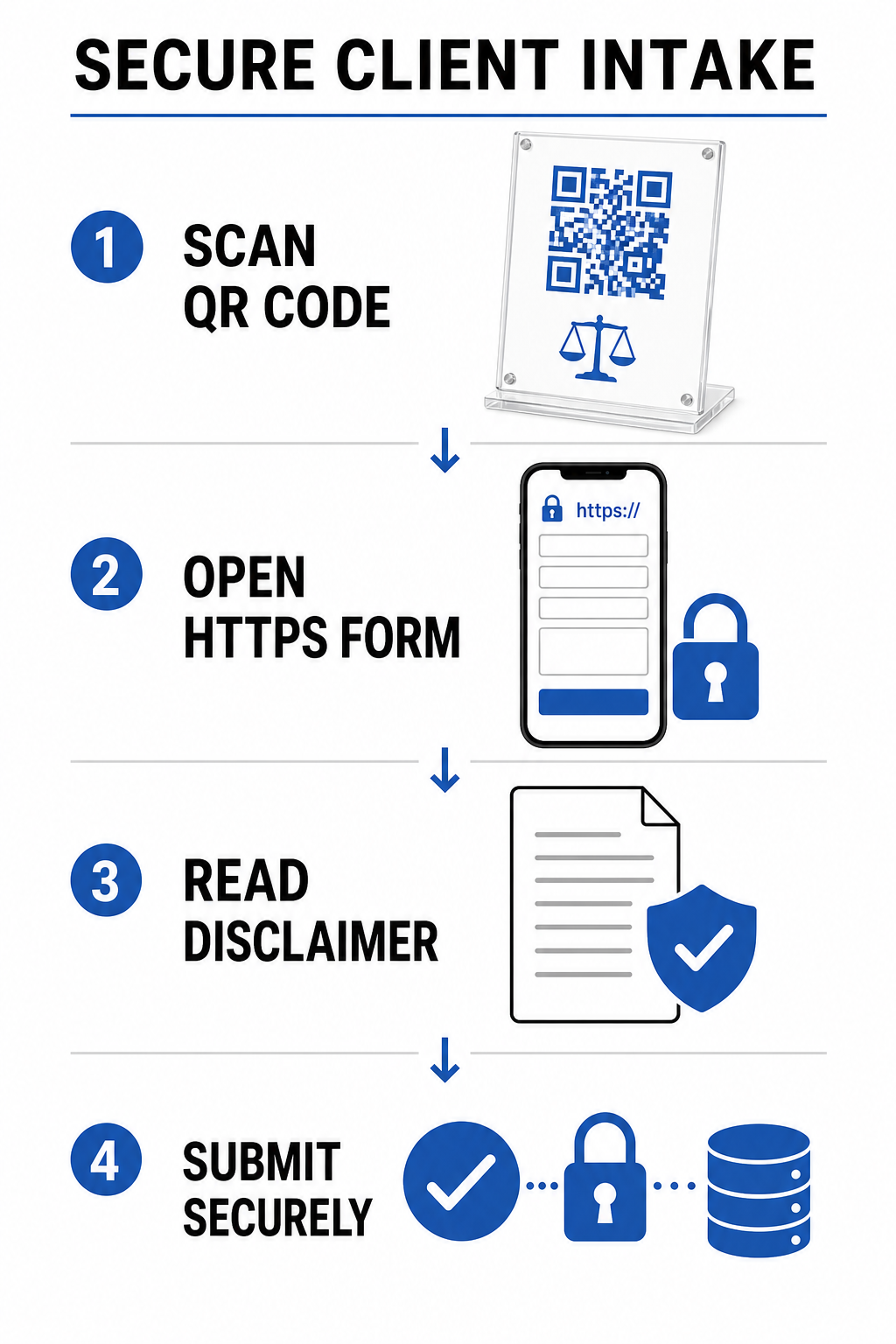
Kuna juriidiline vastuvõtt hõlmab tundlikke isikuandmeid, peavad digitaalsed vastuvõtusüsteemid rangelt järgima eetikastandardeid:
- Konfidentsiaalsuskohustus (ABA mudelreegel 1.6): Nõuab mõistlikke jõupingutusi volitamata juurdepääsu vältimiseks, edastades kõik potentsiaalsete klientide vastuvõtuandmed krüpteeritud HTTPS-kanalite kaudu.
- Tehnoloogia pädevus (ABA mudelreegel 1.1, kommentaar 8): Nõuab, et õigustöötajad oleksid kursis küberjulgeoleku riskide ja kaitsemeetmetega kliendile suunatud digitaalsete tööriistade kasutuselevõtul.
- Advokaadi-kliendi suhte lahtiütlused: Kohustab firmasid kuvama silmapaistvaid teateid, mis kinnitavad, et esialgsete vormide esitamine ei loo ametlikku advokaadi-kliendi suhet.
Potentsiaalsete klientide andmetega tegelevad firmad peavad rakendama ka rangeid andmete säilitamise ja privaatsuse poliitikaid. Vaadake rahvusvahelisi ja piirkondlikke andmekaitse raamistikke meie juhendist QR-koodi privaatsusseadused ja peamised regulatsioonid.
Arvete ja ettemaksete turvaline kiirendamine
Paberarved kannatavad sageli viivitatud töötlemise tõttu, kuna kliendid lükkavad edasi pikkade kontonumbrite sisestamist või veebiportaalide käsitsi külastamist. Makselinkide lisamine, kasutades a PayPali QR koodi loomine otse arveldusavaldustele või ettemakselepingutele võimaldab klientidel turvalised makseportaalid sekunditega avada.
Digitaalsete maksevoodude juurutamisel peavad advokaadibürood rangelt järgima õigusliku raamatupidamise eetilisi põhimõtteid:
| Eetikanõue | Rakendamise juhend |
|---|---|
| Usaldus- ja tegevusfondide eraldamine | Teenimata ettemakse sissemaksete makse QR-koodid peavad suunama eranditult määratud kliendi usalduskontodele (nt IOLTA), mitte kunagi otse tegevuskontodele. |
| Töötlemistasude käsitlemine | Kui kirjalikult kokku lepitud ei ole, peab kaupmehe tehingutasud tasuma advokaadibüroo ja neid ei saa otse kliendi usaldusfondidest maha arvata. |
| Tagasivõtmise kaitsemeetmed | Veebimakseväravad tuleb konfigureerida nii, et vaidlustatud tasud või tagasivõtmised võetakse tegevuskontodelt, mitte kliendi usalduskontodelt. |
Skannitavate makseväravate konfigureerimise üksikasjaliku teabe saamiseks uurige meie õigusressurssi teemal QR-koodid makseteks.
Advokaadibüroode disainistandardid ja trükispetsifikatsioonid
Skannitavuse ja visuaalse autoriteedi säilitamine nõuab õiguslike turundusmaterjalide väljastamisel täpsete tehniliste trükistandardite järgimist:
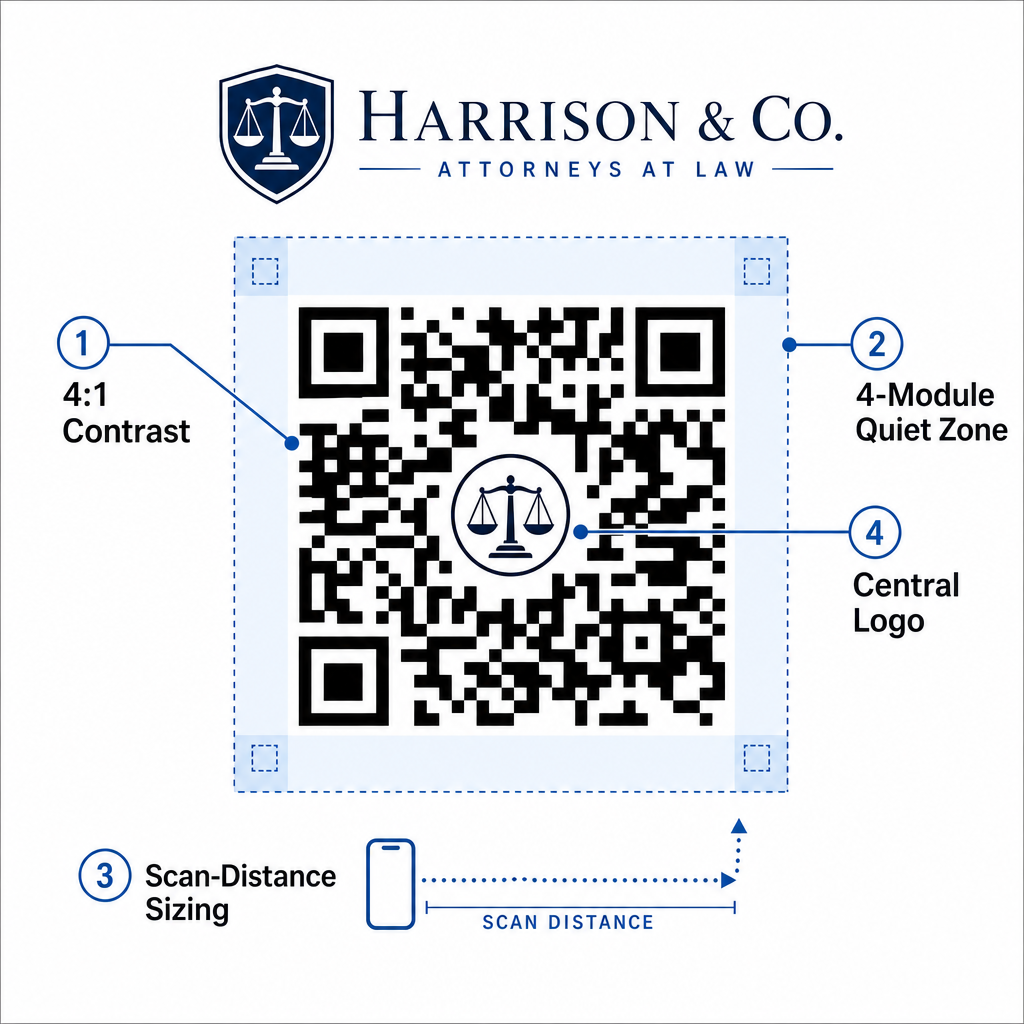
- Kontrastsussuhe: Säilitage esiplaanimoodulite ja tausta vahel minimaalne kontrastsussuhe 4:1. Trükkige tumedad moodulid alati heledale ühtlasele taustale. Vältige inverteeritud kujundusi (heledad koodid tumedal taustal), kuna vanemad mobiilikaamera sensorid näevad sageli vaeva inverteeritud mustrite dekodeerimisega.
- Vaikse Tsooni Piir: Jätke koodimustri kõikide nelja külje ümber takistamatu äär – vaikne tsoon. See vaikne tsoon peab olema vähemalt neli mooduli laiust (ühe üksiku andmeruudu suurus), et eraldada kood ümbritsevast graafikast või tekstist.
- 10:1 Kauguse ja Suuruse Suhte Reegel: Määrake koodi mõõtmed skaneerimiskauguse alusel. Trükitud koodi laius peaks olema vähemalt üks kümnendik kaamera ja sihtkoha vahelisest kaugusest. Näiteks 5 jala kauguselt skaneerimiseks mõeldud plakat vajab QR-koodi laiuseks vähemalt 6 tolli (15 cm).
- Brändielemendid: Kui kinnistate advokaadibüroo logosid kasutades QR-koodi generaator logoga, hoidke logo keskel ja sellise suurusega, et see ei takistaks nurga positsioneerimismustri sihtmärke.
- Vektoreksportvormingud: Eksportige lõplik graafika alati vektorvormingutes (nagu SVG, EPS või kõrge resolutsiooniga PDF) eraldusvõimega 300 kuni 600 DPI, et vältida pikseldamise hägusust professionaalse kommertstrüki ajal.
Täielike paigutusreeglite saamiseks trükimaterjalide kohta, vaadake meie ülim juhend QR-koodi paigutamiseks turunduses, õppige jälgima jõudlust läbi QR-koodide jälgimine, ja uurige kõiki saadaolevaid platvormi Funktsioonid.
Muutke oma õiguspraktika sujuvamaks skaneeritavate töövoogudega
Skannitavate maatrikskoodide integreerimine advokaadibüroo tegevusse muudab staatilised paberipõhised puutepunktid turvalisteks, mõõdetavateks digitaalseteks ligipääsupunktideks. Rakendades visiitkaartidele dünaamilisi vKaarte, luues krüpteeritud vastuvõtuvormide linke, kehtestades rangeid usalduskonto maksekaitsmeid ja järgides professionaalseid trükistandardeid, saab teie büroo kliendi vastuvõttu sujuvamaks muuta, säilitades samal ajal eetikakoodeksi järgimise.
Alustage oma advokaadibüroo jaoks kaubamärgiga, dünaamiliste digitaalsete puutepunktide loomist juba täna, kasutades Pageloot'i professionaalset haldusplatvormi.
Korduma kippuvad küsimused
Jah. ABA mudelireeglite 7.1 ja 7.2 kohaselt võivad advokaadid turundada teenuseid digitaalsete vahendite kaudu, sealhulgas QR-koodide abil, tingimusel, et kogu edastatud teave on täpne, tõene ja mitte eksitav.
Visiitkaardile trükitud QR-kood peaks olema vähemalt 0,8 x 0,8 tolli (2 x 2 cm) koos 4-moodulilise vaikse tsooni äärisega, et tagada kiire ja usaldusväärne skaneerimine kõigis nutitelefonides.
Vastuvõtuvormid, mis on lingitud QR-koodide kaudu, peaksid kasutama krüpteeritud HTTPS-ühendusi ja kuvama selge hoiatuse, mis juhendab kasutajaid mitte saatma ülisalajasi konfidentsiaalseid andmeid enne ametliku esindussuhte loomist.