Startseite > Der Blog > Wie man soziale Medien und E-Mail-Anmeldungen mit einem QR-Code verknüpft
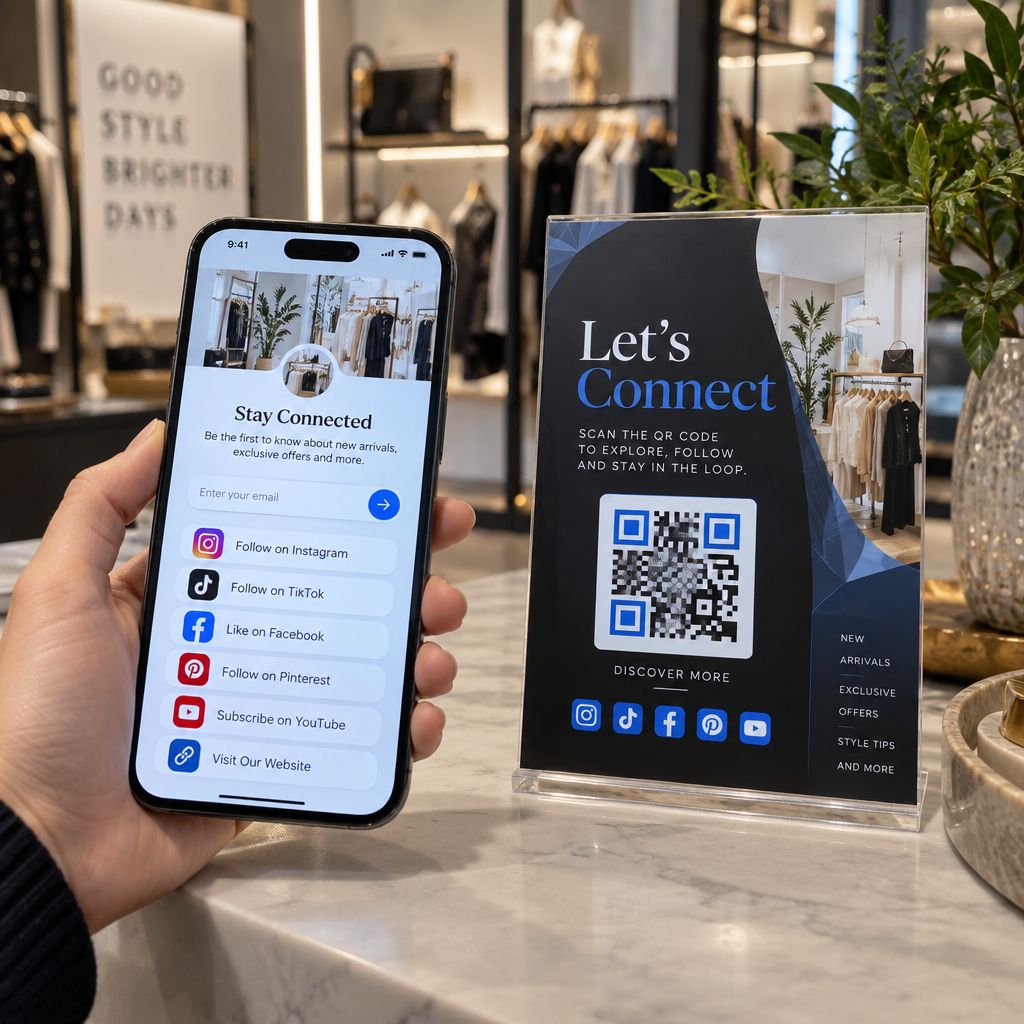
Scanning a multi-link QR code

Wie man soziale Medien und E-Mail-Anmeldungen mit einem QR-Code verknüpft

Learn how to combine your social media links and email signup forms into a single dynamic QR code hub to reduce print clutter and boost engagement.
Updated on September 29, 2026
Inhaltsverzeichnis

Are you struggling to fit multiple social links and email subscription forms onto your printed marketing materials? Cramming several URLs or separate codes onto a business card creates visual friction and lowers engagement. You can solve this by connecting your profiles and signup pages to a single, mobile-friendly QR code hub.

Why One Gateway Solves Multi-Link Clutter

When printing brochures, event flyers, or packaging, physical space is strictly limited. Displaying separate handles for every channel forces potential customers to manually search for each profile or guess which one offers the most relevant updates. This cognitive overload frequently results in abandoned scans.

A single multi-destination code solves this friction by redirecting smartphones to a consolidated, mobile-responsive landing page. Instead of overcrowding your layout with disparate icons, you provide one clean gateway. Visitors tap the code once and immediately view all your active touchpoints in one organized layout, choosing whether to subscribe to your newsletter or follow your brand on their favorite platform.

How Dynamic QR Codes Power Multi-Channel Hubs

Connecting offline audiences to multiple destinations requires a dynamic QR code. Unlike static codes that permanently store a fixed web address in the pattern itself, a dynamic code redirects scanners through an editable short URL. This design gives you complete control over your destinations after printing.

Mit einer Multi QR Code Generator, you can build and host a centralized hub without setting up external servers. If you launch a new promotional video, adjust your newsletter incentive, or change your brand handle, you simply update the destinations inside your dashboard. The printed code remains completely unchanged, saving significant reprinting costs and keeping your marketing materials active indefinitely.
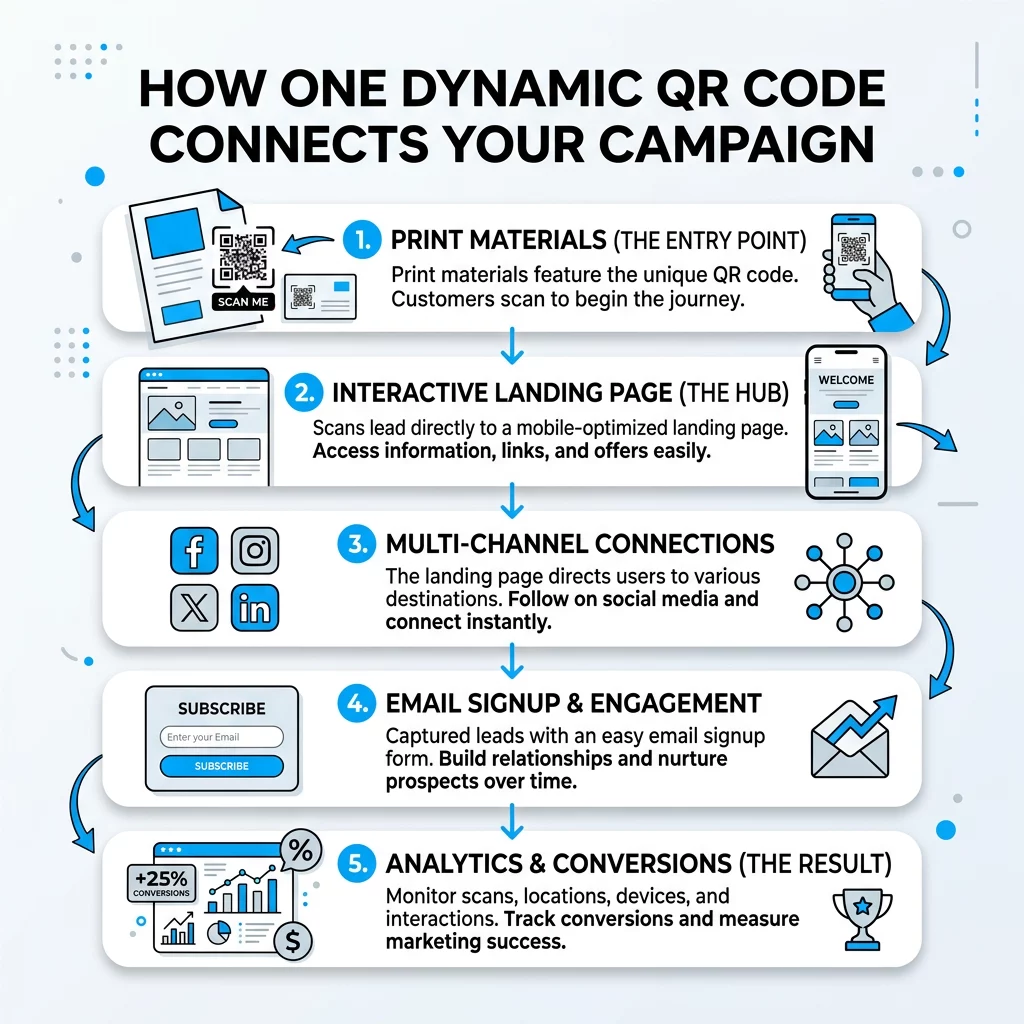
QR-Kampagnenfluss

Create Your Multi-Link Landing Page Combine your social media profiles and newsletter signup forms into a single mobile hub. Build your custom page with the Multi QR Code Generator heute verfügbar sind.

Integrating Email Capture with Social Media Profiles

Capturing first-party contact data gives your business direct communication channels independent of platform algorithm shifts. When pairing an email list with Social Media QR-Codes, structure your layout so that higher-value conversions take visual priority.
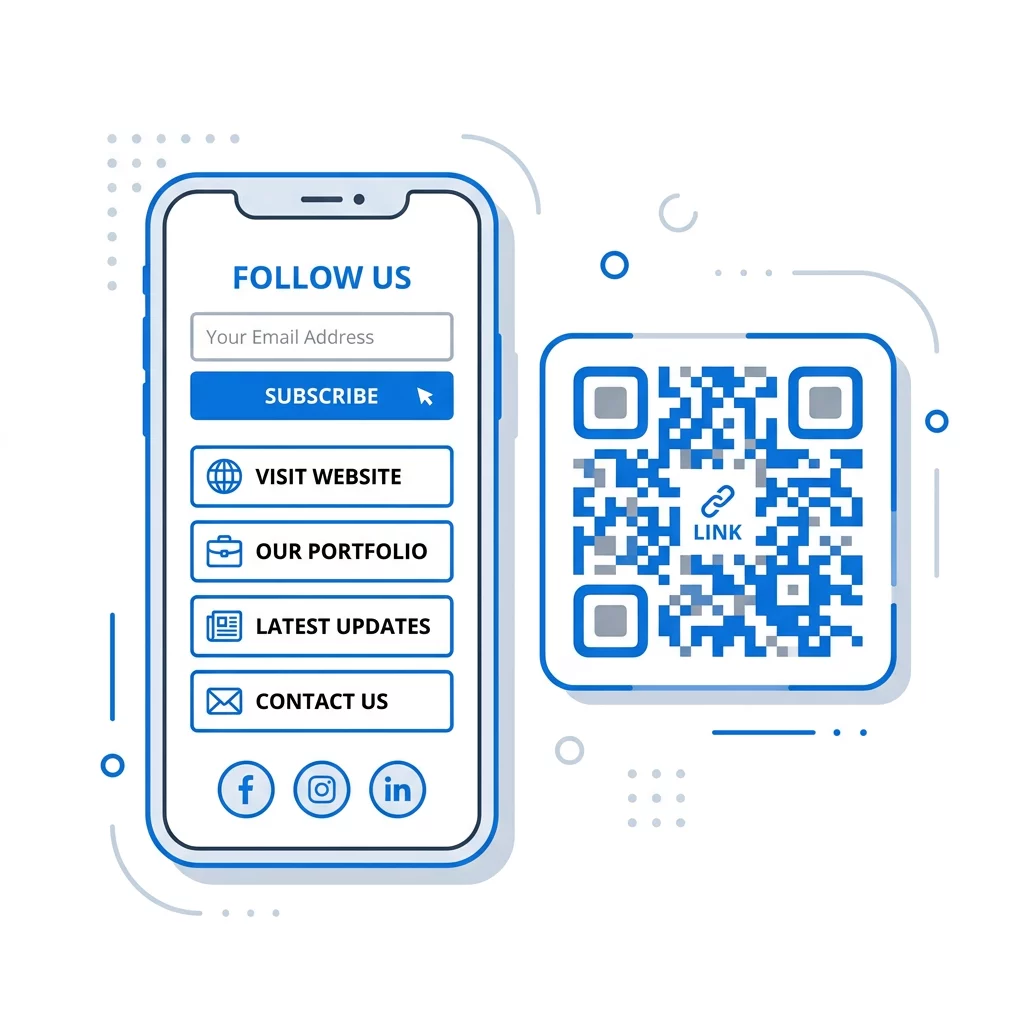
Mobiler QR-Link-Hub

To design an effective lead funnel across print and digital touchpoints:

  • Place your email subscription box at the top of the mobile screen above social channel buttons.
  • Connect your email form to services like Mailchimp QR codes to send new subscribers directly into your automated onboarding sequence.
  • Deploy a Google Formular QR-Code-Generator when your campaign requires structured survey responses or event registrations alongside subscriber details.
  • Provide a clear incentive for email registration, such as an exclusive discount, downloadable resource, or early access notice.
  • Ensure all commercial email communications comply with CAN-SPAM regulations by incorporating your physical business address, providing an unambiguous opt-out mechanism, and processing unsubscribe requests within ten business days.

Design and Placement Rules for Reliable Scans

The success of your campaign relies on how quickly scanners can read your physical code and how easily visitors can navigate your branded landing pages. A code that fails to scan immediately creates frustration and lost opportunities.

To ensure your codes read reliably in every environment, maintain these production standards:

  • Print the code at a minimum size of 0.8 × 0.8 inches (2 × 2 cm) for close-up items like business cards and receipts.
  • Follow the 10:1 scanning ratio for signage, ensuring the code width equals at least one-tenth of the expected scanning distance.
  • Maintain at least 55% contrast between the code and its background, ideally using dark modules on a solid light surface.
  • Keep a quiet zone of at least four clear modules on every side, leaving the border entirely free of text, borders, or background imagery.
  • Position the physical code at eye level in well-lit areas, avoiding reflective materials, curved packaging folds, and sharp angles.
  • Review established best practices for QR codes on social media campaigns to ensure your calls to action provide clear scanning guidance.
  • Test your code under bright, dim, and natural lighting across multiple iOS and Android devices prior to large-scale print runs.

Tracking Performance Across Marketing Touchpoints

Deploying dynamic codes allows you to evaluate your print campaigns with the same precision as digital ads. Using a Dynamischen QR-Code-Generator lets you measure offline user intent in real time through comprehensive analytics dashboards.

You can review total and unique scan volumes, observe peak engagement times, and evaluate performance broken down by scanning city and country. Device metrics reveal whether visitors interact via iOS or Android, helping you optimize your landing page interface for prevailing operating systems. By adding custom campaign parameters to individual print batches, you can easily determine whether storefront window displays, conference flyers, or retail packaging generate the highest volume of newsletter subscribers and social followers.

Building Your Integrated Marketing Hub

Connecting offline audiences to your entire online presence does not require complex technical workflows or crowded print layouts. Consolidating your touchpoints through a dedicated Social-Media-QR-Code-Generator gives your customers an effortless way to choose their preferred channel while driving qualified traffic to your email signup forms.

Begin by outlining your primary call to action, assemble your key profile links, and generate an editable dynamic QR code to streamline your offline-to-online marketing strategy.

Häufig gestellte Fragen

Can I change destination links after printing the QR code?

Yes, as long as you generate a dynamic QR code. The dashboard lets you edit destination links or modify your landing page content at any time without needing to redesign or reprint your physical assets.

What is the minimum recommended size for a printed multi-link QR code?

For close-range materials like business cards and brochures, the minimum size is 0.8 × 0.8 inches (2 × 2 cm). For signs viewed from greater distances, apply the 10:1 distance-to-size rule, making the code width one-tenth of the scanning distance.

How many destinations should I place on one landing page?

Aim for three to five primary links. Keeping your options focused prevents decision fatigue and ensures your most important action, such as joining an email newsletter, remains prominent.


Über den Autor

Siim Kostabi ist Content Lead bei Pageloot. Er schreibt über unsere innovativen QR-Code-Generator-Dienste. Mit über fünf Jahren Erfahrung im Bereich QR-Codes ist Siim ein anerkannter Experte auf diesem Gebiet. Er leistet Pionierarbeit bei der Nutzung der QR-Technologie zur Vereinfachung und Erweiterung digitaler Interaktionen.

Kategorie
Erfahren Sie mehr über
Scanning fashion hangtag
QR Codes für Mode Marken

Wenn Sie QR-Codes online erstellen müssen, können Sie QR Code Erstellen gleich hier kostenlos!
Pageloot ist die #1 Go-To-Lösung zum Erstellen und Scannen von QR-Codes.

BL-0015

blog-gen

Mehr als 20.000 Marken vertrauen uns, um mehr Verkäufe, Bewertungen und Follower zu erzielen.

Kundenlogos
Vertrauen von Top-Marken
Bewertet mit 4.8 von 5

4.86 / 5 Sterne Bewertung

Luka Wolf
Luka Wolf
★★★★★
Restaurantbesitzer
Dies ist der beste QR-Code-Generierungsdienst, den ich gefunden habe. Es ist schnell, einfach, Ihren Code herunterzuladen, und kostenlos, was ist das Beste! Definitiv mein GO-an-QR-Code-Site.
Ben Müller
Ben Müller
★★★★★
Immobilienentwickler
Wir verwenden die QR-Codes für unsere Immobilienentwicklungen. Der QR-Code von Google Maps ist sehr nützlich.
Hannah Mayer
Hannah Mayer
★★★★★
Einzelhandelsprodukte
Fast volle Zugänglichkeit ohne Kosten. Nützliche Funktionen können mit geringer Gebühr gebucht werden. PDF-QR-Codes und VCard-Digital-Visitenkarten.
Luka Wolf
Luka Wolf
★★★★★
Restaurantbesitzer
Dies ist der beste QR-Code-Generierungsdienst, den ich gefunden habe. Es ist schnell, einfach, Ihren Code herunterzuladen, und kostenlos, was ist das Beste! Definitiv mein GO-an-QR-Code-Site.
Ben Müller
Ben Müller
★★★★★
Immobilienentwickler
Wir verwenden die QR-Codes für unsere Immobilienentwicklungen. Der QR-Code von Google Maps ist sehr nützlich.
Hannah Mayer
Hannah Mayer
★★★★★
Einzelhandelsprodukte
Fast volle Zugänglichkeit ohne Kosten. Nützliche Funktionen können mit geringer Gebühr gebucht werden. PDF-QR-Codes und VCard-Digital-Visitenkarten.
Weitere QR-Codes anzeigen
QR-Code auf Broschüre scannen
QR-Codes auf Broschüren
Machen Sie alles zu einem digitalen Erlebnis in weniger als 3 Minuten.

Kostenlose 14-tägige Testversion.

Keine Kreditkarte erforderlich.

Erhalten Sie 30% Rabatt auf Ihren ersten Einkauf

Verwenden Sie den Code:

Teilen Sie Ihre MP3-Dateien

Melden Sie sich an, um PDF-QR-Codes zu erstellen

Laden Sie alles, was Sie brauchen, hoch und zeigen Sie es an:

  • Audio-Dateien
  • Podcasts
  • Musik

14-tägige kostenlose Testphase mit Registrierung.
QR-Codes verfallen nach der Testphase.

melden Sie sich an, um einen Audio-MP3-QR-Code zu erstellen

Mehr Scans mit Rahmen erhalten

Melden Sie sich an, um Ihren QR-Codes weitere Frames hinzuzufügen

Call-to-Action-Rahmen erleichtern Ihren Kunden die Interaktion mit dem QR-Code. Probieren Sie sie aus!

14-tägige kostenlose Testphase mit Registrierung.
QR-Codes verfallen nach der Testphase.

Melden Sie sich an, um Ihren QR-Codes weitere Frames hinzuzufügen

Mehr Stil mit Formen hinzufügen

Melden Sie sich an, um weitere Formen zu erstellen

QR-Codes müssen nicht quadratisch sein. Versuchen Sie, sie an das Image Ihrer Marke anzupassen.

14-tägige kostenlose Testphase mit Registrierung.
QR-Codes verfallen nach der Testphase.

Melden Sie sich an, um weitere Formen zu erstellen

Ein Logo zu Ihrem QR-Code hinzufügen

Melden Sie sich an, um Ihr Logo zu QR-Codes hinzuzufügen

Verleihen Sie Ihrem QR-Code eine besondere Note, indem Sie ihn mit Ihrem Logo und Ihrer Marke versehen.

14-tägige kostenlose Testphase mit Registrierung.
QR-Codes verfallen nach der Testphase.

Melden Sie sich an, um Ihr Logo zu QR-Codes hinzuzufügen

Intelligente App Store Weiterleitungen

Melden Sie sich an, um einen App Store-QR-Code zu erstellen

Fügen Sie Ihre App-Links zu unserem intelligenten App Store QR-Code hinzu. Die Nutzer werden je nach Gerät weitergeleitet.

14-tägige kostenlose Testphase mit Registrierung.
QR-Codes verfallen nach der Testphase.

Melden Sie sich an, um einen App Store-QR-Code zu erstellen

Ein Bild in einen QR-Code hochladen

Melden Sie sich an, um Bild-QR-Codes zu erstellen

Geben Sie Ihre Bilder einfach weiter. Ändern Sie jedes Bild dynamisch innerhalb von Sekunden.

14-tägige kostenlose Testphase mit Registrierung.
QR-Codes verfallen nach der Testphase.

Melden Sie sich an, um Bild-QR-Codes zu erstellen

Teilen Sie Ihre PDF-Dateien

Melden Sie sich an, um PDF-QR-Codes zu erstellen

Laden Sie alles, was Sie brauchen, hoch und zeigen Sie es an:

  • Menüs und Preislisten
  • Anleitungen
  • Beliebige Dokumente

14-tägige kostenlose Testphase mit Registrierung.
QR-Codes verfallen nach der Testphase.

Melden Sie sich an, um PDF-QR-Codes zu erstellen

Später bearbeiten ohne Drucken

Melden Sie sich an, um Ihre QR-Codes zu bearbeiten, ohne sie erneut auszudrucken

Mit dynamischen QR-Codes können Sie den Inhalt Ihres QR-Codes ändern, ohne dass Sie neue Codes drucken müssen.

14-tägige kostenlose Testphase mit Registrierung.
QR-Codes verfallen nach der Testphase.

Melden Sie sich an, um Ihre QR-Codes zu bearbeiten, ohne sie erneut auszudrucken

Wann? Wo? Verfolgen Sie Ihre QR-Code-Scans

Melden Sie sich an, um Ihre QR-Codes zu verfolgen

Entdecken Sie, welche Ihrer QR-Codes die meisten Scans erhalten und was Ihre Kunden am meisten begeistert.

14-tägige kostenlose Testphase mit Registrierung.
QR-Codes verfallen nach der Testphase.

Melden Sie sich an, um Ihre QR-Codes zu verfolgen

Druckfertige Dateien verfügbar

Melden Sie sich an, um Vektor-QR-Codes wie PDF und SVG zu erstellen

.EPS, .PDF, .SVG

Möchten Sie Ihre QR-Codes in HD-Auflösung herunterladen? Holen Sie sich Vektor- oder Pixelformate, die sofort gedruckt werden können.

14-tägige kostenlose Testphase mit Registrierung.
QR-Codes verfallen nach der Testphase.

Melden Sie sich an, um Vektor-QR-Codes wie PDF und SVG zu erstellen

Bitte warten Sie. Ihr QR-Code ist Laden... Laden...

Mach es zu deinem eigenen

Melden Sie sich an, um Ihren QR-Code für später zu speichern

Erzielen Sie mehr Scans, indem Sie auffällige QR-Codes mit verschiedenen Farben, Logos und Call-to-Action-Rahmen erstellen.

14-tägige kostenlose Testphase mit Registrierung.
QR-Codes verfallen nach der Testphase.

Melden Sie sich an, um Ihren QR-Code für später zu speichern